Give yourself a professional email signature in 2 minutes
IT ENVIRONMENT INTEGRATION
WiseStamp manages email signatures so IT doesn’t have to
Sync WiseStamp with your IT environment user directory to set up automation and access control. Run email signature management for Office 365, Google Workspace, and Exchange.
Each team gets the access they need to do their part – no more, no less.
Every team controls what they care about
Get email signature management capabilities tailored for every team. No tug of war. No bottlenecks.
Select your team’s tab
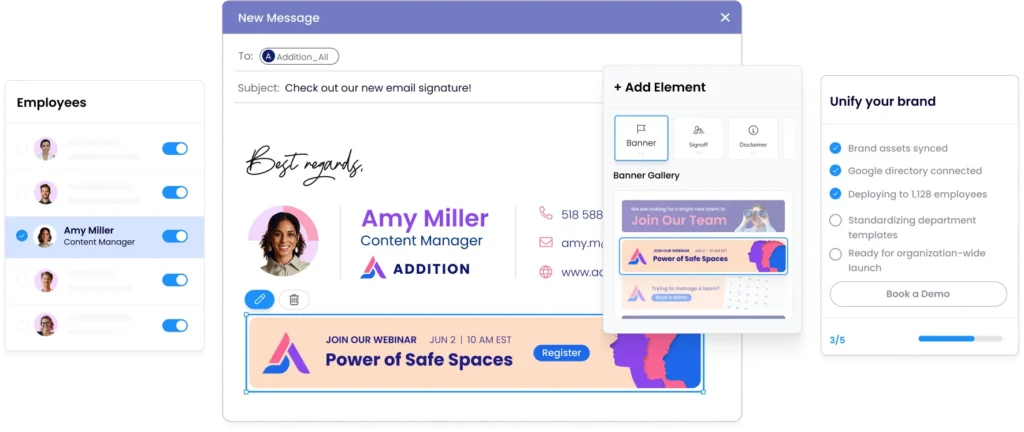
Set and forget org-wide email signatures
Let us take email signatures off your plate, permanently
Automate new-hire provisioning and departure cleanup
Centrally standardize and deploy signatures company-wide.
Integrate WiseStamp with Microsoft Entra ID or Google Directory
Get zero tickets – let others make changes on their own with RBAC
Keep every last email signature on-brand
No more chasing voluntary employee compliance, no more begging IT.
Logo and layout stay locked in every signature
One update reaches every inbox in the company instantly
No off-brand signatures escape your template
Brand guidelines enforced without follow-ups
Make email signatures a marketing channel
Leverage your thousands of outgoing email signatures for lead-gen.
Every employee signature carries your current campaign
Track impressions and clicks through WiseStamp’s analytics
Set automatic scheduled campaigns for holidays and events
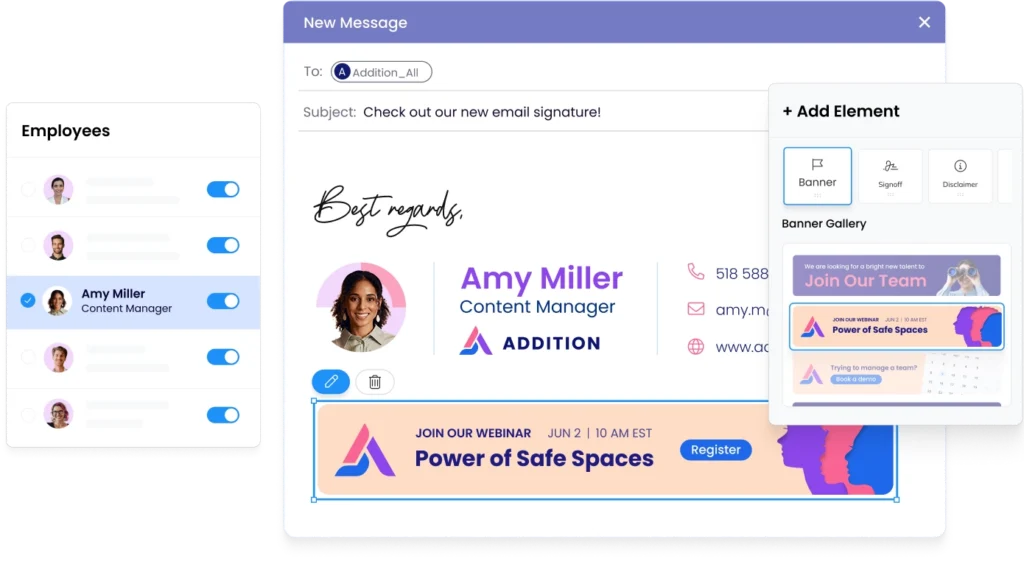
Update banners once, deploy to every signature instantly
Drive demos from your email signatures
Signature CTA banner makes booking a demo easy.
Rep photo and title build trust before the reply
Meeting link in every signature drives demos
Campaign banners align with active promotions
Every rep looks consistent, credible, and inviting
Enforce legal disclaimers org-wide
Compliance enforced across every outgoing email automatically.
Centrally lock approved disclaimers for all emails
Employees cannot remove or modify required text
Set email footer disclaimer by department and region
Full audit log of every deployed signature
Make your reps’ signature a trust signal
Every signature makes customers feel a personal touch.
Every rep looks credible from the first outreach
Meeting links and CTAs embedded in every signature
Consistent branding across every customer conversation
Signature updates reach the whole team instantly
Enforce only authorized employee signatures
Automate signature setup for new hires and prevent unauthorized changes.
Every employee email reflects a professional, credible employer brand
Prevent employees from changing their formal job title, and other info
New hires get their branded signature automatically on day one
No IT ticket needed when someone joins or leaves
The overall efficiency and time-saving aspects for IT administration are paramount. WiseStamp truly makes managing email signatures a seamless process, freeing up valuable IT resources.
Soumen Garain Senior IT & ERP Manager, Convenient Brands, LLC
FULL FEATURE COVERAGE
Everything you need to complete the job
Give every team the set of tools they need to run centralized email signatures at scale
Design and configure every signature element
AI signature designer
Generate a complete, on-brand signature from a prompt or logo
Screenshot migration
Upload any existing signature screenshot and rebuild it automatically
Drag-and-drop editor
Build and edit signatures visually, with no designer and no code
Professional templates
Templates that render correctly across every major client
Dark mode preview
Preview and optimize signatures for legibility in dark mode
Legal disclaimers
Attach mandatory disclosures per department, region, or jurisdiction
Cover every platform, client, and device
Flexible deployment
Client-side, server-side, or hybrid to cover every device.
Microsoft 365 support
Native Outlook desktop, web, and mobile integration via Add-In
Google Workspace support
Chrome Extension and server-side cover Gmail web, iOS, and Android
Exchange and hybrid
Full on-prem Exchange and hybrid support, no duplicate signatures.
CRM coverage
Covers emails from Salesforce, HubSpot, Dynamics 365, and more
Reply and forward
Route a shorter or no signature to replies or forwards
Deploy, provision, and govern from one place
Central admin control
Deploy, update, and govern every signature from one dashboard
Directory sync
Syncs from Entra ID or Google Directory; new hires covered on day one
SSO and admin MFA
SAML 2.0 and Okta sign-in with MFA enforced on admin access
Automated offboarding
Signatures revoke automatically when a user is deprovisioned
Department groups
Assign templates to teams, offices, or custom groups
Conditional signature rules
Route templates by department, recipient domain, message type, or date
Enforce brand, access, and compliance rules
Multi-brand management
Manage standards for multiple brands and subsidiaries in one account
Role-based access
IT sets deployment rules; marketing edits within guardrails
Employee self-service
Employees update approved fields; every brand element stays locked
Signature enforcement
Server-side injection applies the signature without user bypass
Compliance certifications
SOC 2 Type II, ISO 27001, ISO 27018, GDPR, and CCPA, plus HIPAA readiness.
Audit trail
Logs how each message was processed and by which method
Run campaigns, track clicks, get feedback
Signature campaigns
Turn every employee email into a promotional, clickable placement
Campaign scheduling
Set start and end dates and rotate multiple banners automatically
Banner analytics
Track impressions and click-through rates for every campaign
Trackable branded links
Short links on your own domain, with UTM tagging for attribution
In-signature surveys
Collect NPS, CSAT, or custom feedback directly from the signature
AI insight reporting
Summarizes survey responses and campaign performance into themes
WISESTAMP INTEGRATIONS
Keep signature branding consistent everywhere
Ensure email signatures sent from your CRM and email automation tools remain compliant
WiseStamp never reads or stores your email content – you retain data ownership – always. Control signature standards through locked fields, audit logs, and RBAC. No custom configuration.
An email signature manager is a platform that centralizes creation, deployment, and governance of employee email signatures across Microsoft 365, Google Workspace, and Exchange.
It syncs with Microsoft Entra ID or Google Directory to auto-populate templates, enforces brand and compliance standards via admin controls, and delivers signatures through client-side Outlook Add-Ins, Chrome Extensions, or server-side mail flow — covering every device and client.
WiseStamp ranks first among email signature software for medium and large companies on feature coverage, ahead of Exclaimer and Opensense.
Rankings use WiseStamp’s own weighted scoring of 83 mid-market and enterprise features. The score is the equal average of both segments, out of 100.
WiseStamp: 77.7 coverage score. G2 support score of 9.2 out of 10 (about 565 reviews). Platform plan costs about $1.38 per user per month at 500 employees, with SAML SSO included.
Exclaimer: 74.8 coverage score. G2 support score of 9.0 out of 10 (about 1,339 reviews). Standard plan costs $1.45 per user per month, with Microsoft and Google SSO but no SAML.
Opensense: 70.7 coverage score. G2 support score of 9.6 out of 10 (about 364 reviews). Plans start at $1 per user per month with a $500 monthly minimum, and SAML SSO requires the $5 Complete plan.
WiseStamp leads enterprise coverage (73.5 versus 68.4 for Exclaimer) and is the only one of the three offering SAML SSO below $5 per user. Opensense scores higher on mid-market coverage (83.1 versus 81.8 for WiseStamp) and on support.
WiseStamp has a dedicated solution for Office 365, Google Workspace cloud environments as well as Exchange on-premises server. WiseStamp’s solution can work for one or all of them in concert.
WiseStamp best serves mid-size organizations from of 50-1000 employees. But WiseStamp’s solution works very well for all company sizes from small businesses to large enterprises, roughly 10 to 5,000+ employees. The fit shifts by segment:
Mid-market (50 to 1,000 employees): directory sync and role-based governance
Enterprise (1,000+ employees): SOC 2, ISO 27001, and audit-ready compliance controls
WiseStamp’s strongest capability is separating signature control from IT dependency, letting marketing manage signatures company-wide without filing IT tickets, through:
Employee Hub: self-serve edits within admin-locked guardrails
Marketing Suite: click analytics, trackable links, and native surveys
Signature Studio: AI-assisted, no-code editing
Yes. WiseStamp’s email signature management software gives IT and marketing full central control over every signature in the organization.
You can create templates, assign them by department or group, deploy changes to every mailbox at once, and audit deployments without touching individual accounts.
WiseStamp’s email signature manager syncs daily with Microsoft Entra ID (formerly Azure AD), Google Directory, and SCIM-compatible identity providers.
When an employee’s name, title, phone number, department, or office address changes in the directory, WiseStamp updates the corresponding signature fields on the next sync cycle — automatically, with no IT ticket and no action required from the employee.
When an employee leaves the organization and is removed from the directory, WiseStamp email signature platform automatically deactivates their signature on the next sync cycle — no manual cleanup or IT intervention required.
Most organizations complete full company-wide deployment of WiseStamp email signature software in under a day.
The process follows 4 steps:
Connect Google Workspace, Microsoft 365, or Exchange
Sync employees from the directory
Design a template in the drag-and-drop Studio or let the AI Designer build it from a prompt
Assign and activate — signatures reach every inbox instantly
Yes. When a new employee is added to the connected company directory, WiseStamp email signature software automatically activates a branded signature and deploys it to their inbox.
No IT ticket is required. No action is needed from the new hire. The signature is active from day one.
Both. With WiseStamp email signature management software, IT connects the directory, configures deployment, and sets role-based access permissions.
Marketing then manages templates, runs banner campaigns, and schedules seasonal updates — all without opening an IT ticket.
IT teams typically spend 30 to 45 minutes per employee on each manual signature update cycle. WiseStamp email signature manager reduces that to zero.
Yes. The WiseStamp email signature manager has role-based access that gives marketing editing rights within IT-defined guardrails.
Marketing can update campaign banners, swap images, schedule promotional content for holidays or product launches, and deploy changes across all employee signatures — all without IT involvement.
Banners can be targeted to specific employee groups or departments rather than applied org-wide, and each banner links to a URL of your choice. Scheduling includes start and end dates, so banners go live and expire automatically without manual intervention.
Yes. WiseStamp’s email signature management software allows admins to lock specific text fields — legal disclaimers, regulatory disclosures, compliance notices — by department and region.
Locked fields display a lock icon in the employee’s view and cannot be changed or removed. WiseStamp email signature platform maintains a full, dated audit log of every deployed signature, supporting compliance review and legal discovery requirements.
The WiseStamp email signature management software supports 3 deployment modes: client-side, server-side, and hybrid.
Client-side deploys signatures via the Outlook Add-In, Chrome Extension, or Desktop App — signatures appear in the compose window before sending and can be centrally deployed via MDM or GPO.
Server-side applies signatures at the mail server level after sending, covering every device and client without local installs.
Hybrid combines both: server-side injects only when no client-side WiseStamp signature is detected, eliminating duplicate signatures while guaranteeing universal coverage including mobile and CRM-originated emails.
Yes. WiseStamp’s server-side email signature deployment applies signatures to all outgoing emails after sending, at the mail server level, regardless of what device or client the email was sent from — Outlook desktop, Outlook web, iOS, Android, or any other client.
No software installation is required on employee devices. WiseStamp email signature software never reads or stores email content during this process.
Yes. The WiseStamp email signature software’s server-side deployment covers emails originating from CRM platforms including Salesforce, HubSpot, Microsoft Dynamics 365, Pipedrive, Zoho CRM, Marketo, and Salesloft.
CRM emails route through the organization’s mail server, then through WiseStamp’s host before delivery — ensuring every customer-facing email from sales and marketing carries a consistent, branded signature.
The WiseStamp email signature manager is certified SOC 2 Type II, ISO 27001, and ISO 27018, and meets GDPR and CCPA requirements, and is HIPAA ready: it works according to HIPAA guidelines, offers a Business Associate Agreement (BAA), and does not collect or store protected health information (PHI), so full HIPAA compliance is not required.
WiseStamp email signature platform never reads or stores email content — signatures are applied to outgoing emails without routing message content through WiseStamp’s servers.
Full compliance documentation and certificates are available in the WiseStamp Trust Center.
Yes. WiseStamp email signature management software’s multi-organization architecture supports separate signature standards for multiple brands, subsidiaries, and regional entities — each with its own templates, logos, domain, compliance rules, and access permissions — all managed from a single admin account.
This is frequently cited as the deciding capability in enterprise evaluations, particularly for multi-brand organizations operating across regions.
Yes. WiseStamp email signature software allows admins to create named employee groups — by department, region, team, or any custom category — and assign one or more signature templates to each group.
Every employee in a group automatically receives the group’s template. Groups can carry different primary, reply, and forward signatures. Changes made at the group level propagate immediately to every member without per-employee work.
Yes. WiseStamp email signature software’s AI Designer generates a complete, on-brand email signature from a plain-text description or an uploaded logo. Type a prompt describing the style and the AI Designer builds the full layout.
Upload your logo and it extracts brand colors automatically. Refine the result with follow-up prompts such as “make it more minimal” or “add a darker header.” Every AI-generated design is fully editable in the Studio after generation.
Yes. WiseStamp email signature management software integrates natively with Microsoft 365, supporting Outlook desktop (Windows and Mac), Outlook Web App, and Outlook mobile.
IT teams can deploy the Outlook Add-In centrally via MDM or GPO for client-side coverage, or use server-side deployment to apply signatures at the Exchange Online level — covering every Outlook client without local installation on employee devices.
Yes. WiseStamp email signature software works with Google Workspace across Gmail web, the iOS Gmail app, and Android Gmail clients.
Client-side deployment uses the Chrome Extension, which integrates into the Gmail compose window.
Server-side deployment applies signatures at the Google Workspace mail level, covering all Gmail clients — including mobile — without requiring the Chrome Extension on every device.
Yes. WiseStamp email signature management software supports on-premises Exchange, Exchange Online, and hybrid Exchange/Microsoft 365 environments. Server-side deployment applies signatures at the mail server level regardless of where mailboxes are hosted.
In hybrid setups, WiseStamp email signature platform’s hybrid mode applies client-side signatures where the Add-In is installed and server-side as a fallback — preventing duplicate signatures while guaranteeing universal coverage.
Yes. WiseStamp email signature software’s analytics dashboard tracks banner impressions and click-through rates for each signature campaign across the organization.
Marketing teams can compare performance by department, campaign, and time period to identify which banners drive the most engagement and optimize scheduling for future campaigns.