Email Signature Management
Marketing Loves & IT Trusts
Centrally manage email signatures for any number of employees with ease
No credit card needed • Get started in minutes

Trusted by 80,000+ companies. Used by millions.
Signature management THAT SCALES
Simple for everyone. Powerful for enterprise.
Enforcing consistent email signatures company-wide stays easy – always.
- Small businesses get AI-led design and no-code setup
- Mid-size companies get automations and integrations
- Enterprises get robust security, governance, and compliance

Enterprise ❯
Multi-brand. Multi-region. One email signature platform.
Mid-Size ❯
Marketing autonomy. IT peace of mind. Both, at last.
Small Business ❯
Make a professional, credible impression with every email
Individual ❯
Give yourself a professional email signature in 2 minutes
IT ENVIRONMENT INTEGRATION
WiseStamp manages email signatures
so IT doesn’t have to
Sync WiseStamp with your IT environment user directory to set up automation and access control.
Run email signature management for Office 365, Google Workspace, and Exchange.
Role-based email signature management
Team autonomy with IT guardrails
Each team gets the access they need to do their part – no more, no less.
Every team controls what they care about
Get email signature management capabilities tailored for every team. No tug of war. No bottlenecks.
Select your team’s tab

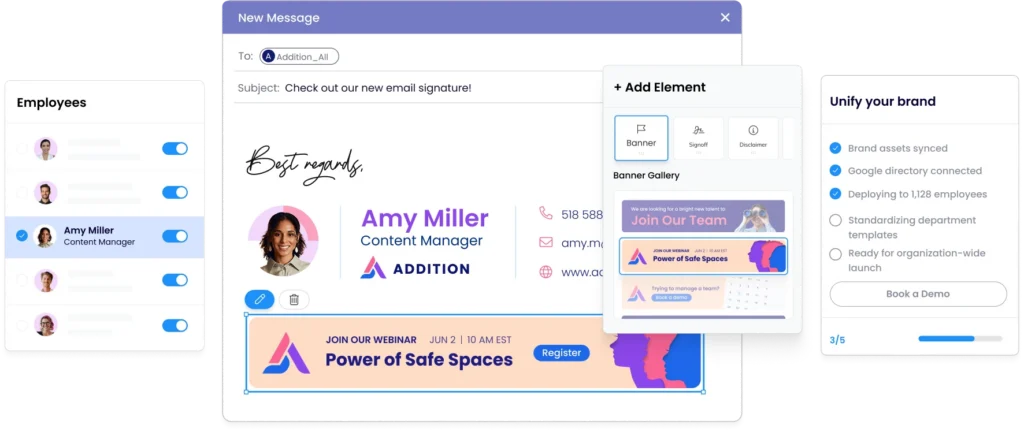
Set and forget org-wide email signatures
Let us take email signatures off your plate, permanently
- Automate new-hire provisioning and departure cleanup
- Centrally standardize and deploy signatures company-wide.
- Integrate WiseStamp with Microsoft Entra ID or Google Directory
- Get zero tickets – let others make changes on their own with RBAC

Keep every last email signature on-brand
No more chasing voluntary employee compliance, no more begging IT.
- Logo and layout stay locked in every signature
- One update reaches every inbox in the company instantly
- No off-brand signatures escape your template
- Brand guidelines enforced without follow-ups

Make email signatures a marketing channel
Leverage your thousands of outgoing email signatures for lead-gen.
- Every employee signature carries your current campaign
- Track impressions and clicks through WiseStamp’s analytics
- Set automatic scheduled campaigns for holidays and events
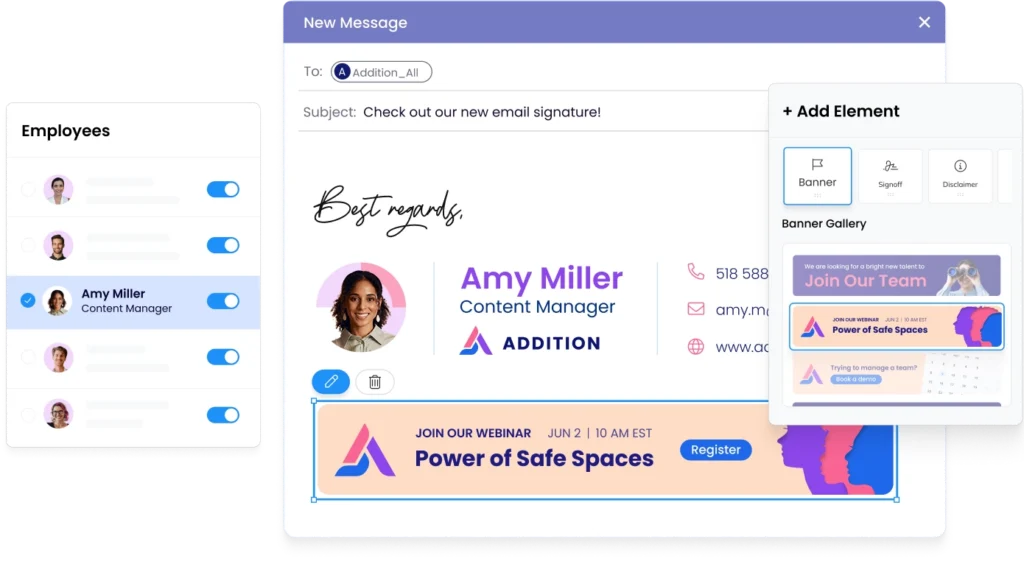
- Update banners once, deploy to every signature instantly

Drive demos from your email signatures
Signature CTA banner makes booking a demo easy.
- Rep photo and title build trust before the reply
- Meeting link in every signature drives demos
- Campaign banners align with active promotions
- Every rep looks consistent, credible, and inviting

Enforce legal disclaimers org-wide
Compliance enforced across every outgoing email automatically.
- Centrally lock approved disclaimers for all emails
- Employees cannot remove or modify required text
- Set email footer disclaimer by department and region
- Full audit log of every deployed signature
Make your reps’ signature a trust signal
Every signature makes customers feel a personal touch.
- Every rep looks credible from the first outreach
- Meeting links and CTAs embedded in every signature
- Consistent branding across every customer conversation
- Signature updates reach the whole team instantly
Enforce only authorized employee signatures
Automate signature setup for new hires and prevent unauthorized changes.
- Every employee email reflects a professional, credible employer brand
- Prevent employees from changing their formal job title, and other info
- New hires get their branded signature automatically on day one
- No IT ticket needed when someone joins or leaves


The overall efficiency and time-saving aspects for IT administration are paramount. WiseStamp truly makes managing email signatures a seamless process, freeing up valuable IT resources.

Soumen Garain
Senior IT & ERP Manager, Convenient Brands, LLC
Design and configure every signature elements

AI signature designer
Generate a complete, on-brand signature from a prompt or logo
Screenshot migration
Upload any existing signature screenshot and rebuild it automatically
Drag-and-drop editor
Build and edit signatures visually, with no designer and no code
Professional templates
Templates that render correctly across every major client
Dark mode preview
Preview and optimize signatures for legibility in dark mode
Legal disclaimers
Attach mandatory disclosures per department, region, or jurisdiction
Cover every platform, client, and device
Flexible deployment
Client-side, server-side, or hybrid to cover every device.
Microsoft 365 support
Native Outlook desktop, web, and mobile integration via Add-In
Google Workspace support
Chrome Extension and server-side cover Gmail web, iOS, and Android
Exchange and hybrid
Full on-prem Exchange and hybrid support, no duplicate signatures.
CRM coverage
Covers emails from Salesforce, HubSpot, Dynamics 365, and more
Reply and forward
Route a shorter or no signature to replies or forwards
Deploy, provision, and govern from one place
Central admin control
Deploy, update, and govern every signature from one dashboard
Directory sync
Syncs from Entra ID or Google Directory; new hires covered on day one
SSO and admin MFA
SAML 2.0 and Okta sign-in with MFA enforced on admin access
Automated offboarding
Signatures revoke automatically when a user is deprovisioned
Department groups
Assign templates to teams, offices, or custom groups
Conditional signature rules
Route templates by department, recipient domain, message type, or date
Enforce brand, access, and compliance rules
Multi-brand management
Manage standards for multiple brands and subsidiaries in one account
Role-based access
IT sets deployment rules; marketing edits within guardrails
Employee self-service
Employees update approved fields; every brand element stays locked
Signature enforcement
Server-side injection applies the signature without user bypass
Compliance certifications
SOC 2 Type II, ISO 27001, ISO 27018, HIPAA, GDPR, and CCPA.
Audit trail
Logs how each message was processed and by which method
Run campaigns, track clicks, get feedback
Signature campaigns
Turn every employee email into a promotional, clickable placement
Campaign scheduling
Set start and end dates and rotate multiple banners automatically
Banner analytics
Track impressions and click-through rates for every campaign
Trackable branded links
Short links on your own domain, with UTM tagging for attribution
In-signature surveys
Collect NPS, CSAT, or custom feedback directly from the signature
AI insight reporting
Summarizes survey responses and campaign performance into themes
WISESTAMP INTEGRATIONS
Keep signature branding consistent everywhere
Ensure email signatures sent from your CRM and email automation tools remain compliant
Hubspot

Marketo
Microsoft Dynamic
Pipedrive
Salesforce
Salesloft
Zoho
Netsuite
Make every email count
“In order to make $10 billion, you have to look like $10 billion”
– Ryan Coyne, CTO at Serhant

SUPPORT
Expert support you can count on
24/7 support
You can depend on us to be there when you need us.
High availability
We ensure 99.999% uptime, so you are never held back.
Knowledge base
Get a clear and simple, up-to-date answers.
Trust center
See our latest pentests, audits, and certifications.
Start creating from a template
Choose a template and perfect it in WiseStamp’s email signature design studio in minutes


SECURITY & COMPLIANCE
Give your security team peace of mind
WiseStamp never reads or stores your email content – you retain data ownership – always.
Control signature standards through locked fields, audit logs, and RBAC. No custom configuration.

SOC2 Certified
ISO Certified

GDPR Compliant
Take control of company email signatures
Stop signature chaos. Roll out standardized, brand-consistent signatures company-wide in less than a day.
