GMAIL SIGNATURE
Free Gmail Signature Generator by WiseStamp
Generate a professional Gmail signature free in 5 minutes. Pick a template, add your logo and social icons, and set up with a click.
Free · No Code · 1-click install to Gmail
Gmail signature templates
Start from a library of ready-made Gmail signature templates, then tweak one to fit your name, role and brand in minutes.


What you get
Earn a better first impression, every time

Make every email look intentional
One professional signature goes out on every email you send, so a first impression stops being accidental and starts being consistent.
Turn your inbox into a channel
Add banners, links and call-to-action buttons that turn routine email into a channel driving real clicks, leads and replies.
Skip the designer and the code
Skip the designer and the HTML. Pick a template, add your details, and get a polished signature in about two minutes.
Keep one signature on every device
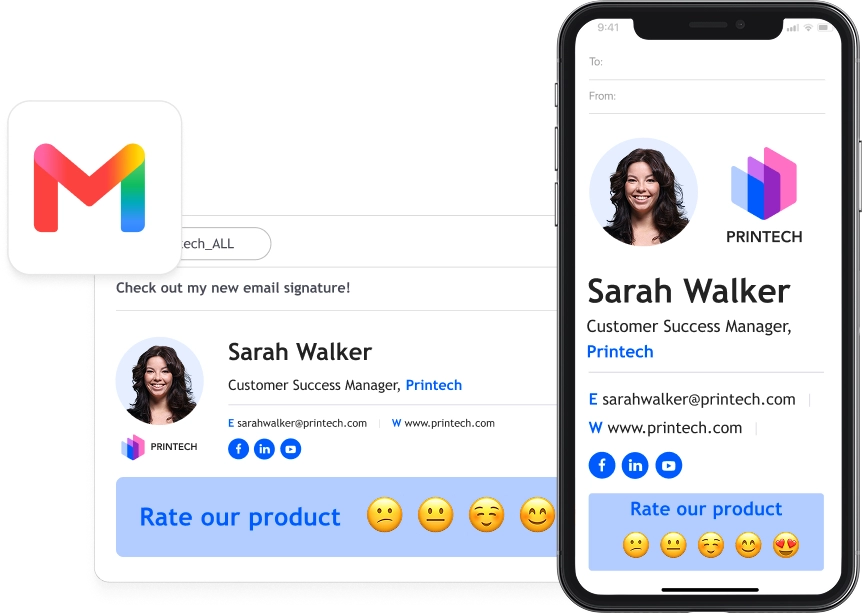
The same signature renders identically on desktop and mobile, so nothing gets clipped, resized or left looking broken on someone’s phone.

HOW IT WORKS
Get a finished signature in 4 steps
Prefer to set it up manually in Gmail’s own settings? Here’s the full walkthrough for how to add a signature in Gmail.
Mobile uses the same connected signature automatically, no separate setup.
the toolkit
See what’s inside the generator
Start from a professional template
A ready design library, no blank canvas panic.
Build it without touching code
Drag, drop, done. No HTML required.
Add your logo and photo
Upload once. Looks sharp on any screen.
Make your social icons clickable
Tap an icon, land on your profile.
Add a banner or CTA button
Turn a signature into a tiny ad.
Include a legal disclaimer
One line, always there, no copy-paste.
Add animated extras
GIFs, video links or a review widget.
Install to Gmail in one click
Connect your account. Signature appears instantly.
Keep a signature for each address
Different roles, different inboxes, one tool.
Match desktop and mobile exactly
Same signature, same look, every screen.
1-CLICK SETUP
Install to Gmail in one click
Connect your Google account once and your signature drops straight into Gmail, live on every email without digging through settings.


MOBILE RENDERING
Ensure a great-looking signature on desktop and mobile
Start from a library of ready-made Gmail signature templates, then tweak one to fit your name, role and brand in minutes.
LOGO & PHOTO
Add your logo and headshot in seconds
Upload your logo and photo once. WiseStamp sizes both automatically, so nothing looks stretched, pixelated or oddly cropped on any screen.


CLICKABLE SOCIAL ICONS
Grow your following from every email
Link clickable icons for LinkedIn, Instagram, X and more, so every email you send points straight to your profiles.
PROMOTIONAL BANNERS
Turn every email into a marketing channel
Drop a banner or CTA button into your signature, linking to a launch, event or booking page that drives clicks.


LEGAL DISCLAIMER
Include a disclaimer on every email automatically
Pick a ready disclaimer or write your own, and it appears on every email without any HTML or copy-paste work.
Give yourself a professional Gmail signature
Make a professional impression with every email you send. Create your Gmail signature with WiseStamp.
