9 Best Google Workspace Email Signature Software (2026)
Compare 9 Gmail signature management tools on directory sync, locking, deployment, and price. Compare paid options vs free native scripting with GAM.

Short answer
What are the top 3 Google Workspace email signature tools?
1. WiseStamp is the best overall choice. It leads with fast setup and an easy to use interface that give IT tight security and control while allowing other teams to self-serve.
Signatures write through the Gmail API with no MX or SPF change.
Field locking ships on every plan, and marketing runs its own banners with impression and click analytics.
2. SyncSignature is the fastest and cheapest way to get live.
The vendor documents a 50-person Workspace rollout in under 30 minutes, at $10 per month for 5 users.
Delegated banner access means marketing never needs admin credentials.
3. SignatureSatori has the deepest campaign toolkit for Google-only shops.
Scheduled campaign rotation across banner variants, a built-in Canva editor, and RSS and YouTube content sources.
A Marketing Manager role rounds it out, one that can’t touch users, signatures, or billing.
This guide covers 9 tools scored on Google Workspace mechanics.
For the platform-agnostic version covering signature management for Office 365 and Exchange, see the full email signature management software comparison.
Comparison Table
How do the best Google Workspace signature management tools compare?
| Tool | Score /100 | Best for | Workspace deployment | Directory sync | Locking and enforcement | Also does Microsoft 365 | Starting price |
|---|---|---|---|---|---|---|---|
| WiseStamp | 92.5 | Best overall for Workspace teams | Gmail API auto-inject, no MX or SPF change. Server-side optional on Platform | Google Directory, read-only OAuth, day-one provisioning | Field locking on all plans. Full bypass prevention on Platform | Yes | $19/mo + $1/user/mo |
| SyncSignature | 89.0 | Fast, low-cost Workspace rollout | Gmail `sendAs` API. No mail flow rules, no routing | Google Directory and Entra ID, custom attributes | Template lock, client-side only. No server-side at any tier | Yes | $10/mo for 5 users |
| SignatureSatori | 84.0 | Long-standing Workspace-native option | Gmail API. Vendor states it has “eliminated the use of SMTP” | Google Directory, OU, custom schema. Daily auto-sync on Subscription | No hard lock. Daily overwrite on Subscription only | No | Credits or subscription |
| Exclaimer | 81.5 | Strongest enforcement, built Microsoft-first | Server-side needs mail routing plus SPF change. Client-side syncs every 4 hours | Entra ID, Google Directory, Okta, all plans | Server-side enforcement on all plans. Field locking on Standard | Yes | $0.90/user/mo, 10 user min |
| BulkSignature | 75.0 | Campaign analytics on a small budget | Google Workspace API inject, 24-hour refresh | Google Admin API and Azure AD, 24-hour batch | No field locking, no enforcement | Yes | Seat slider, 10 user min |
| NewOldStamp | 74.0 | Design-led marketing teams | Marketplace app, 24-hour sync with force update | Google Workspace 24-hour, Entra via Graph | Field and section locking on master template. Workspace path bypassable | Yes | $109/year for 5 signatures |
| CloudM | 72.5 | Teams already running Workspace migrations | Gmail API, “without the need to route emails through 3rd parties” | Reacts to Google directory changes, custom attributes | Cannot lock. Weekly Saturday sync is the only overwrite | No | $18/user/year |
| Patronum | 69.3 | Signatures inside Workspace lifecycle management | Gmail API, no SMTP or SPF change | Google Directory, hourly sync | No enforcement. Hourly overwrite only | No | $8/user/year |
| Bybrand | 54.8 | Quick setup and simple templates | Push into Gmail settings, admin-initiated | Import from Google Groups, admin-initiated | No field locking, no enforcement | Yes | $8/mo for 10 signatures |
* Pricing verified August 2026. Prices change, so check each vendor’s page before you budget.
Evaluation Criteria
How do I evaluate Google Workspace signature management tools?
The 6 criteria, and why they’re weighted this way:
- Google Directory sync (20 points). Which attributes map, how often it re-syncs, and whether it’s event-driven or batch.
- OU and group assignment (15 points). Whether you can target by organizational unit, Google Group, or directory attribute.
- Deployment method (20 points). Gmail API `sendAs` writes versus SMTP relay and mail rerouting, the question admins ask first and vendor pages rarely answer.
- Enforcement and locking (20 points). Whether the tool can stop signature drift, and whether that’s real enforcement or just an overwrite on a timer.
- Marketing self-service (15 points). Whether a non-admin can run banners without Admin console access.
- Multi-domain and mobile Gmail (10 points). Multiple domains under one tenant, and documented iOS and Android behavior.
Full Software Evaluation
What is the best Google Workspace email signature software?
The best tool syncs Google Directory in real time, locks signatures without rerouting mail, deploys through the Gmail API, and lets marketing self-serve banner campaigns.
Here’s the list of the best tools to get the job done.
1. WiseStamp: best overall for Google Workspace teams
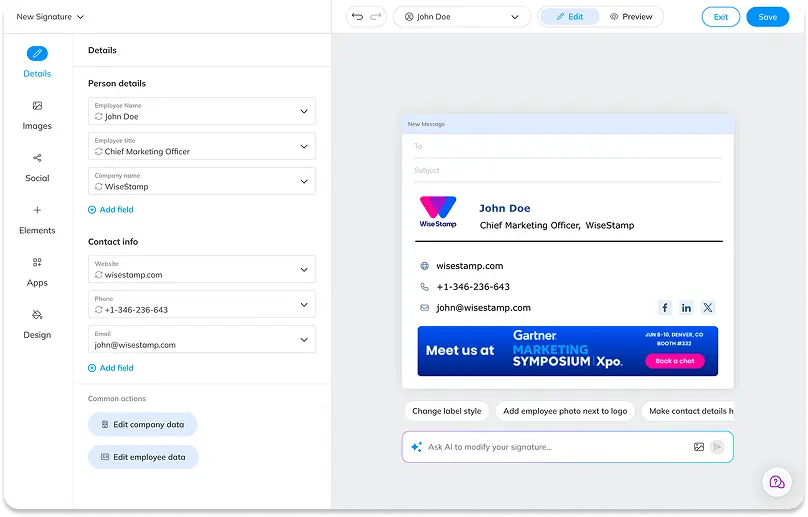
WiseStamp is the easiest tool here to run day to day, since IT keeps full control while marketing works independently.
IT locks brand elements and deploys through the Gmail API with no mail rerouting, while marketing self-serves banners and click analytics from Grow up.
Pros
- Gmail API auto-inject, no infrastructure change. No MX record change, no SPF change, no mail rerouting.
- Field locking on every plan. Lock brand elements, leave personal fields open. Only NewOldStamp matches this here.
- Marketing self-service from Grow up. The Campaigns module gives banner scheduling and click analytics without Admin console access.
- Both deployment modes. Client-side from Basic, server-side injection from Platform, plus hybrid for Exchange.
- SAML 2.0 and Okta SSO on Platform. Exclaimer supports neither at any tier.
- Reply and forward deduplication. Targeting rules route “No Signature” to replies from Grow up.
Cons
- Real enforcement is gated to Platform. On Basic and Grow, a determined user can override the signature client-side.
- Directory sync is daily polling, not event-driven. There’s no SCIM protocol support, which WiseStamp confirms is absent.
- No HRIS integrations. Support confirmed in May 2026 that none exist and none are planned. Employee data flows only through Google Directory or Entra ID.
- No public API for custom workflows.
- Single-org below Platform. Multi-organization starts at Platform with a 3-org cap, unlimited only on Enterprise.
- Missing QA and testing tools. No broken link detection, no cross-client screenshot preview, no version history or rollback, no A/B testing.
Pricing
A flat platform fee plus a per-employee rate, so cost scales gently with headcount rather than doubling at 200 seats.
Pro+ runs $9/mo, Basic $19/mo plus $1 per user, Grow $49/mo plus $1 per user, Platform $189/mo plus $1 per user, and Enterprise is custom.
All billed annually, 14-day trial, no credit card. See WiseStamp plan pricing and the Google Workspace signature management product page.
2. SyncSignature: best for a fast, low-cost Workspace rollout
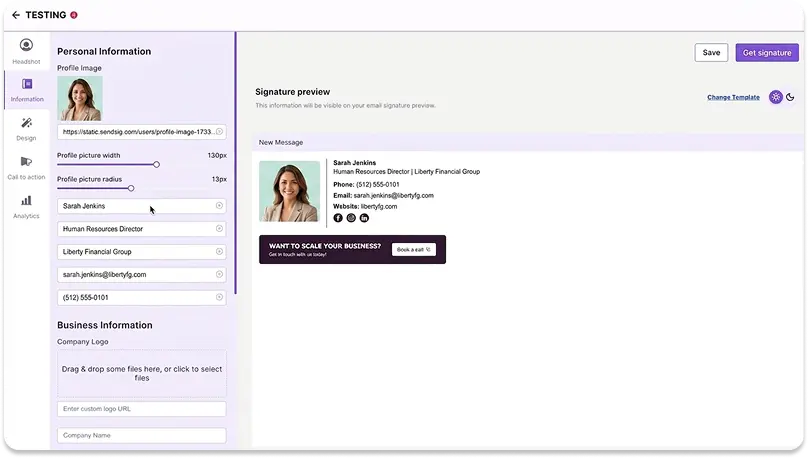
SyncSignature writes to the Gmail `sendAs` profile and documents a 50-person Workspace rollout in under 30 minutes.
The speed and price are real. The tradeoff is a compliance posture the vendor openly declines to certify.
Pros
- Fastest documented rollout. Under 30 minutes for 50 Workspace users, under 15 for Microsoft 365.
- No mail flow changes. The vendor states plainly there are “no MX changes, no mail flow rules, no server-side mail routing.”
- Delegated access for non-admins. Marketing, HR, or a department lead updates banners and templates without admin credentials.
- Directory sync with custom attributes across Google Directory and Entra ID, with group targeting by department, role, or office.
- Automatic offboarding on the next sync after a directory account is suspended.
- Cross-client preview across Gmail, Outlook, Apple Mail, and mobile before deploying.
Cons
- Hosting is AWS India only. The vendor’s own docs call it “not configurable per tenant,” ruling out EU, UK, US, or Australian data residency.
- Explicitly disclaims certifications. No SOC 2 Type 1 or Type 2, no ISO 27001, no HIPAA Business Associate status, and no audit log export.
- No SAML SSO. Pricing and product pages list it as “not offered today.” A separate enterprise page claims SSO exists, likely describing social login instead.
- No server-side option at any tier. Enforcement is always an overwrite, never a mail-flow guarantee, and no higher tier fixes this.
- Coarse field locking. SyncSignature’s own docs call it a “coarser mechanism”: a template is either locked or opens a small named set of fields.
- No internal versus external routing.
Pricing
Per-user with a 5-seat minimum on the team plan, and volume rates fall to roughly $1.40 per user at 100 seats.
Solo is $6/month, Team is $10/month for 5 users which works out to $2 per user, and Enterprise is quote-based.
There’s also a free forever tier. 7-day trial. See SyncSignature pricing.
3. SignatureSatori: best long-standing Workspace-native option
SignatureSatori is a Google-only specialist from AppSatori s.r.o. in Prague, operating since 2011 as a Google Cloud Premier Partner.
The campaign tooling is the deepest in this group. Enforcement is the weak point, and only arrives on the subscription tier.
Pros
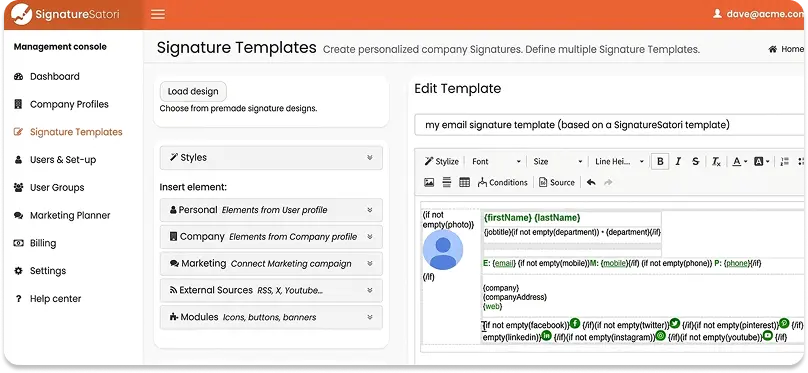
- Deepest campaign toolkit here. Smart Marketing Planner handles scheduled campaigns with rotation across banner variants, plus a built-in Canva editor.
- Content pulls from live sources including RSS, YouTube, X, and Eventbrite.
- Dedicated Marketing Manager role that grants campaign access while blocking payments, user changes, and manual signature edits.
- No SMTP involvement. The vendor states it has “eliminated the use of SMTP,” and its Marketplace listing confirms “no intervention into e-mail flow.”
- Rich directory sync. Pulls contact details, job titles, departments, OU membership, custom schema fields, profile pictures, and the domain logo.
- ISO 27001 certified and GDPR compliant, hosted entirely on Google Cloud Platform.
- Mobile Gmail documented for both iOS and Android, including the caveat that a signature can take up to an hour to appear.
Cons
- No hard lock, and the vendor says so. Users “still can change or edit the signature” in their client. The fix is daily re-sync on Subscription, a 24-hour drift window.
- Enforcement requires the paid subscription. The credits model has no automatic re-sync at all.
- Google Workspace only. Microsoft 365 isn’t supported as a managed platform.
- Contradictory docs on Google Group assignment. The security article says “we currently don’t load any Group-related data.” The pricing page references group-based sizing anyway.
- Pricing is hard to read. Figures render through a JavaScript calculator rather than appearing in the page.
- Analytics are Google Analytics link tracking, not a native click dashboard.
Pricing
2 models, which is unusual and worth understanding before you commit.
Credits are a one-time purchase with a 10-credit minimum. 1 credit sets or changes 1 user’s signature and stays valid 24 hours for unlimited edits.
Subscription is monthly per user with a 5-user minimum, and it’s the only way to get the Marketing Planner and daily automatic sync.
You can combine both. 5 free credits on signup. See SignatureSatori pricing.
4. Exclaimer: strongest enforcement, but built Microsoft-first
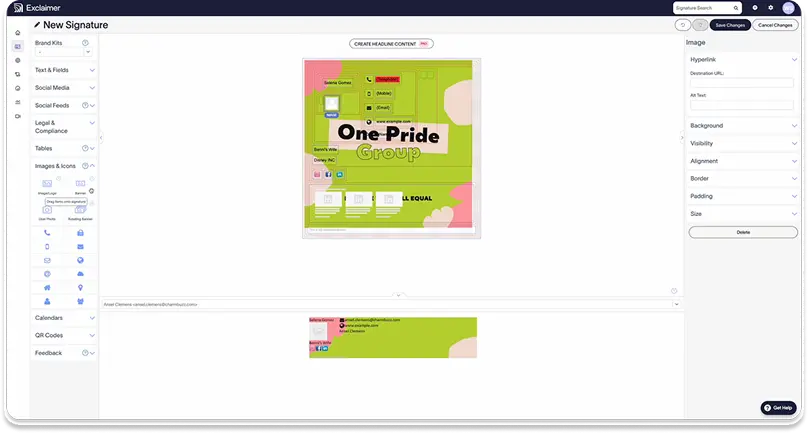
Exclaimer is the only tool here with server-side enforcement on every plan, including entry level.
On Google Workspace that strength costs you either a mail routing change plus an SPF edit, or your banner campaigns. Pick your compromise.
Pros
- Server-side enforcement on all plans including Starter. No other tool here offers it below a premium tier.
- Directory sync on all plans across Entra ID, Google Workspace, and Okta Universal Directory.
- Role-based access across the range with Owner, Editor, and Auditor roles.
- Internal versus external routing and exclusion rules from Standard up.
- Campaign scheduling from Standard, with advanced repeatable rules and engagement analytics on Pro.
- Hybrid environment support for on-premises Exchange alongside cloud mailboxes.
- Field locking from Standard, and Starter gives users no editable fields at all.
Cons
- Server-side on Workspace means rerouting your mail. The setup guide has you add a host route and configure the Google SMTP relay for Exclaimer’s IPs. You also change the route via a content compliance rule and add an SPF change to `include:spf.
.exclaimer.net`. - The client-side alternative is capped. Exclaimer documents “only one Google client-side signature can be synced per account.” It also states “campaigns and disclaimers are not supported for client-side signatures for a Google Workspace subscription.”
- Client-side sync is every 4 hours, per Exclaimer’s Gmail synchronization doc.
- No SAML SSO and no Okta SSO. The Security and Compliance FAQ confirms both. Microsoft and Google SSO with MFA are supported, so this only bites if Okta or PingFederate is your primary identity provider.
- 10-user minimum, and Starter includes only 1 template.
- No HRIS integrations documented.
Pricing
Straight per-user per-month with a 10-user minimum, licensed per active mailbox.
Starter is $0.90, Standard $1.45, Pro $1.75, and Enterprise is custom, all billed annually with a monthly toggle available.
The Google Workspace product carries no separate price list, so Workspace and Microsoft 365 cost the same.
14-day trial, no credit card. See Exclaimer pricing.
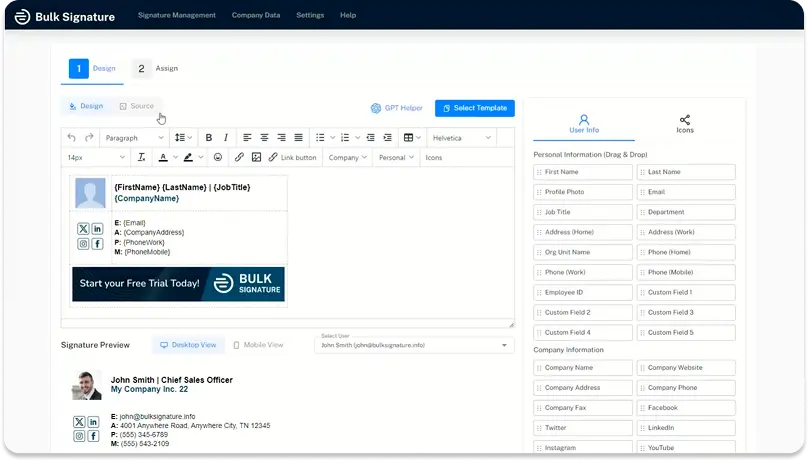
5. BulkSignature: best campaign analytics on a small budget
BulkSignature delivers more click measurement than tools costing several times more, along with confirmed SOC 2 and GDPR compliance.
What you give up is any form of signature control: no field locking, no enforcement, and a 24-hour sync cycle.
Pros
- Real campaign measurement. Click and impression tracking with CTR broken out by campaign, department, and user.
- SOC 2 and GDPR both confirmed, which NewOldStamp, Bybrand, and SyncSignature cannot document.
- Full assignment flexibility by org unit, Google Group, or individual user.
- Campaign scheduling with start and end dates in the campaign manager.
- Role-based permissions so marketing runs campaigns without admin access.
- AI signature designer built into the product.
- Covers both platforms. Google Workspace via the Workspace API, Microsoft 365 via an Outlook add-in.
Cons
- No field locking and no enforcement. Deployment is client-side with no server-side option. A capable user can override the signature, and it stays overridden until the next refresh.
- 24-hour sync cycle. A new hire may wait a full day for a signature. A departed employee’s signature can also remain active for up to a day after deprovisioning.
- No SAML SSO of any kind.
- No reply and forward deduplication. Users must configure reply behavior manually in Gmail settings.
- No data residency options documented, and Apple Mail support isn’t explicitly confirmed.
- No internal versus external routing.
Pricing
Per seat with a 10-user minimum and a stated 20% discount for annual billing.
Be careful here: the pricing page computes the rate from a JavaScript seat slider, and BulkSignature’s own pages quote different per-user figures in different places.
Get a number in writing before you budget. 14-day trial, no credit card. See BulkSignature pricing.
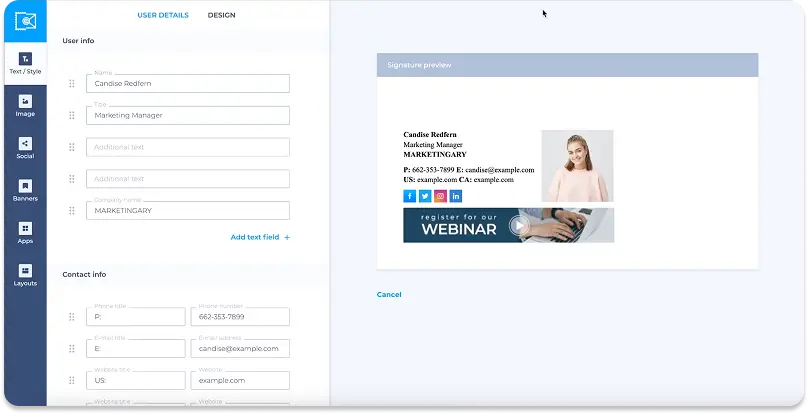
6. NewOldStamp: best for design-led marketing teams
NewOldStamp treats the signature as a campaign surface, with the strongest banner analytics of any tool at its price.
Two things narrow its fit sharply: one Workspace domain per account, and no published security certifications at all.
Pros
- Banner Campaigns with real reporting. Start and end dates per campaign, plus clicks, impressions, and CTR per element. All filterable by department and date range.
- Field and section locking on the master template is a documented core feature.
- Unlimited departments, each with its own master template, mappable to region or role.
- Force Data Update to push changes immediately rather than waiting for the sync window.
- Server-side path available on Microsoft 365 through Exchange mail flow rules, which also enables reply and forward rules.
- Broad client coverage including Gmail, Outlook, Apple Mail, iPhone Mail, and Samsung Email.
Cons
- One Google Workspace domain per account. Multiple domains means multiple separate NewOldStamp accounts. This is the hard blocker for multi-brand teams.
- No security certifications documented anywhere in NewOldStamp’s public materials: no SOC 2, no ISO 27001, no published GDPR or data residency detail. A procurement review stalls here.
- Organizational unit targeting only. No Google Group assignment.
- No automated offboarding. Removing a departed employee’s signature is a manual admin action.
- No role separation between marketing and IT, so whoever holds admin access owns everything.
- No SAML SSO.
- Setup isn’t quick. The Workspace path requires whitelisting, a Marketplace install, and connection steps.
Pricing
A single slider-based plan priced per signature rather than per seat, starting at a 5-signature minimum.
At that minimum, it’s $109 billed annually, which works out to $1.80 per signature per month, and the rate falls as the count rises.
Above 200 signatures, it moves to custom pricing. 7-day trial. See NewOldStamp pricing.
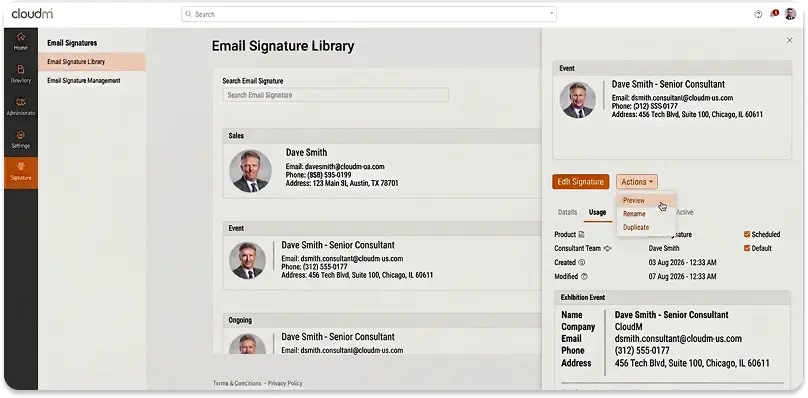
7. CloudM: best if you also run Google Workspace migrations
CloudM is a Workspace management platform where signatures are a module inside CloudM Automate, not a standalone product.
Multi-domain handling is genuinely thorough. The catch is a weekly overwrite cycle, which is the longest drift window in this guide.
Pros
- Gmail API deployment. Signatures are “synced directly via the Gmail API” and applied “without the need to route emails through 3rd parties.”
- Thorough multi-domain and alias handling. Dedicated support for secondary-domain and Google Group send-as aliases. Multi-brand senders get the right signature per address.
- Smart Teams targeting. Dynamic attribute-based groups alongside organizational units, with OU inheritance as a toggle.
- Campaign scheduling by date range per OU or Smart Team, built for conferences and launches.
- Signature Manager role for delegating campaign work to a non-admin.
- Bundled with migration and lifecycle tooling, which is the real reason to buy it.
Cons
- Cannot lock a signature, and a manual edit can survive 7 days. CloudM’s sync documentation confirms this gap. A manual Gmail edit “has no visibility” until the next sync, which runs weekly on Saturday at 00:00.
- The daily sync won’t help. It only checks for CloudM-side changes, so it won’t catch a Gmail-side edit.
- No click analytics appear anywhere in CloudM’s signature documentation.
- Banners aren’t a managed object. The documented method is a hosted image inside a template.
- Scheduling is primary-domain only where secondary domains exist.
- Google Workspace only for signatures, with no Outlook equivalent.
- You buy the whole platform. There’s no signature-only product or price.
Pricing
Bundled, not standalone. Automate & Protect Essential is $18 per user per year and includes email signatures, with Enterprise quoted custom.
Judged as a signature tool alone that’s inexpensive, but you’re paying for a Workspace management platform.
The value depends on whether you’ll use the migration, offboarding, and Drive governance modules too. See CloudM pricing.
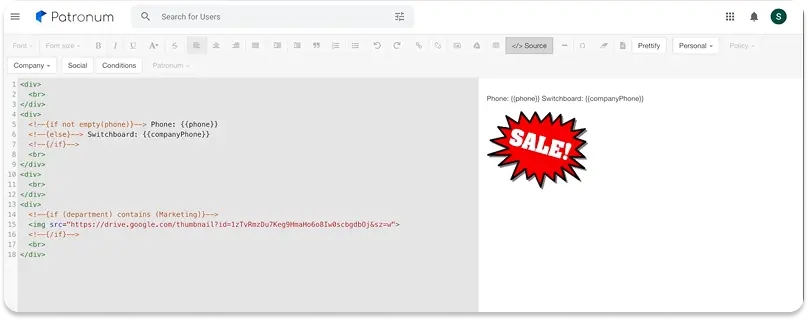
8. Patronum: best when signatures are part of Workspace lifecycle management
Patronum is a Google Workspace admin suite from Bespin Labs where signatures are 1 module among onboarding, offboarding, Drive management, and contact sharing.
Buy it for the lifecycle automation. The signature layer itself is thin, with no campaign tooling at all.
Pros
- Signature offboarding is part of a real deprovisioning workflow, alongside Drive transfer and contact reassignment.
- Hourly sync, faster than the 24-hour batch cycle several rivals run.
- Gmail API deployment with no SMTP or SPF changes required.
- Flexible policy targeting by organizational unit, group, or directory attribute.
- Up to 50 signatures per Gmail account, with send-as alias signatures supported.
- 30-day free trial, the longest here.
Cons
- No enforcement. Patronum applies signatures client-side, and a user edit persists until the next hourly sync. Gmail can cache the signature for another 1 to 2 hours on top of that.
- No native field locking. User-editable fields depend on configuring Google Directory custom attribute permissions instead.
- No campaign or banner module at all. No scheduling, no marketing self-service, so a banner swap means editing template HTML as an admin.
- Analytics are manual UTM codes into Google Analytics, with no native dashboard.
- Reply and forward signatures can’t be managed. Patronum’s Help Center attributes this to Google. “The Google Gmail API does not allow Patronum the ability to set the Reply/Forward Use email signature.”
- No SAML SSO and no audit trail documented.
- Google Workspace only. No Microsoft 365 support.
Pricing
Priced per user per year rather than per month, which makes it look dramatically cheaper than the field until you notice the unit.
Education and non-profit is $2 per user per year, and Business is $8.
Patronum+ is $16 per user per year, with a backup add-on at $3 per user per month.
Given how far below the category norm that sits, confirm the unit on a quote before budgeting.
30-day free trial. See Patronum pricing.
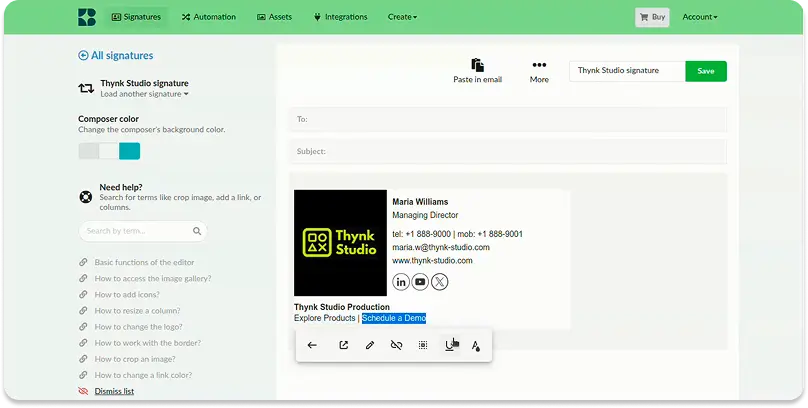
9. Bybrand: best for quick setup and simple template management
Bybrand is a signature builder with a Workspace integration, priced per signature rather than per seat.
Templates and setup speed are genuinely good. Almost every automation an admin would want is absent, including automatic propagation.
Pros
- Instant setup with no DNS changes. The trial starts immediately.
- Broad documented client coverage including Gmail, Outlook in all variants, Roundcube, Yahoo Mail, Thunderbird, and mobile.
- Outlook add-in overrides manual signatures. The FAQ confirms it inserts the official signature even when a user has their own.
- Automation groups such as “Sales Team” or “Support,” each mapped to a different template.
- Bulk user management through CSV import and integration imports.
- Priced per signature, which suits teams where only some staff need a managed signature.
Cons
- Propagation is admin-initiated. Updates push by bulk action from the dashboard, not on template save, so nothing reaches users until someone clicks.
- No day-one provisioning. Google Workspace sync is admin-triggered. Entra ID sync for Microsoft is listed as “coming soon” on the vendor’s own add-in page.
- No field locking and no enforcement. Neither is available at any tier.
- No campaign scheduling and no native analytics. Click tracking depends on Google Analytics UTM parameters or a link shortener.
- No automated offboarding documented.
- No SOC 2 or ISO 27001 certification appears in Bybrand’s materials.
- Monthly billing only, with no annual discount available.
Pricing
Per signature, not per seat, and monthly only with no annual option.
The base plan is $8 per month covering 10 manually created signatures.
Then it’s $0.80 per month for each additional signature, or $0.50 per month per employee synced through automation.
That structure is cheap for a 10-person team and gets expensive relative to per-seat rivals past about 50 people.
14-day trial with no credit card, plus a 30-day money-back guarantee. See Bybrand pricing.