Design and analyze email signatures with AI

Power your Email Signatures with WiseStamp’s innovative AI, from design to in-signature survey analytics.

No credit card needed • Get started in minutes
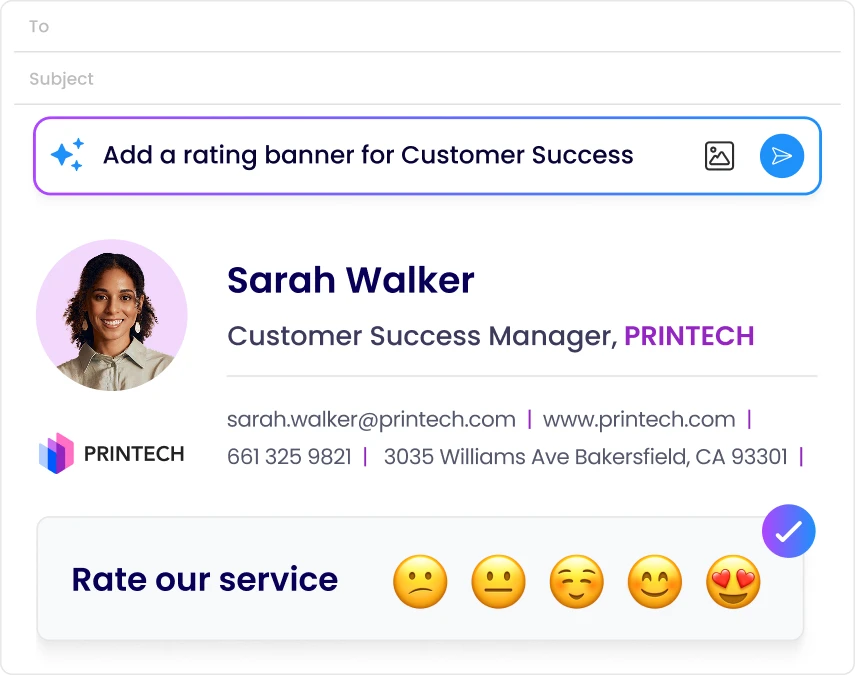
AI Capabilities in email signature
AI email signature prompting

Faster email signatures with AI design

blue tick

Describe the signature you want, and the AI Designer builds it

blue tick

Upload a file or business card to get a design-ready draft

blue tick

Start from scratch or a template, and edit with AI

blue tick

Use Smart Suggestions tailored to your design

AI email signature prompting

Rebuild your old signature with AI

blue tick

Upload a screenshot or image of your current signature

blue tick

AI Designer automatically drafts an on-brand WiseStamp version

blue tick

Migrate from old tools without starting from scratch

AI generated email signature from screenshot
email signature survey data analytics

Turn survey responses into business insights

blue tick

Inquire about NPS, CSAT, star, or Yes/No customer responses

blue tick

Get answers based on meaning and intent

blue tick

Skip the exports, the data gathering, and the analyst.

Import external survey data with WiseStamp responses on Platform and Enterprise plans.

email signature survey data analytics

Put AI to work on your signatures and your feedback

Join 80,000+ companies using WiseStamp to design signatures and understand their audience, without hiring a designer or an analyst. This page covers what WiseStamp’s AI can do today. As new AI features ship, they’ll be added here.

No credit card needed • Get started in minutes

email signature before and after AI prompting

FAQ

WiseStamp’s AI capabilities are two built-in features: the AI Designer, which builds an email signature from a text prompt or an uploaded logo, and AI Insights, which answers plain-language questions about your survey responses. Both live inside the WiseStamp product you already use, with no separate AI tool to buy or install.

Open the Studio, choose New Signature, and use the AI chat box to describe the signature you want or upload a logo or headshot. WiseStamp generates a draft, and you refine it with Smart Suggestions before saving. The AI Designer is available in the Studio, not the Classic Signature Editor.

Ask a plain-language question about your NPS, CSAT, star, or Yes/No survey responses, and WiseStamp’s AI Insights returns an answer based on the meaning of the responses, not just keyword matches. No export, spreadsheet, or analyst is required.

Yes. WiseStamp’s AI Designer replaces the design brief with a text prompt or a logo upload, and AI Insights replaces manual analysis with a plain-language question. Marketing and admin users can do both directly inside WiseStamp with no outside help.

Yes. Signatures built with the AI Designer deploy the same way as any WiseStamp signature:

  • Google Workspace (Gmail), on desktop and mobile
  • Microsoft 365 (Outlook), on desktop and mobile

AI Insights is included with Surveys on every plan that includes Surveys, at no extra cost. The AI Designer is included on every paid WiseStamp plan and uses a monthly AI credit allowance:

  • Trial and Pro+: 200 credits
  • Basic: 500 credits
  • Grow: 1,500 credits
  • Platform: 5,000 credits
  • Enterprise: 7,500 credits

Credits can be viewed or added anytime from Plan & Billing.

Yes. WiseStamp is hosted on infrastructure meeting SOC 2 Type II and ISO 27001 standards, and supports GDPR and HIPAA requirements. WiseStamp never accesses, stores, or reads the content of your team’s emails.

Yes, on Platform and Enterprise plans. WiseStamp can import responses from SurveyMonkey, Typeform, or any other external survey tool, so AI Insights can analyze them alongside your WiseStamp survey data for a single, holistic view.

Yes. A signature built with the AI Designer deploys and renders the same way any WiseStamp signature does, appearing consistently on desktop, mobile apps, and webmail.

The AI Designer is available on every paid WiseStamp plan, including Pro+, which is built for individuals and micro-teams. Larger plans include a bigger monthly AI credit allowance, but the feature itself is not limited to Enterprise.