GMAIL SIGNATURE MANAGEMENT
Control & Automate
Google Workspace Signatures
Deploy company-wide signatures from Google Workspace User Directory in minutes

Trusted by 80,000+ companies. Used by millions.
HOW IT WORKS
Take email signatures off IT’s plate
Own every Google Workspace signature from one dashboard
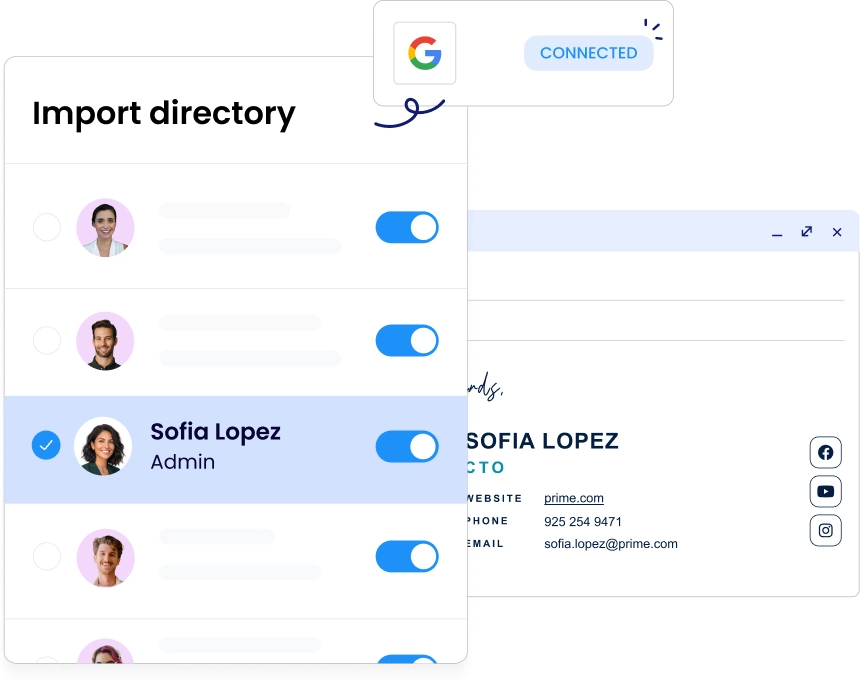
Connect to Google Workspace directory in minutes
- Connects to Google Workspace via the Google Directory API with read-only directory access
- One-time super admin authorization to connect your Google Workspace account
- Syncs employees names, titles, departments, and phone numbers from Google Directory daily
- Assigns signature templates by OU, group, or custom rules without per-user configuration
- Client-side mode writes signatures directly into Gmail settings, so DKIM stays intact

Satisfy your security review with ISO 27001 and SOC 2
- ISO 27001, ISO 27018, and SOC 2 Type II certified
- GDPR, CCPA, and HIPAA compliant, with a signed DPA
- Data encrypted in transit (TLS 1.3) and at rest (AES-256)
- RBAC with Admin, Designer, and IT roles
- SAML 2.0, SSO, and MFA available for admin access control

Confirm readiness for deployment
- A Google Workspace account with super admin credentials for initial authorization and setup
- Google Directory must be active; WiseStamp imports employee data via read-only API access
- Gmail must be the organization’s active email client for signature deployment to function
- Admin dashboard requires a modern browser: Chrome, Firefox, Edge, or Safari will work
- No on-premise hardware required. WiseStamp is a fully cloud-based SaaS on Google Cloud


We just had to configure WiseStamp one time. After that, each user has been synced automatically. It works like a charm!

Avi Drucker
CIO, Sela Cloud
CENTRALIZED MANAGEMENT
Own every Google Workspace signature from one dashboard
One update reaches every mailbox. Push a rebrand, a new campaign banner, or a policy change to every employee in minutes.


DIRECTORY SYNC
Keep signature data current without manual updates
WiseStamp syncs from your Google Workspace Directory daily. Job titles, phone numbers, and departments update automatically when records change.
SIGNATURE LOCKING
Stop employees from changing or breaking signatures
Admins lock the template. Employees can update approved personal details. The branding, disclaimers, and design always remain intact.


GROUP ASSIGNMENT
Assign signatures by team, department, or brand
Different templates apply automatically to each Google Workspace group or OU. Finance, Sales, and Legal each get the right signature.
Take control of email signatures
WiseStamp manages email signatures so you don’t have to
DEPLOYMENT OPTIONS
Deploy server-side with no plugins or email rerouting
Signatures deploy directly to Gmail via the Google Workspace API using OAuth 2.0. No client plugin or email rerouting required.


WISESTAMP INTEGRATIONS
Connect to your identity and directory systems
- Google Directory and Azure Active Directory
- SCIM-compatible HRIS platforms
- SSO providers via SAML 2.0
- Employee data maps directly into signature templates without duplicate data entry
ENTERPRISE SECURITY
Pass your next compliance review with confidence

SOC 2 Type II, ISO 27001, GDPR, and HIPAA compliant
No email rerouting and no email content access
Legal disclaimers enforced by department or region
Audit logs, SSO/SCIM, and OAuth 2.0 included
The overall efficiency and time-saving aspects for IT administration are paramount. WiseStamp truly makes managing email signatures a seamless process, freeing up valuable IT resources.
Soumen Garain
Senior IT & ERP Manager, Convenient Brands, LLC
TEAM CAPABILITIES
Give every team what they need from the same platform
Schedule and measure signature campaigns across Gmail
- Set campaign run time so banners swap automatically on schedule
- Run tests across departments to compare banner and CTA performance
- View click and impression data by department, campaign, and date

Enable Sales to drive demos from their Gmail signatures
- Place demo or calendar booking buttons and CTAs directly in reps’ signature
- Pull rep details from Salesforce or HubSpot so signature data stays current
- Time signature banners to product launches, conferences, or campaign windows

Keep every Gmail message legally covered, automatically
- Assign HIPAA notices, GDPR disclosures, and confidentiality clauses to the right group
- The correct legal text appears in every outgoing Gmail from that group, without exception
- The audit log records which disclaimer each user had active on any given date
Collect feedback and surface social proof in every email
- Review widgets display your current G2 or Trustpilot score, refreshed automatically
- A CSAT or survey link sits in the signature, ready for one-click response
- Social feed widgets surface your most recent posts or testimonials on every send
Signatures sync with Google Workspace accounts
- The signature is ready the moment a new Google Workspace account goes live
- Signatures deactivate the moment an account is removed from Google Workspace
- Contacts who email a departed employee are automatically redirected to their replacement

NATIVE SOLUTION VS WISESTAMP
What does native Google Workspace
signature management leave unsolved?
| Capabilities | Native Google Workspace | WiseStamp |
|---|---|---|
| Company-wide signature enforcement | No | Yes |
| Template locking (prevent employee edits) | No | Yes |
| Group or department-based assignment | No | Yes |
| Consistent signature across Gmail web, iOS, and Android | Varies (user-set) | Yes |
| Auto-provision new hires from Google Directory | Manual | Automatic |
| Sync job titles and phone numbers from directory | Manual | Automatic |
| Disclaimer enforcement by department or region | No | Yes |
| Marketing banners and click analytics | No | Yes (Marketing Suite) |
| Audit trail and change history | No | Yes |
Take control of company email signatures
Stop signature chaos. Roll out standardized, brand-consistent signatures company-wide in less than a day.
