Automated vs Manual Email Signature Management
Use this 5-signal checklist to decide if manual email signature management has become a liability for your IT. Score your org in 2 minutes.
Short answer
What’s the difference between automated and manual email signature management?
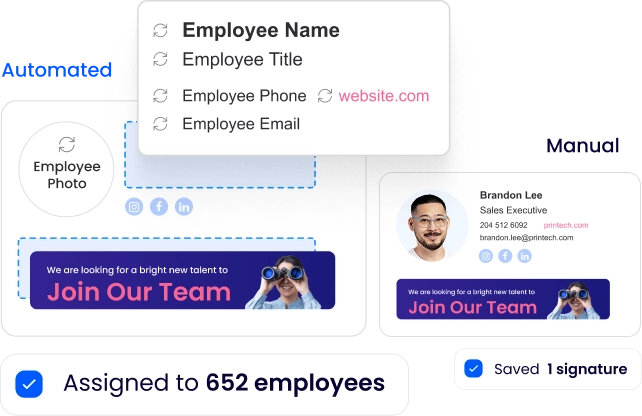
Manual management means updating each employee’s signature individually through copy-paste instructions, IT-assisted installs, or self-setup guides.
Automated management deploys and governs signatures org-wide from a centralized platform, with no per-user action required.
Decision criteria
How do I know if I need manual or automated signature management?
Use these 5 signals. If 3 or more point to “Automated,” manual management is a liability, not a cost saving.
| Signal | Manual is sufficient | Automated is needed |
|---|---|---|
| Team size | Under 15 employees | 15+ employees |
| Update frequency | Annual or less | Quarterly or more |
| Compliance requirements | None | Legal disclaimers, GDPR, SOC 2 |
| IT bandwidth | Adequate for per-user support | IT is already stretched |
| Device diversity | Single platform, desktop only | Mobile, CRM, or mixed email clients |
The pattern in almost every mid-market and enterprise evaluation: organizations started manual and tolerated it far longer than they should have.
The shift to automated happens after a compliance incident or a failed rebrand rollout makes the cost of inaction visible.
The problem of scale
Why does signature management become an IT problem at scale?
Most organizations start with manual signatures and don’t revisit the approach until something breaks.
A rebrand launches and half the team keeps sending the old logo for weeks. A compliance audit flags inconsistent legal disclaimers.
That’s when the question shifts: why is IT still doing this one employee at a time?
Manual Management
What does manual email signature management involve?
Manual signature management is the process of creating, distributing, and updating email signatures without a centralized platform. At most organizations, that means 1 or more of these methods:
- Copy-paste instructions sent to each employee via email or helpdesk ticket
- IT-built HTML files distributed through an internal wiki or onboarding doc
- Admin-assisted installs on individual workstations
- Employee self-setup guided by a PDF or screenshots walkthrough
The core constraint isn’t the method. It’s that every change requires someone to do the work per employee.
There is no broadcast update and no enforcement mechanism. When an employee ignores the instructions or installs incorrectly, the admin won’t know until someone notices.
Automated Management
What is automated email signature management?
Automated signature management is a centralized approach where admins design one branded template, connect it to the employee directory, and deploy it organization-wide from a single interface.
Templates pull employee-specific data from Microsoft Entra ID (formerly Azure AD) or Google Workspace via directory integration.
A change to the template publishes instantly to every assigned employee. Employee data stays current through daily directory sync, with no manual entry in a separate system.
WiseStamp’s Studio Editor handles template design with a drag-and-drop canvas, no HTML or design skills required.
Once connected to the directory, IT assigns templates by department group and chooses a deployment method: Outlook Add-In, Chrome Extension, or server-side for complete mobile and CRM coverage.
Cost of manual management
What does manual signature management cost IT?
Manual management costs are mostly invisible. They don’t appear in a budget line, but they accumulate in support time, undetected inconsistencies, and compliance gaps that surface at the worst moments.
I came across an IT professional in an online forum who had tried to measure the impact directly.
“IT was spending ridiculous amounts of time helping users update signatures. It was a total waste of resources.”
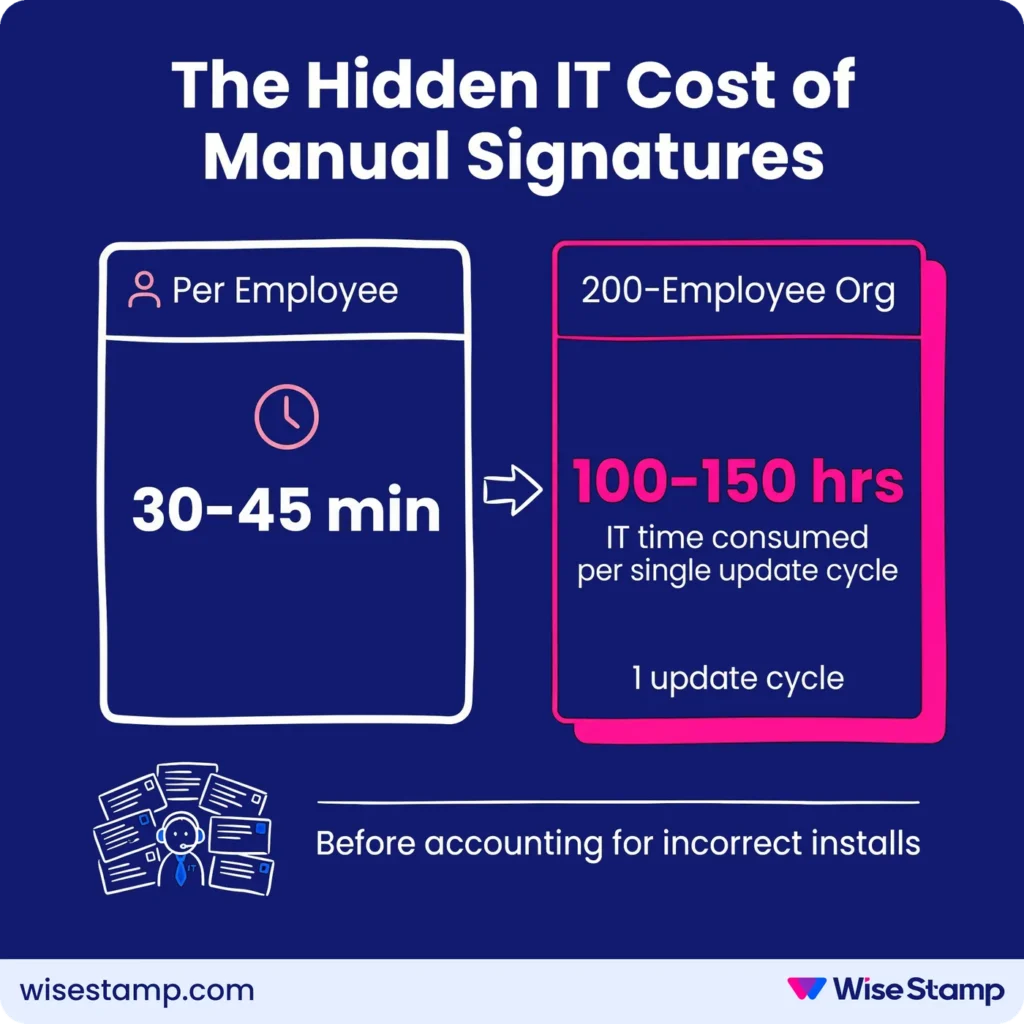
The numbers confirm this. IT Operations contacts report spending 30-45 minutes per employee for a guided signature update.
At 200 employees, that’s 100-150 hours of IT time for a single update cycle, before accounting for the employees who still install it incorrectly or not at all.
Marketing & IT tension
Why signature management creates tension between IT and Marketing?
Manual management creates an ownership problem that automated management resolves by design.
Marketing owns the brand standard. IT owns the infrastructure to distribute it. Neither owns the manual labor of getting each employee to comply. In practice, the work lands on whoever is most responsive to complaints.
I’ve seen this described the same way across IT forums, sales calls, and support threads.
“Marketing wanted control over branding, IT had to implement it, and nobody wanted to own the manual work.”
Automated management makes the split explicit. Marketing designs and updates templates. IT configures deployment and directory sync once.
Employees update their personal details through self-service. The work is divided by function, not dumped on whoever is available.
Value for IT
What does automated signature management give IT that manual cannot?
Automated management delivers 3 operational gains that manual cannot replicate at any scale.
Directory sync removes manual data entry entirely. Employee names, titles, departments, and contact details pull from Microsoft Entra ID or Google Workspace. Role changes update automatically. New hire records appear without a helpdesk ticket.
Employee lifecycle automation handles onboarding and offboarding without IT involvement. New employees receive the correct signature on activation. Departures are removed automatically when the directory record is deleted.
WiseStamp’s Employee Hub gives employees self-service access to their permitted fields (phone number, headshot, pronouns) without raising a ticket. Brand and compliance fields remain admin-locked. Nothing changes without admin action.
I spoke with an IT professional who had recently moved from manual to centralized management. Their summary was brief.
“Being able to update a signature once and have it roll out to the entire company instantly was huge.”
Automated Deployment
How does automated signature deployment work?
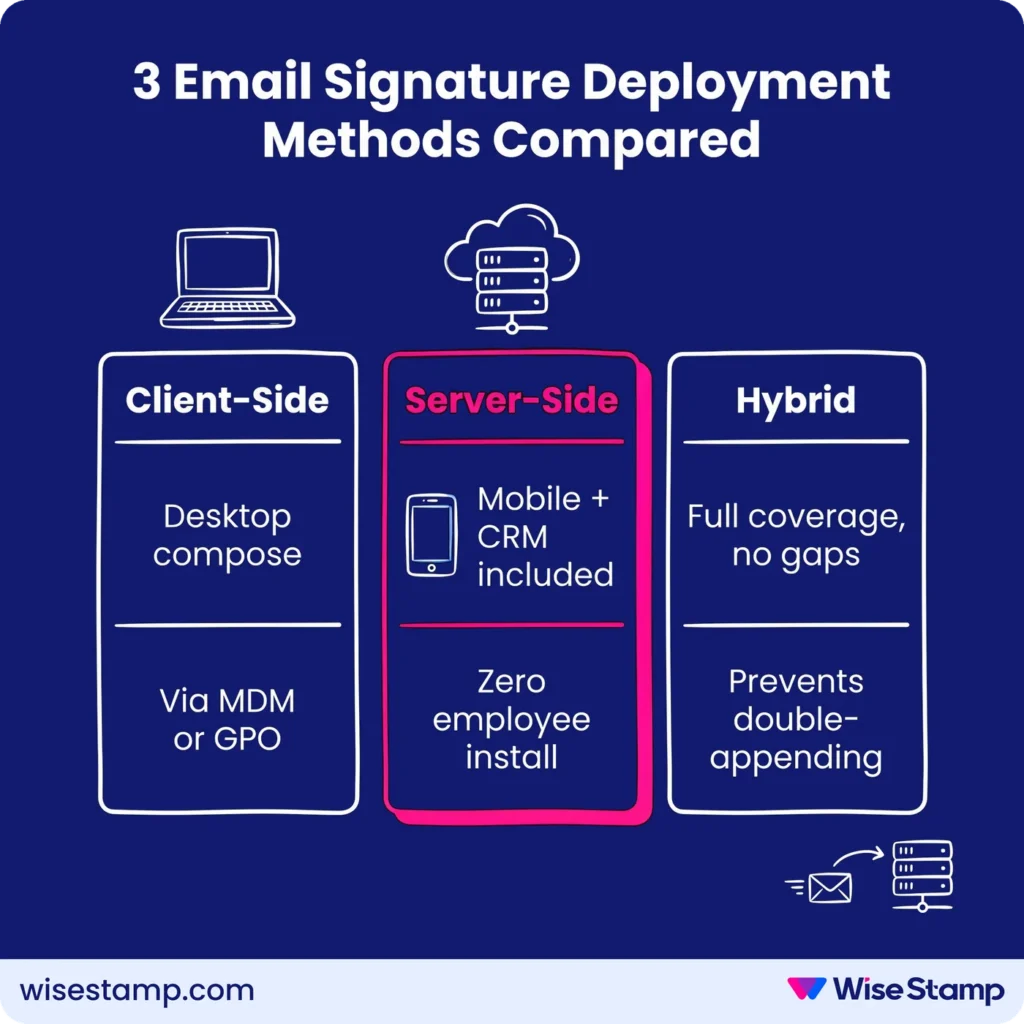
WiseStamp supports 3 deployment methods, each covering different surfaces:
- Client-side: Outlook Add-In or Chrome Extension injects the signature into the compose window. The sender sees it before sending. Deployable centrally via MDM or GPO, no per-device configuration by employees.
- Server-side: Signature appended after the email leaves the mail server. Covers every device and email client, including mobile and CRM-originated emails. Zero employee installation required.
- Hybrid: Client-side handles desktop users; server-side fills mobile and CRM gaps. Duplicate signature detection prevents double-appending.
For organizations with compliance requirements around mobile coverage, server-side is the only model that guarantees universal deployment without exception.
The governance question
How do automated and manual signature management compare on compliance and governance?
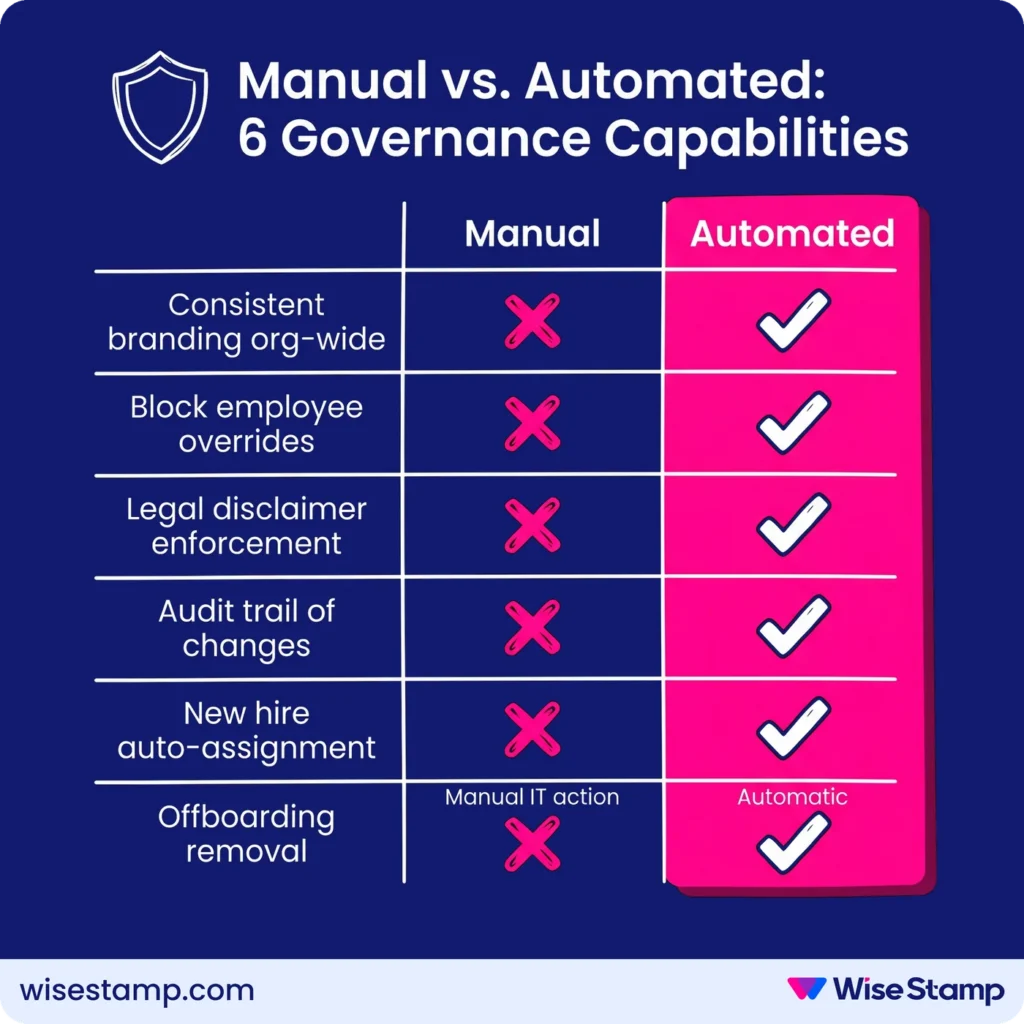
Governance is where the 2 models diverge most sharply.
Manual management has no enforcement layer. Admins distribute correct templates, but can’t prevent employees from editing fonts, adding personal text, or removing legal disclaimers.
No audit trail exists showing who has which signature version and when it was last updated.
Automated management enforces governance at the field level. Brand and legal elements are locked. Employees edit only permitted fields. Every template change is logged.
WiseStamp applies this through role-based access controls (RBAC), where admins define which fields are editable and which are locked, org-wide from a single settings panel.
| Governance capability | Manual | Automated |
|---|---|---|
| Consistent branding org-wide | No | Yes |
| Prevent employee overrides | No | Yes (RBAC) |
| Legal disclaimer enforcement | No | Yes |
| Audit trail of changes | No | Yes |
| New hire auto-assignment | No | Yes |
| Offboarding signature removal | Manual IT action | Automatic |
Small team considerations
When does manual signature management make sense?
Manual management is viable when all of the following are true:
- Team is under 15 employees
- Signatures change once a year or less
- A single email platform is in use (all Gmail or all Outlook, desktop only)
- No legal disclaimer or compliance requirements apply
Beyond those conditions, manual produces diminishing returns quickly. The inflection point for most IT teams is 20-50 employees, where support time and compliance exposure start to outweigh any savings from avoiding a centralized platform.
At that scale, the question is rarely “should we automate?” It’s “how long have we been paying the manual tax without realizing it?”
Takeaway
Email signatures are an IT governance problem hiding as a design problem. Manual management works at very small scale and fails gradually everywhere else. The failures are invisible until they become expensive.
Automated management changes the equation: one setup, zero per-user maintenance, full coverage across whatever devices and platforms your org runs.
To see how centralized deployment, directory sync, and field-level governance work in practice, See WiseStamp’s automated email signature management in action.
FAQ
>