Email Signature Software for Marketing: Buyer’s Guide
Evaluate and choose email signature software based on what matters to marketing: template control, IT independence, campaign scheduling, and measurable ROI.

Short answer
What should Marketing look for in email signature software?
Marketing teams should prioritize 4 capabilities when evaluating email signature software:
- A non-technical drag-and-drop editor (no HTML required)
- Full marketing autonomy from IT for updates and campaigns
- Scheduled campaign and banner management with group targeting
- Click analytics tied to Google Analytics 4
Platforms that lack these end up owned by IT, not marketing.
The real cost
Why your email signatures are a brand liability right now
Email signatures are embedded in one of the most widely used communication channels on earth: email reaches 4.6 billion users globally (Statista, 2025).
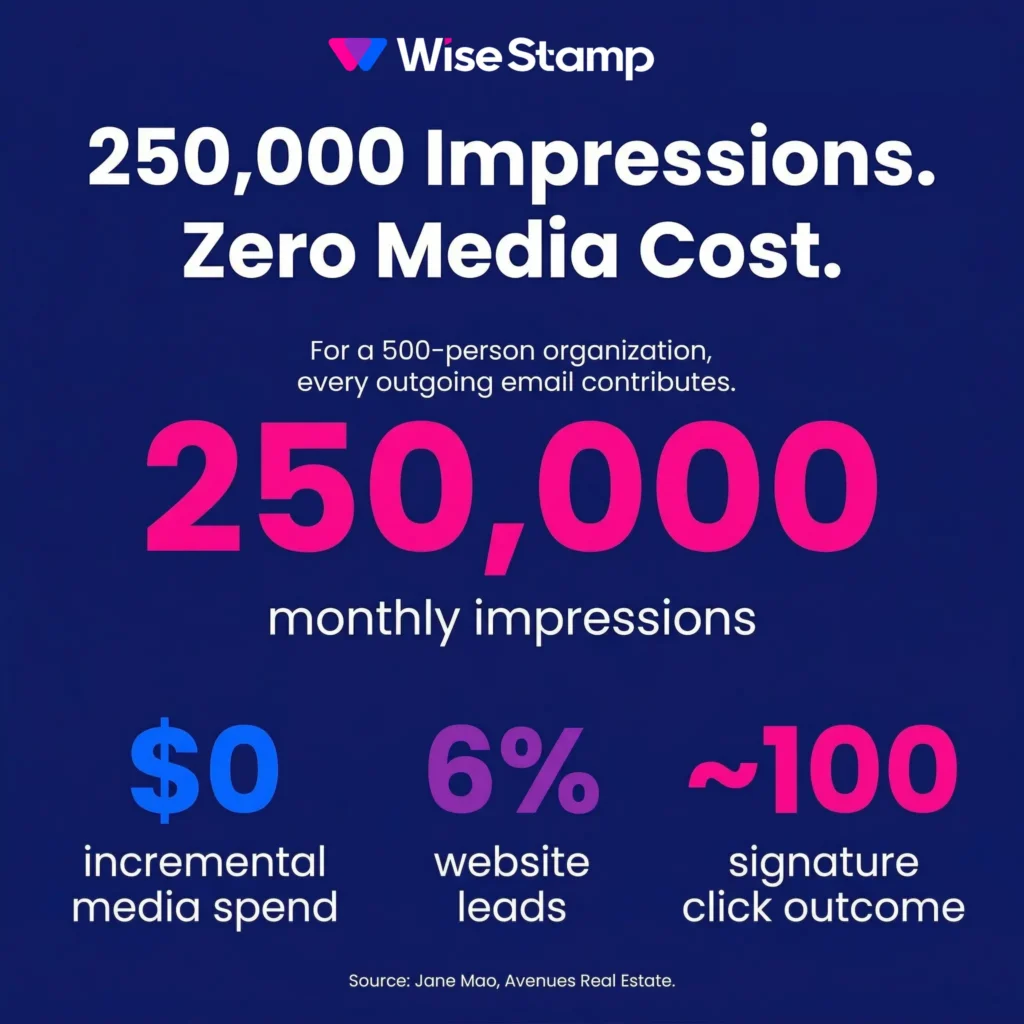
A 500-person company sends roughly 250,000 emails per month, according to WiseStamp’s analysis of average organizational send volumes. That’s 250,000 brand impressions either reinforcing your standards or quietly undermining them.
For most organizations right now, it’s the latter, and nobody’s measuring it.
Buying mistake
Why most email signature software fails marketing teams
Most email signature software was built for IT buyers. The criteria IT cares about – deployment architecture, directory sync, mail flow configuration – are legitimate.
But they produce a tool that IT owns and runs.
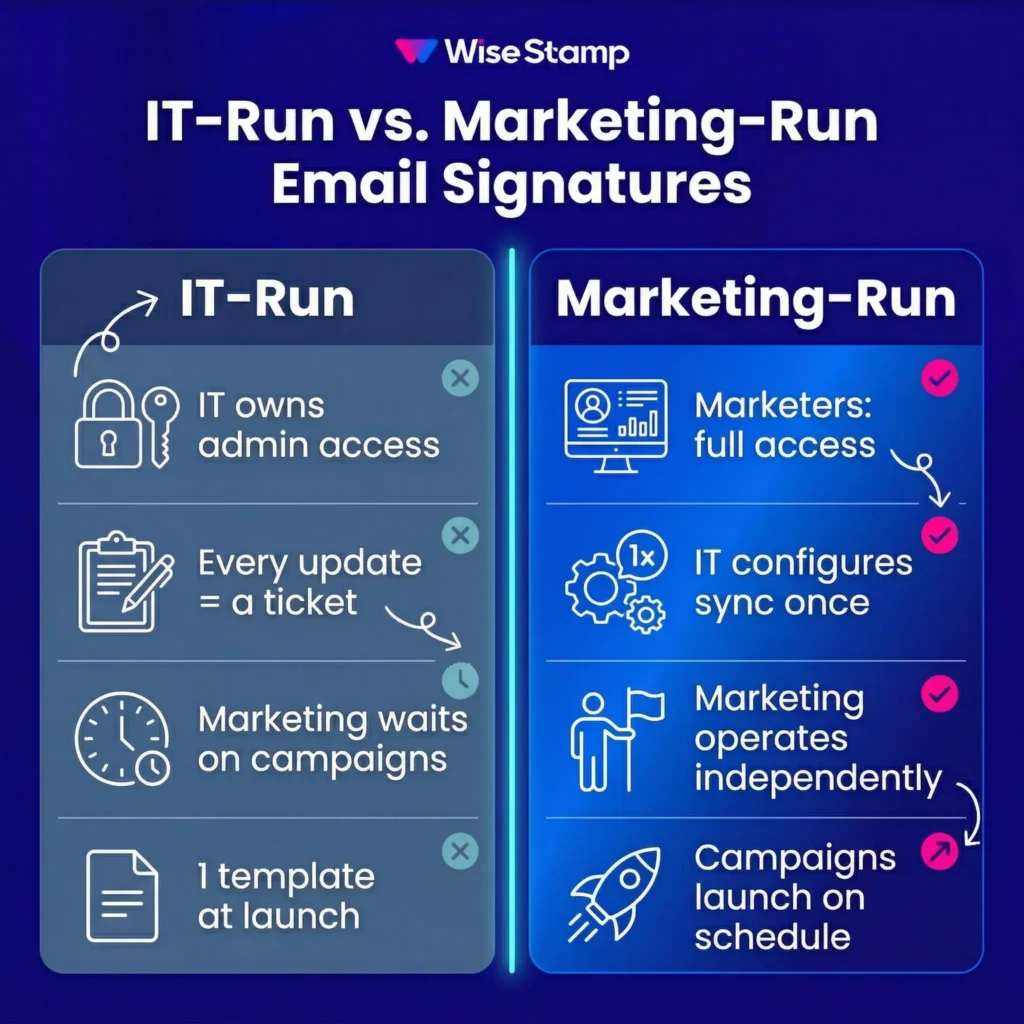
Marketing gets 1 template at launch. After that, every update is a ticket.
Exclaimer, CodeTwo, and Letsignit each have IT as their primary implementation owner.
That’s not a product flaw – it’s structural.
When IT buys and configures, IT runs. When marketing needs a banner updated for a product launch, they open a ticket.
One IT professional put it directly: “Marketing wanted control over branding, IT had to implement it, and nobody wanted to own the manual work.”
That’s the failure mode in 1 sentence.
The criteria below are written for marketing, not IT.
Usability test
Can non-technical marketers build and update email signatures without developer help?
Non-technical usability is the most important criterion for marketing teams evaluating email signature software.
A platform that requires HTML to create or modify a signature template is, in practice, an IT tool. Marketing will onboard at implementation and stop making changes.
Look for a drag-and-drop editor with a template gallery and AI-assisted creation.
WiseStamp’s Studio Editor lets admins build signatures without code: recreate a design from a screenshot, generate one from a text prompt, or start from a template gallery.
One change publishes to every assigned employee instantly on save.
The usability test is simple: hand the admin panel to someone on your marketing team who wasn’t in the demo.
If they can build something in under 20 minutes without help, the tool is genuinely usable for marketing.
One enterprise client described their first session: “I really, really like this platform. It’s very easy to use. This is something that I can show to even someone who is not technically savvy and they’ll be able to understand.”
Marketing autonomy
Can marketing update email signature campaigns without involving IT?
Marketing autonomy is the phrase vendors use. Verify it with 2 specific scenarios during the demo – not during the polished walkthrough.
Ask the rep to demonstrate a non-technical team member doing each of the following:
- Updating a campaign banner without IT access
- Creating a new signature template for a product launch without IT involvement
If either requires developer-level access, the platform is an IT tool in practice.
Watch someone who isn’t a trained sales engineer navigate the admin side. If they struggle, your team will too.
WiseStamp’s role architecture separates responsibilities at the platform level. The Marketer role accesses campaigns, analytics, and signature design independently from IT’s integration and employee lifecycle settings.
IT configures the Google Workspace or Microsoft 365 directory sync once. Marketing operates from that point without opening a ticket.
Brand control
How should email signature software handle brand template governance?
Brand governance in email signatures means locking what must stay consistent and freeing what employees need to manage themselves. Most platforms handle 1 side well and fail the other.
Evaluate 3 specific capabilities:
- Can you lock specific fields (logo, legal disclaimers, color scheme) while leaving others editable?
- Can you assign different signature templates to different departments or regions?
- Can employees update permitted details (mobile number, headshot, LinkedIn URL) without touching locked brand elements?
WiseStamp’s Employee Hub applies control at the field level. Admins toggle edit permissions per variable: the phone number field can be editable while the legal footer stays locked.
Employees see a lock icon next to protected fields and update the rest themselves. Brand standards hold without IT involvement.
The alternative is what happens without field-level governance.
One brand standards manager described it on a call: “I think right now we have some people that have, like, cosmic sans. We have some people that have, like, the pharaohs font, and I’m like, oh my god.”
Font chaos is the default state when employees have no guardrails and no easy way to self-serve correctly.
Campaign capability
What does email signature campaign management look like in practice?
Email signature campaigns convert every outgoing email into a measurable owned-media impression.
At a 500-person organization sending roughly 250,000 emails per month, a coordinated banner across all employee signatures generates 250,000 impressions at zero incremental media cost.
The most capable platforms support:
- Scheduled campaigns with defined start and end dates that activate and expire automatically – no manual swap required
- Group targeting so the sales team carries a different CTA than support or finance
- UTM parameter configuration per campaign so click data flows into GA4 and CRM attribution reports
WiseStamp’s Marketing Suite includes all 3, with per-group targeting, configurable UTM tags, and campaign priority controls for overlapping promotions.
A marketing leader seeing this for the first time told me: “I could also see, like, there’s certain campaigns – that’s gonna unlock a new part. It’s just like a new channel almost for our marketing.”
That reaction is common once the math lands: 250,000 impressions, zero media budget.
Measurement
How should email signature analytics prove channel value to leadership?
Email signature analytics transform signatures from a brand hygiene project into a channel you can justify in a quarterly business review.
The minimum measurement stack for marketing:
- Click-through rates per campaign banner, tracked to a named destination
- UTM parameters flowing into Google Analytics 4 so signature traffic appears under Source = emailsignature in acquisition reports
- Per-group attribution, not just aggregate totals
WiseStamp’s analytics dashboard tracks signature exposure via a tracking pixel and click behavior via UTM-tagged links, with full GA4 integration and CSV export.
The ROI case can be significant.
Jane Mao, Marketing Consultant at Avenues Real Estate, measured it directly: “6% of our leads to the website actually come from WiseStamp – that comes out to be like a hundred leads or so per month.”
WiseStamp also supports embeddable NPS, CSAT, and 5-star surveys distributed through the signature or via direct link, with AI-assisted sentiment classification.
Feedback from existing contacts collected at the moment of highest context, without a separate survey tool.
Cross-client rendering
Do email signatures render consistently across Outlook, Gmail, and mobile clients?
Email signatures that look correct in Gmail web but break on iOS Mail represent a brand consistency failure.
Cross-client rendering is where many platforms fail quietly, and where the problem lands back on IT as a support queue.
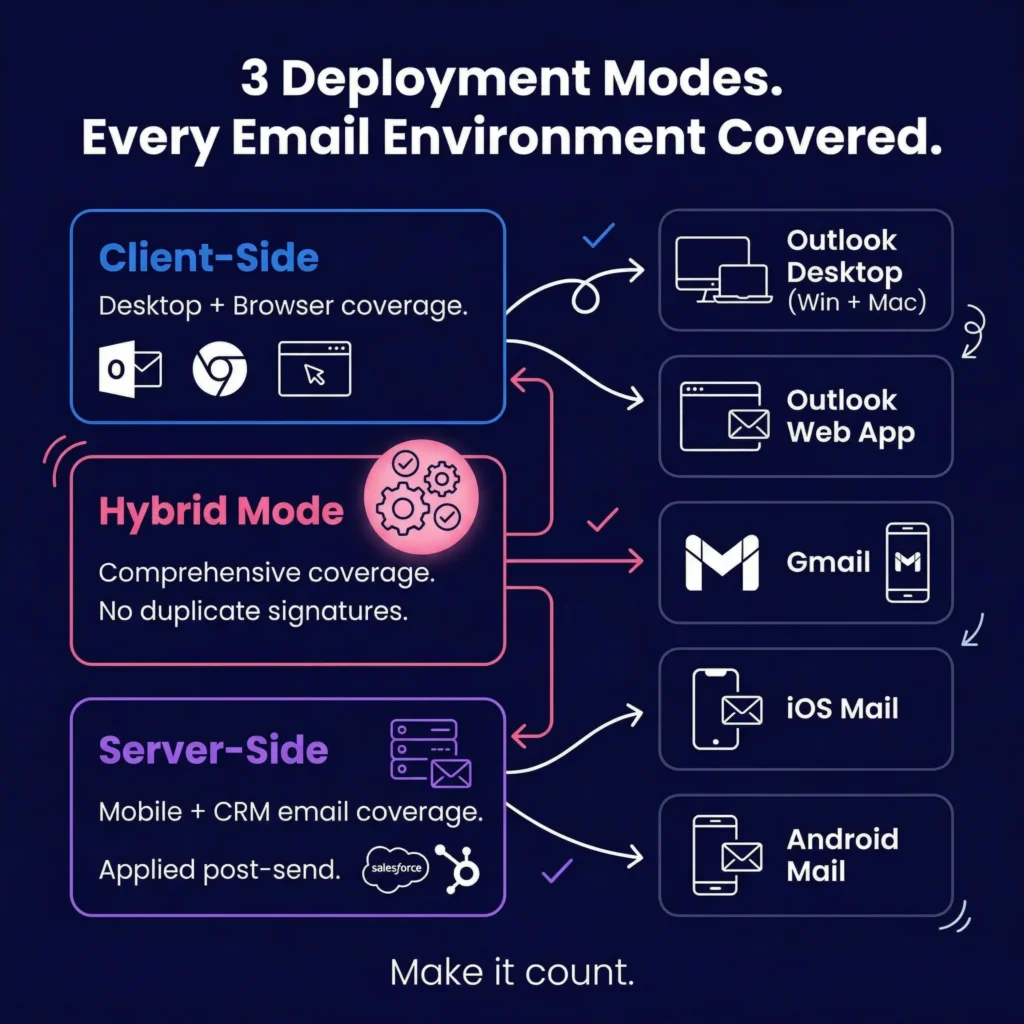
Request a live render during the demo on each of these:
- Outlook Desktop (Windows and Mac)
- Outlook Web App
- Gmail web and Gmail mobile
- iOS native Mail app
- Android native Mail app
WiseStamp supports both client-side and server-side deployment. Client-side covers desktop and browser environments via Outlook Add-In, Chrome Extension, and Desktop App.
Server-side covers mobile and CRM-originated emails, applied post-send before delivery.
Hybrid mode combines both without generating duplicate signatures.
One IT manager described the outcome simply: “Mobile and desktop signatures finally looked the same. That alone sold it for us.”
Deal breakers
Red flags that tell you email signature software isn’t built for marketing
| Red flag | What it signals |
|---|---|
| IT owns all admin access | Every campaign update requires a ticket. Marketing autonomy is marketing theater. |
| No drag-and-drop editor | Templates require HTML. Marketing can’t create or update without developer help. |
| No campaign scheduling | Banners require manual swaps. Campaign timing depends on someone remembering to act. |
| No click analytics or UTM support | The channel produces no measurable evidence. The investment can’t be justified past brand hygiene. |
| Shared mailboxes billed as user seats | An unexpected seat count inflates renewal cost. Clarify billing definitions before signing. |
| Marketing bought it, IT runs it | The most common failure pattern in the category. When IT owns content decisions, marketing disengages. The tool gets renewed once, then dropped. |
Takeaway
How to evaluate email signature software as a marketing team
Email signature software built for IT will end up owned by IT.
The right platform gives marketing a non-technical editor, field-level brand governance, campaign scheduling with UTM tracking, and analytics that prove channel value to leadership.
The practical test is the clearest one. After the demo, hand the admin panel to someone on your marketing team who wasn’t in the room.
If they can navigate it and build a signature in 20 minutes without help, the tool will work for marketing. If they can’t, it won’t.