Who Owns Email Signatures – Marketing or IT?
Learn how to split email signature responsibility. Marketing owns design and campaigns. IT owns deployment and compliance. Read how it's done
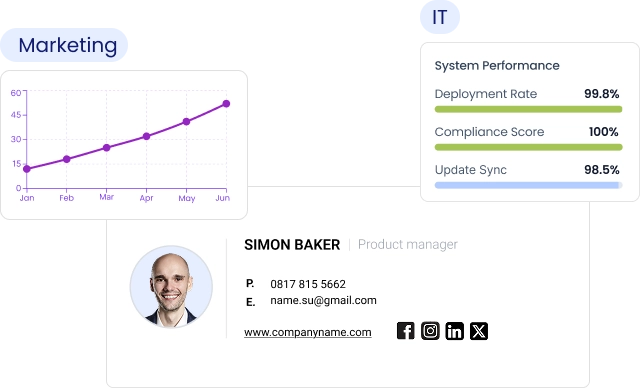
Short answer
Who should own email signatures: Marketing or IT?
Marketing owns:
- Design standards, templates, and signature content
- Campaign banners, CTAs, and trackable links
- Day-to-day updates, without IT involvement
IT owns:
- Deployment into Microsoft 365, Google Workspace, or Exchange
- Security controls, RBAC, SSO/SCIM, and compliance enforcement
- Directory integration, provisioning, and audit logs
The cost of inaction
Why leaving email signature ownership unresolved quietly costs your brand
Email signature ownership left undefined defaults to 1 of 2 bad outcomes.
IT ends up playing brand manager on a Microsoft 365 or Google Workspace system they shouldn’t own. Or Marketing makes changes they can’t correctly deploy.
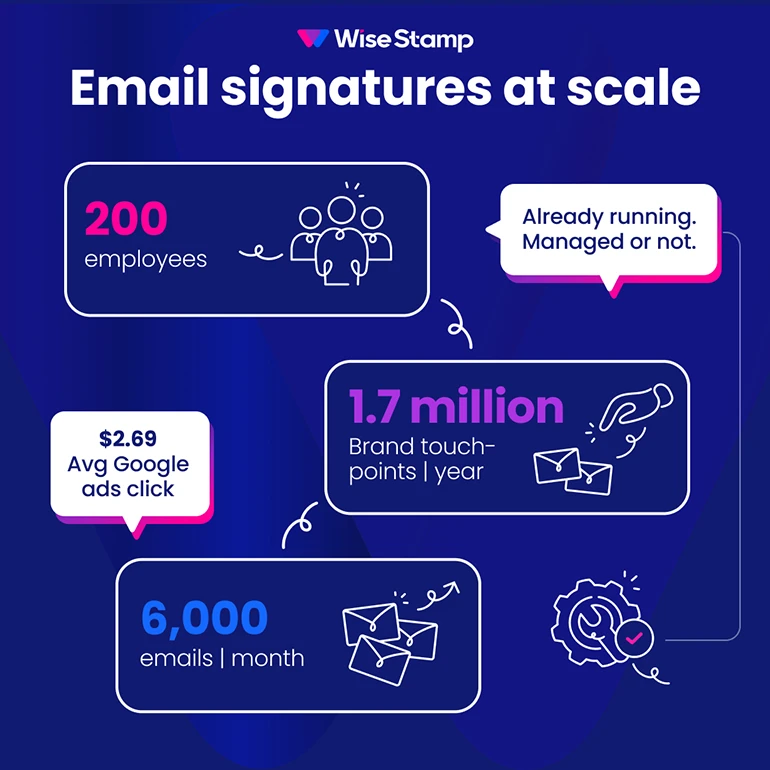
A 200-person company sends more than 6,600 emails per day. That’s roughly 1.7 million brand touchpoints per year (WiseStamp ESM Guide).
Too much volume to leave to chance.
An IT professional in a community thread described it well.
“Marketing wanted control over branding, IT had to implement it, and nobody wanted to own the manual work”.
That sentence describes half the email signature programs I’ve seen. It also explains why so many of them fail.
Marketing’s stake
What email signatures actually represent for Marketing
Email signatures are a brand channel – one that’s already running at massive scale, whether Marketing is managing it or not.
The math is hard to ignore. A 200-person company sends 6,600 emails per day. That’s 1.7 million brand touchpoints annually (WiseStamp internal user survey Jan 2026).
Everyone carries a signature that either reinforces the brand or quietly dilutes it.
The average Google Ads click costs $2.69 (Mailchimp benchmark data). Managed well, those impressions convert at scale without the ad spend.
Michael Yehoshua, CMO of WiseStamp, put it clearly.
“Buyers now live in the inbox. Every employee signature is media – whether you manage it or not”.
Marketing’s specific stakes here are 4:
- Brand consistency across every employee’s outgoing email, regardless of department, region, or device
- Campaign reach through signature banners, CTAs, and trackable links embedded in every email sent company-wide
- Speed – the ability to update a template for a rebrand or product launch without waiting in an IT queue
- Measurement – knowing whether signature campaigns are driving clicks, registrations, or pipeline
None of these are achievable when Marketing has to file a ticket for every change.
The ownership model has to reflect this. Marketing can’t own an outcome they can’t control.
IT’s stake
What IT needs to control in company-wide email signatures
IT’s position is equally legitimate. Email signatures touch core infrastructure:
- Mail flow
- Employee directory
- Device management
- Compliance records
Deployment at scale across Microsoft 365, Google Workspace, Exchange, or hybrid environments requires IT’s involvement.
Signatures must render correctly across Outlook desktop, web, iOS, Android, and Apple Mail. That’s an infrastructure problem, not a design decision.
Directory integration with Microsoft Entra ID or Google Directory keeps employee data current without manual entry.
New employee joins. Title changes. Someone leaves. IT’s job is to make the signature system reflect that automatically.
Security and governance covers:
- RBAC (role-based access control)
- SSO with providers like Okta
- SCIM for automated provisioning
- Audit logs
For organizations subject to SOC 2, ISO 27001, HIPAA, or GDPR, these arenât optional.
Low ticket load is the goal. IT sets the system up once. Then it runs.
An IT administrator in a community discussion said it well.
“Design is Marketing… content requirements is HR… but enforcing and standardizing it across a large organization automatically, that’s IT”.
That’s the right framing. IT owns the enforcement mechanism. Not the content decisions.
Ownership split
How to split email signature responsibilities between Marketing and IT
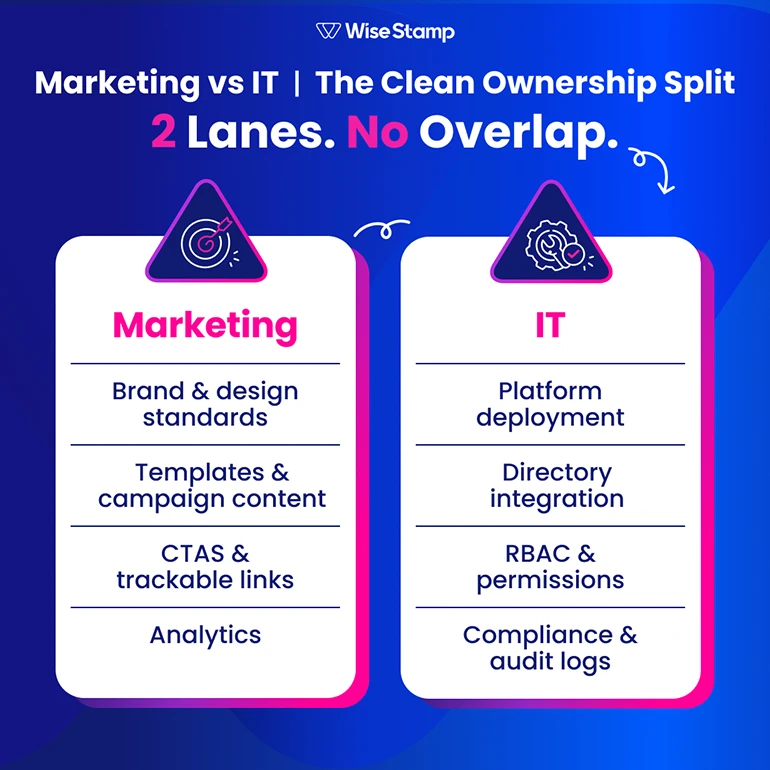
Email signature responsibilities aren’t a 50/50 share of the same job. The split is a clean handoff at a defined boundary.
Marketing controls the message. IT controls the infrastructure and guardrails.
| Responsibility | Owner | Rationale |
|---|---|---|
| Brand and design standards | Marketing | Brand decisions belong to brand owners |
| Signature template design and updates | Marketing | Requires design expertise and campaign agility |
| Campaign content, banners, and CTAs | Marketing | Tied to marketing calendar and goals |
| Trackable links and analytics | Marketing | Campaign performance is Marketing’s metric |
| Legal disclaimers and compliance text | IT (with Legal) | Compliance requires policy control, not design freedom |
| Platform deployment and mail flow | IT | Infrastructure and security ownership |
| Directory integration (Entra ID, Google) | IT | System access and data governance |
| RBAC, permissions, and locked fields | IT | Defines what Marketing can and cannot change |
| SSO, SCIM, and audit logs | IT | Enterprise governance and security review |
| Employee personal detail updates | Employees (within IT-defined guardrails) | Reduces tickets without losing brand control |
The line is clean once you see it. Marketing operates freely inside a defined space. IT defines and maintains that space.
Employees handle approved personal details – name, title, mobile number… within limits IT has set. Nobody crosses into the other team’s lane.
Day-to-day management
Who handles day-to-day email signature updates, and how?
Day-to-day management belongs to Marketing. With 1 important condition: they need a platform that lets them operate independently.
In practice, Marketing can publish a new campaign banner without filing a ticket.
They can update a template and see it propagate to every assigned employee instantly. Analytics (clicks, CTR by campaign) are available without requesting a data export.
IT’s involvement after initial setup should be close to zero.
Directory sync with Microsoft Entra ID or Google Directory handles employee data automatically. RBAC prevents brand drift without IT policing individual changes.
New employees receive properly configured signatures on day 1 through provisioning. Offboarding removes access through the same integration. No tickets either way.
One of WiseStamp’s enterprise clients described the steady state during a product call.
“They don’t even have to think about it. As soon as their email gets installed, they already have a signature”.
Thatâs the right outcome. The platform is managing it. Both Marketing AND IT are off the hook.
Note: WiseStamp’s Employee Hub lets employees directly update approved personal details, such as headshot, mobile number, and pronouns.
No IT ticket. Nothing Marketing has locked gets touched. This alone eliminates a significant portion of signature-related support requests.
What breaks without structure
What happens when email signature ownership isn’t clearly defined or supported
Email signature ownership, even when formally assigned, doesn’t hold without the right platform. 3 failure modes recur in practice.
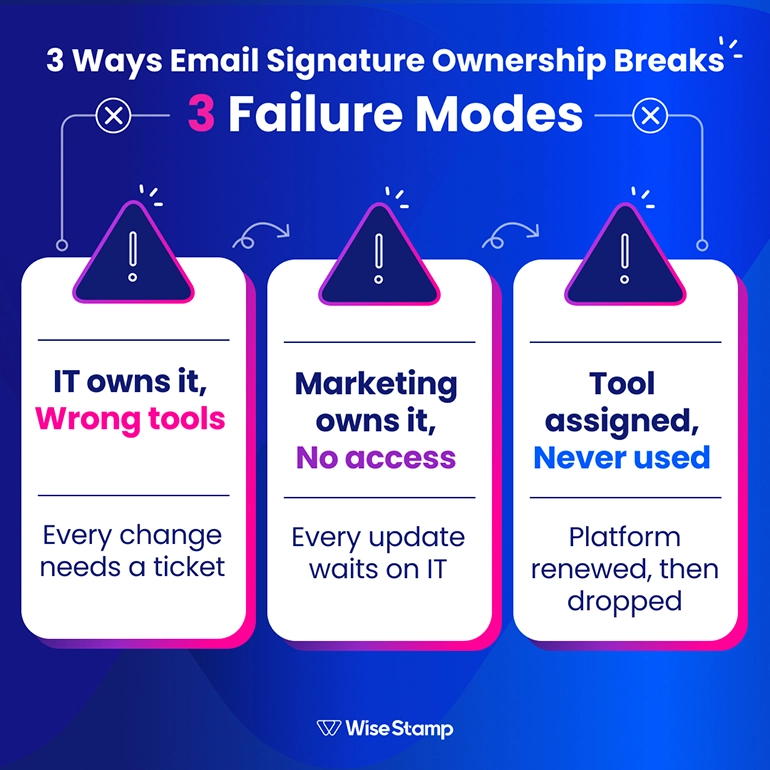
IT owns it without the right tools
Every logo swap, title update, and campaign banner requires IT intervention.
The queue grows. Marketing waits. Brand consistency suffers because changes pile up or get skipped entirely.
I came across an IT admin in a community thread who put the endpoint plainly.
“Without automation, we would have to hire someone just to do email signatures”.
That’s not a resourcing request. That’s what a broken email signature program looks like from the inside.
Marketing owns it without actual access
Marketing has nominal ownership but no way to act on it.
Every template change goes through IT. Campaigns are delayed. Rebrands take weeks.
The relationship between the 2 teams deteriorates. Marketing is constantly waiting on someone else for something that should be in their control.
Ownership is assigned but the tool isn’t used
This is the most common failure mode.
An IT professional in a community review said it in 2 sentences.
“Marketing bought the tool but never maintained it. IT ended up owning a system nobody used properly”.
The tool gets renewed once, then dropped. Marketing asks about signature management roughly once a year. When IT asks if they’re ready to actively maintain it, the conversation ends fast.
The platform determines whether the ownership model actually holds.
Assign all the responsibility you want. If the tool doesnât support the split, the split doesnât survive.
Bridging Marketing & IT
How WiseStamp makes the Marketing-IT split work without constant friction
WiseStamp was built for this structure. IT connects it once. Marketing runs it after that.
ITâs setup covers:
- Google Workspace or Microsoft 365 integration
- Microsoft Entra ID or Google Directory sync
- SSO with Okta
- SCIM provisioning
- RBAC to define what Marketing can and canât change
WiseStamp holds SOC 2 and ISO 27001 certifications.
The platform reads employee data but never stores or accesses email content. That privacy-first architecture passes enterprise security review without a lengthy back-and-forth.
Marketingâs controls live inside those guardrails:
- The Studio Editor for building templates
- Signature campaigns with banners and trackable CTAs
- Click analytics
- AI-powered surveys embedded directly in signatures
The Employee Hub sits between the 2 teams. Employees update approved personal details (headshot, mobile number, pronouns) directly, without creating a ticket.
Marketing doesnât have to manage hundreds of individual records. It doesn’t have to field the requests.
I spoke with Jane Mao, Marketing Consultant at Avenues Real Estate, about what this looks like for her team.
“It’s a really good way to have consistency for branding purposes, but it also has the flexibility, so that managers can still promote their own listings”.
That balance between brand control and individual flexibility is what makes the ownership model work in practice.
Michael Yehoshua, CMO of WiseStamp, describes what the platform actually is.
“WiseStamp sits at the intersection of IT governance and marketing execution – bridging the two without any dodgy gaps”.
That’s the positioning. Not IT-first, not Marketing-first. The whole point is that neither team has to compromise to use it.
That’s the model. Not IT versus Marketing. Not shared ambiguity. 1 platform, 2 clear lanes, no ticket queues for routine updates.
Verdict
Email signature ownership belongs to both teams – in different lanes
- Marketing owns the brand layer: everything from template design to campaign execution.
- IT owns the technical layer: deployment, directory integration, and compliance enforcement.
Day-to-day management belongs to Marketing when the platform gives them direct access without requiring IT’s time for every change.
The right platform is the difference between an organizational argument that restarts every year and a system that runs itself.
To find the right setup for your org – get advice from a professional