How to Choose Email Signature Management Software (IT Guide)
Deployment model, SCIM provisioning, audit logs, and RBAC - criteria IT uses to shortlist vendors and stay out of the loop after rollout.

Short answer
What should IT look for in email signature management software?
Email signature management software should deploy via API with no MX changes, provision users automatically via Microsoft Entra ID, Okta, or Google Workspace, and enforce brand policy through locked fields and RBAC. IT configures it once. Marketing runs it from there.
IT problem
Why email signature management keeps ending up on IT’s desk
Email signature management starts as a marketing problem. Marketing decides the org needs consistent signatures. IT implements the system. Marketing moves on to the next initiative. IT fields the tickets for the next 3 years.
One IT manager put it plainly in a forum I came across: “Marketing wanted control over branding, IT had to implement it, and nobody wanted to own the manual work.”
The overhead compounds with headcount. IT teams managing signatures manually report spending up to 45 minutes per user on individual updates (WiseStamp VoC analysis, 2025). At scale, that’s a substantial hidden cost.
The criteria below are written for IT: what to evaluate, what to watch for, and how to pick a tool that removes you from the day-to-day rather than adding another system to babysit.
Deployment model
What deployment model causes the least disruption to your mail flow?
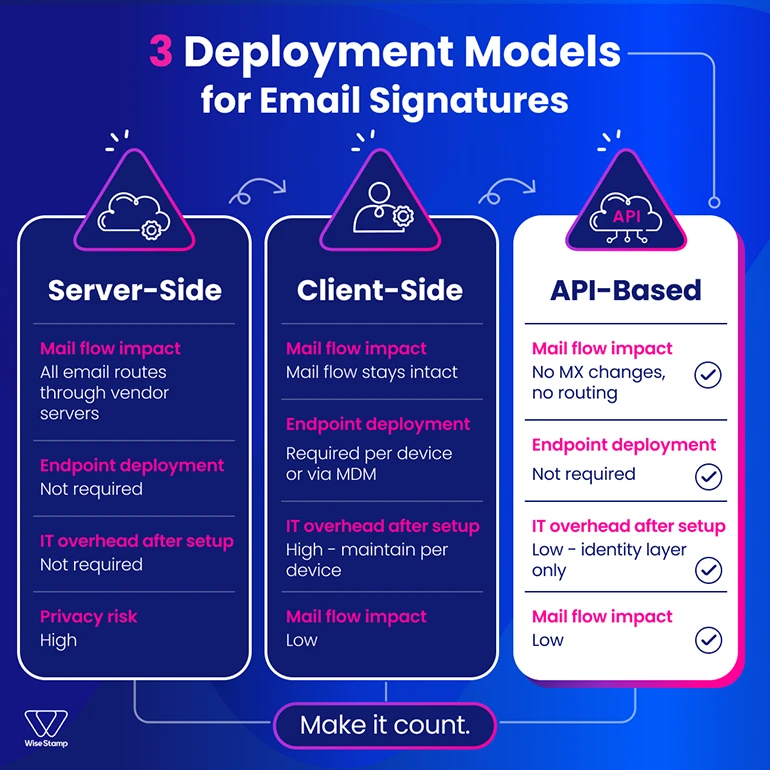
3 deployment models exist for email signature management software. Your choice has significant infrastructure implications before you evaluate anything else.
| API-based | Server-side | Client-side | |
|---|---|---|---|
| How signatures insert | Connects directly to Microsoft 365 or Google Workspace via API; no mail routing | Routes all outbound email through vendor servers; signature appended before delivery | Plugin in Outlook or Gmail injects signature at compose time |
| Mail flow impact | No MX changes, no connectors, no transport rules | Full dependency on vendor infrastructure; downtime affects delivery | Mail flow stays intact |
| Endpoint deployment | Not required | Not required | Required per device or via MDM |
| Privacy risk | Low | High — email passes through vendor servers | Low |
| IT overhead after setup | Low — connects at identity layer, not mail layer | Low setup, ongoing risk management | High — endpoint agents require per-device maintenance |
API-based deployment is the lowest-disruption option for cloud-first environments. No transport rules to configure, no connector changes, and no vendor infrastructure sitting in your outbound mail path.
Ask any vendor directly before shortlisting: do any emails pass through your servers? Get a data-flow diagram. Vendors who hesitate on this question are telling you something useful.
WiseStamp uses native API integration with Microsoft 365 and Google Workspace. No MX changes required. No email content is accessed or stored.
Provisioning
How does SSO and SCIM provisioning eliminate ongoing signature maintenance?
Manual user provisioning is the fastest way to turn a signature rollout into a permanent IT commitment. Every new hire, role change, and offboarding becomes a manual task. At 500 employees, it’s manageable. At 2,000 it isn’t.
SSO and SCIM provisioning remove this burden. Users are added, updated, and removed automatically based on changes in Microsoft Entra ID, Okta, or Google Workspace. The right signature appears on the first email a new hire sends, with no IT action required.
If a vendor doesn’t support SCIM, treat it as a maintenance commitment that compounds with every hire. That’s the only honest framing.
Avi Drucker, CIO at Sela Cloud, described the experience after WiseStamp setup: “We just had to configure WiseStamp one time. After that, each user has been synced automatically. It works like a charm.”
Security certifications
What security certifications should IT require from any signature management vendor?
Security certifications for email signature management vendors should cover 4 areas at minimum.
| Certification | What it confirms | Required when |
|---|---|---|
| SOC 2 Type II | Independent audit of security controls over time | Always — baseline for enterprise vendor review |
| ISO 27001 | Certified information security management system | Always — signals a mature, audited security program |
| GDPR compliance | EU data protection obligations and DPA availability | EU employee data or any EU operations |
| HIPAA readiness | PHI protections and appropriate data handling controls | Healthcare orgs or any processing of protected health information |
One question cuts through most vendor security reviews: does this tool access or process email content to apply signatures? Server-side architectures that read email bodies to append signatures introduce a data handling exposure worth clarifying in the DPA before you sign.
WiseStamp’s architecture is privacy-first. Signatures apply without reading, storing, or accessing email content. SOC 2 Type II attestation and ISO 27001 certificate are available on request.
Cross-client compatibility
How do email signatures render differently across Outlook, Gmail, and Apple Mail?
Email clients don’t render HTML uniformly. Outlook desktop, Outlook Web (OWA), Gmail, Apple Mail, and native iOS and Android mail apps each handle HTML differently. A signature that renders correctly in Gmail on Chrome will often break in Outlook desktop or disappear entirely on an iPhone.
Over 60% of email is opened on mobile (Litmus Email Analytics, 2024). A signature that breaks on mobile isn’t just a design inconvenience. It generates a predictable stream of user tickets.
Request a live demo across at least these 4 environments:
- Outlook desktop (Windows and Mac)
- Outlook Web (OWA)
- Gmail web and mobile
- iOS and Android native mail apps
One IT manager described a previous solution as something that “worked 90% of the time” but resulted in doubled signatures and a steady stream of support tickets. Cross-client rendering is a required demo item, not a vendor assumption.
Policy enforcement
How do locked fields and RBAC protect brand standards after rollout?
Locked fields and RBAC are where most signature programs quietly fail after initial rollout. Everything looks correct at launch. Within 6 months, employees have edited logos, changed fonts, and added personal disclaimers. Brand drift is slow, invisible, and expensive to remediate at scale.
The governance layer that prevents this combines 3 controls: locked fields that prevent employees from editing brand elements, role-based access control (RBAC) that separates what marketing can change from what compliance owns, and audit logs that produce a timestamped change history for any review.
WiseStamp enforces this split at the field level:
| Signature element | Controlled by |
|---|---|
| Logo, brand colors, legal disclaimers | Admin (locked) |
| Campaign banners | Marketing team |
| Phone number, pronouns, headshot | Employee via Employee Hub |
Audit logs are the underrated half of this setup. When a compliance review asks who changed the legal disclaimer and when, having that record is what separates a governance platform from a deployment tool.
Employee self-serve
How does employee self-serve reduce IT ticket volume without losing brand control?
Employee self-serve in signature management directly determines IT ticket volume. Phone number updates, title corrections, LinkedIn URL changes — without a self-serve layer, every one of those is a ticket.
WiseStamp’s Employee Hub gives employees a freedom-with-guardrails model. They update only the fields the admin has unlocked. Brand elements stay locked. Legal disclaimers stay locked. IT fields fewer tickets without giving up governance.
One enterprise customer described it after going live: “As soon as their email gets installed, they already have a signature. I love it.”
The outcome is exactly right for IT: own the configuration, not the maintenance.
Marketing handoff
How should IT hand off email signature management to marketing?
IT is not the right long-term owner of email signatures. Marketing is. If every campaign banner change or new template requires an IT ticket, you’ve created a permanent dependency nobody agreed to.
Evaluate 2 things during your vendor review: can a marketing manager launch a new banner without opening a ticket? Can they build or edit a template without writing HTML?
If marketing can’t run the system day-to-day, they’ll stop using it. Then you own it by default — which is exactly where you started.
WiseStamp’s Studio Editor is built for non-technical users: drag-and-drop editing, AI-assisted template creation, and a guided interface that doesn’t require IT involvement after initial setup. Marketing runs campaigns, updates templates, and rotates banners independently.
Before signing anything, run it through our technical review checklist before you buy.
Vendor questions
What questions should IT ask email signature vendors before shortlisting?
Vendor questions worth asking before any demo:
- Does any email pass through your servers? Can you provide a data-flow diagram?
- Which identity providers do you support for SSO and SCIM?
- Can you provide your SOC 2 Type II attestation, ISO 27001 certificate, and a DPA?
- How are locked fields and RBAC configured across different admin roles?
- What does a non-technical marketing user see in the admin panel day-to-day?
- What happens to email delivery if your service has downtime?
- Can you demonstrate signatures rendering in Outlook desktop, OWA, and mobile during the live demo?
Vendors with strong answers have documentation ready and show the data-flow diagram without being asked twice. Vendors who struggle with these questions are telling you something.
Red flags
What red flags should IT watch for when evaluating email signature software?
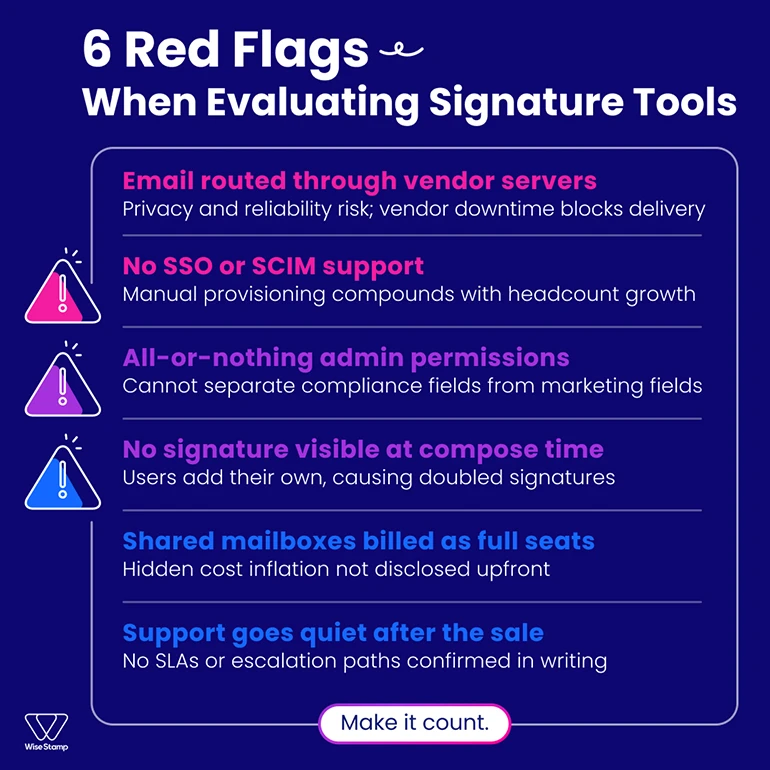
Red flags in vendor evaluation map directly to operational risk. Each one below is worth treating as a potential disqualifier.
| Red flag | Why it matters |
|---|---|
| All email routed through vendor servers | Vendor downtime affects your email delivery. Get the data-flow diagram confirming outbound mail doesn’t touch their infrastructure. |
| No SSO or SCIM support | Manual provisioning compounds with headcount. Unsustainable past 500 users. |
| All-or-nothing admin permissions | Marketing can’t be separated from compliance fields. Not enterprise-ready. |
| No compose-time signature preview | Users add their own signatures on top of the deployed one. Doubled signatures and a permanent ticket queue. |
| Shared mailboxes billed at full seat rate | Several vendors don’t disclose this upfront. Clarify seat definitions before signing. |
| No SLA documentation | Email infrastructure is invisible until it breaks. Confirm SLAs and first-response commitments in writing before you commit. |
Conclusion
Email signature management software done right removes IT from day-to-day operations entirely. It provisions users through Microsoft Entra ID, Okta, or Google Workspace automatically, enforces brand policy through locked fields and RBAC, renders consistently across Outlook, Gmail, Apple Mail, and mobile, and hands ongoing control to marketing.
Start with the deployment architecture question. It narrows the field quickly, and the answer tells you more about how seriously a vendor has thought about your environment than any feature list will.
Schedule a security review with WiseStamp