ADA Compliant Email Signatures: Requirements and Enforcement
A practical guide to ADA compliant email signatures: the 5 WCAG 2.1 criteria that apply, how to test them, and how to enforce them across your organization.
Short answer
What makes an email signature ADA compliant?
An ADA compliant email signature meets WCAG 2.1 Level AA standards. All non-decorative images must include descriptive alt text. Text must achieve a minimum 4.5:1 contrast ratio against its background.
Links need descriptive anchor text rather than generic labels. Animated elements must not flash more than 3 times per second.
Ada Compliance Risk
The legal cost of inaccessible email signatures compounds with every message sent
Email signatures are business communications under the law.
ADA Title III and Section 508 of the Rehabilitation Act both require organizations to make digital communications accessible to people with disabilities.
A 500-person company sends roughly 250,000 emails per month. Each one carries a signature.
If those signatures fail WCAG 2.1 Level AA criteria, that’s 250,000 monthly accessibility failures delivered directly to clients, prospects, and partners.
The exposure compounds with every send.
Ada And Wcag Standards
Which ADA and WCAG standards govern email signature accessibility?
Email signature accessibility sits within 2 overlapping regulatory frameworks:
- ADA Title III: Requires that places of public accommodation — including digital communications — be accessible to people with disabilities. Private employers with 15 or more employees are covered.
- Section 508: Requires federal agencies and contractors to make all electronic communications, including email, conform to WCAG 2.1 Level AA. The DOJ’s 2024 final rule codified this standard for state and local government entities as well.
WCAG 2.1, published by the W3C, organizes accessibility requirements under 4 principles: Perceivable, Operable, Understandable, and Robust — the POUR framework.
For email signatures specifically, 5 success criteria carry the most practical weight:
- Alt text on images
- Color contrast
- Text sizing
- Link purpose
- Animation control
Image Alt Text Requirement
What alt text does an ADA compliant email signature require on images?
Alt text is required for every non-decorative image under WCAG 2.1 Success Criterion 1.1.1 (Non-text Content). In a typical email signature, that includes:
- Company logos
- Employee headshots or profile photos
- Promotional or campaign banners
- Social media icons that function as links
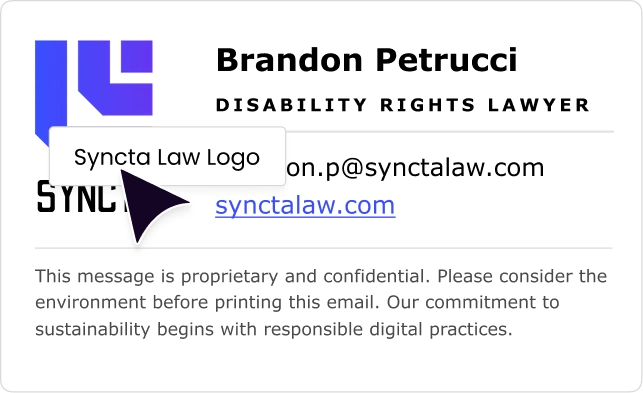
Alt text must communicate the image’s purpose, not its visual appearance. “Acme Corp logo” is correct. “Blue square with rounded corners” is not.
Purely decorative images that carry no information should use an empty alt attribute (`alt=””`). This signals to screen readers — JAWS, NVDA, and Apple VoiceOver — to skip the element without announcing it.
The most common failure: a campaign banner with promotional text embedded in the image, but no alt attribute. Screen reader users receive nothing. The message is invisible to them.
When signature templates are managed centrally, alt text is set once at the template level and propagates to every employee’s signature automatically. No individual employee can accidentally delete it.
Color Contrast Requirements
What color contrast ratio does an ADA compliant email signature require?
WCAG 2.1 Success Criterion 1.4.3 (Contrast Minimum, Level AA) sets 2 thresholds:
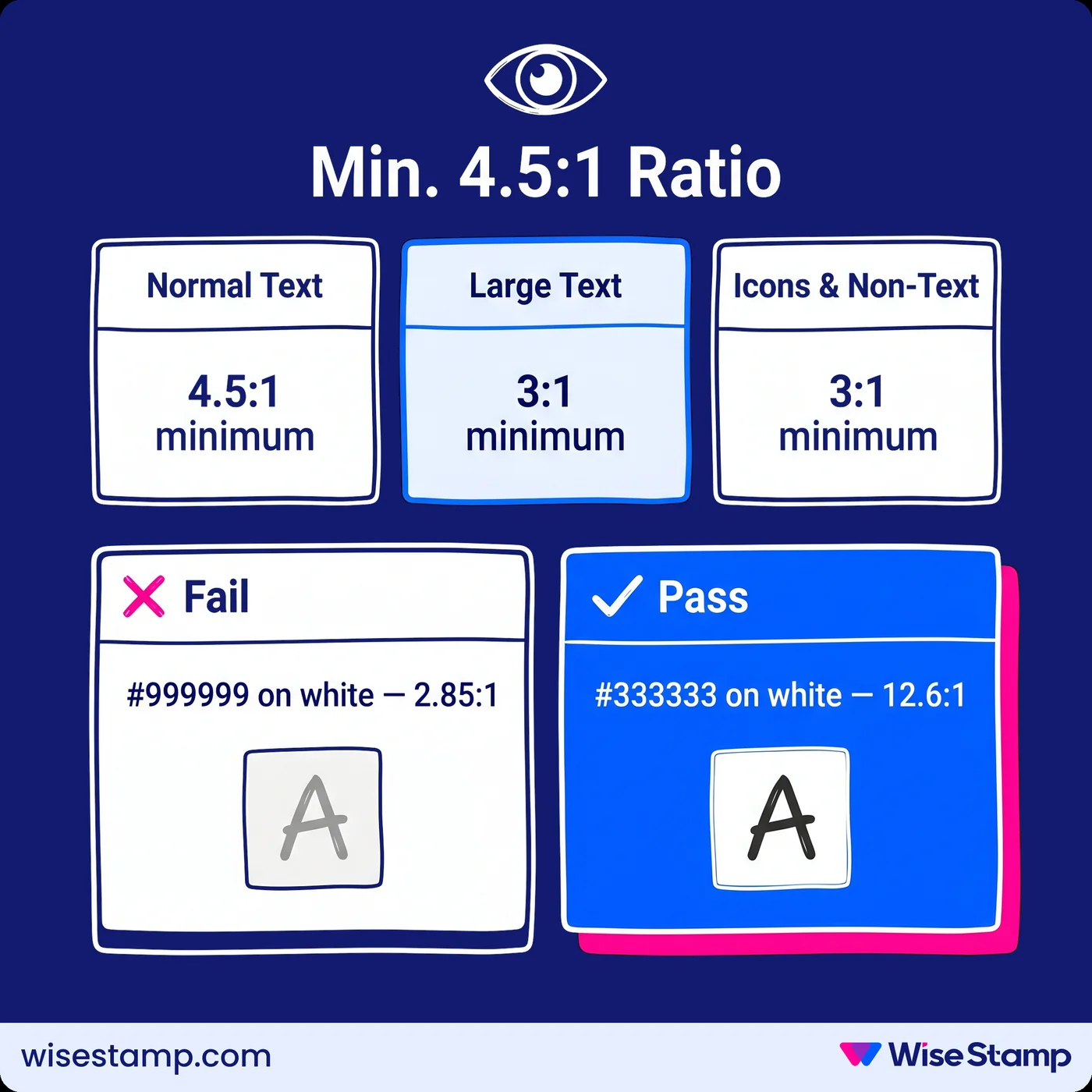
- Normal text (below 18px, or below 14px bold): minimum 4.5:1 contrast ratio against background
- Large text (18px or larger, or 14px bold and above): minimum 3:1 contrast ratio
- Non-text elements such as social media icons and UI components: minimum 3:1
A common failure: light gray body text (#999999) on white (#FFFFFF) achieves a 2.85:1 ratio — a WCAG Level AA failure.
Dark gray (#333333) on white achieves 12.6:1 — fully compliant.
Tools for validation: WebAIM’s Contrast Checker, TPGi’s Color Contrast Analyzer, and Deque Systems’ axe DevTools all calculate ratios from hex color values.
One dimension IT admins often miss is dark mode rendering.
A signature with white text on a transparent background may look fine in light mode.
In dark mode, the same signature can become invisible when an email client switches the background to dark gray.
Preview tools that simulate both light and dark mode rendering catch this before any signature reaches an inbox.
Font And Text Sizing
What font and text size requirements apply to ADA compliant email signatures?
WCAG 2.1 doesn’t set a hard minimum pixel size, but 2 success criteria create practical constraints for email signature HTML:
- WCAG 1.4.4 (Resize Text, Level AA): Text must remain readable when the user increases font size by 200%. Signatures with hard-coded HTML font sizes that override email client preferences may fail in compliant viewing environments.
- WCAG 1.4.12 (Text Spacing, Level AA): Content must not lose readability when users adjust line height, letter spacing, or word spacing. Densely structured HTML tables, common in email signature markup, are a known failure point here.
14px is the practical minimum for normal signature text.
16px is safer for body copy and secondary contact information.
Sans-serif typefaces — Arial, Helvetica, Verdana, Calibri — render more legibly at small sizes than serif alternatives.
They’re universally safe across Outlook, Gmail, and Apple Mail without requiring font embedding.
Link Text Requirements
How do email signature links need to be structured for WCAG compliance?
WCAG 2.1 Success Criterion 2.4.4 (Link Purpose, Level AA) requires that each link’s purpose is clear from the anchor text alone.
If the anchor text alone is unclear, the surrounding context must make the purpose evident.
Email signatures commonly fail this criterion in 3 patterns:
- A linked URL written out as `www.company.com`
- Anchor text reading “Click here,” “Visit us,” or “Learn more”
- A linked image with no alt text
Compliant approaches:
- “Visit Acme Corp’s website”
- “Connect on LinkedIn”
- A company logo image with `alt=”Acme Corp logo”`, linked to the homepage
Screen reader users navigating by links hear each anchor text in isolation, out of document context. “Click here” provides no information. “Download the 2025 security assessment” does.
A typical email signature contains 4-6 links: website, LinkedIn, email address, phone, and scheduling link. WCAG 2.4.4 applies to every one of them.
Animation And Banner Requirements
What WCAG rules apply to animated GIFs and rotating banners in email signatures?
Animated content in email signatures is governed by 2 WCAG 2.1 criteria:
- WCAG 2.3.1 (Three Flashes or Below Threshold, Level A): Content must not flash more than 3 times per second. GIF animations with rapid flash cycles can trigger photosensitive seizures in users with photosensitive epilepsy. This is a Level A requirement — the baseline floor of WCAG conformance.
- WCAG 2.2.2 (Pause, Stop, Hide, Level AA): Moving content that plays for more than 5 seconds must be pausable or stoppable by the user.
Email clients don’t support the interactive controls (buttons, scripts) that would allow users to pause a GIF.
The practical WCAG path for animated signature banners: a single-pass animation that completes in under 5 seconds.
Flash rate must stay below 3 cycles per second, with no indefinite loop.
Most email accessibility guidance recommends avoiding auto-looping GIFs in signatures entirely.
Auditing For Wcag Compliance
How do IT admins test email signatures for WCAG 2.1 compliance?
Testing an email signature requires both automated scanning and manual validation:
| Method | Tool | What it catches |
|---|---|---|
| Contrast ratio check | WebAIM Contrast Checker, TPGi Color Contrast Analyzer | Color failures in text and non-text elements |
| HTML accessibility scan | Deque Systems axe DevTools, WAVE (WebAIM) | Missing alt text, malformed link text, semantic structure issues |
| Screen reader test | JAWS (Windows), NVDA (Windows), Apple VoiceOver (macOS/iOS) | Reading order, link text quality, image announcement behavior |
| Dark mode rendering | Email client dark mode preview | Contrast failures under dark mode conditions |
Automated tools catch the majority of WCAG failures at the code level.
Screen reader testing reveals how a user actually experiences the signature — which is the only test that matters in the end.
Enforcing Compliance At Scale
How do organizations enforce ADA compliant email signatures across hundreds of employees?
Designing a compliant template is straightforward. Keeping it compliant after it’s in employees’ hands is where most organizations fail.
When employees install signatures manually, every act of copying is a chance for the accessibility markup to break.
They’re copying HTML from a shared document into Outlook or Gmail. Alt text disappears. Colors get altered. Link text gets retyped.
One IT operations contact put the overhead plainly:
IT definitely spends close to 30 to 45 minutes on a call with these people, with each person.
That’s the cost of a compliance model that depends on individual behavior.
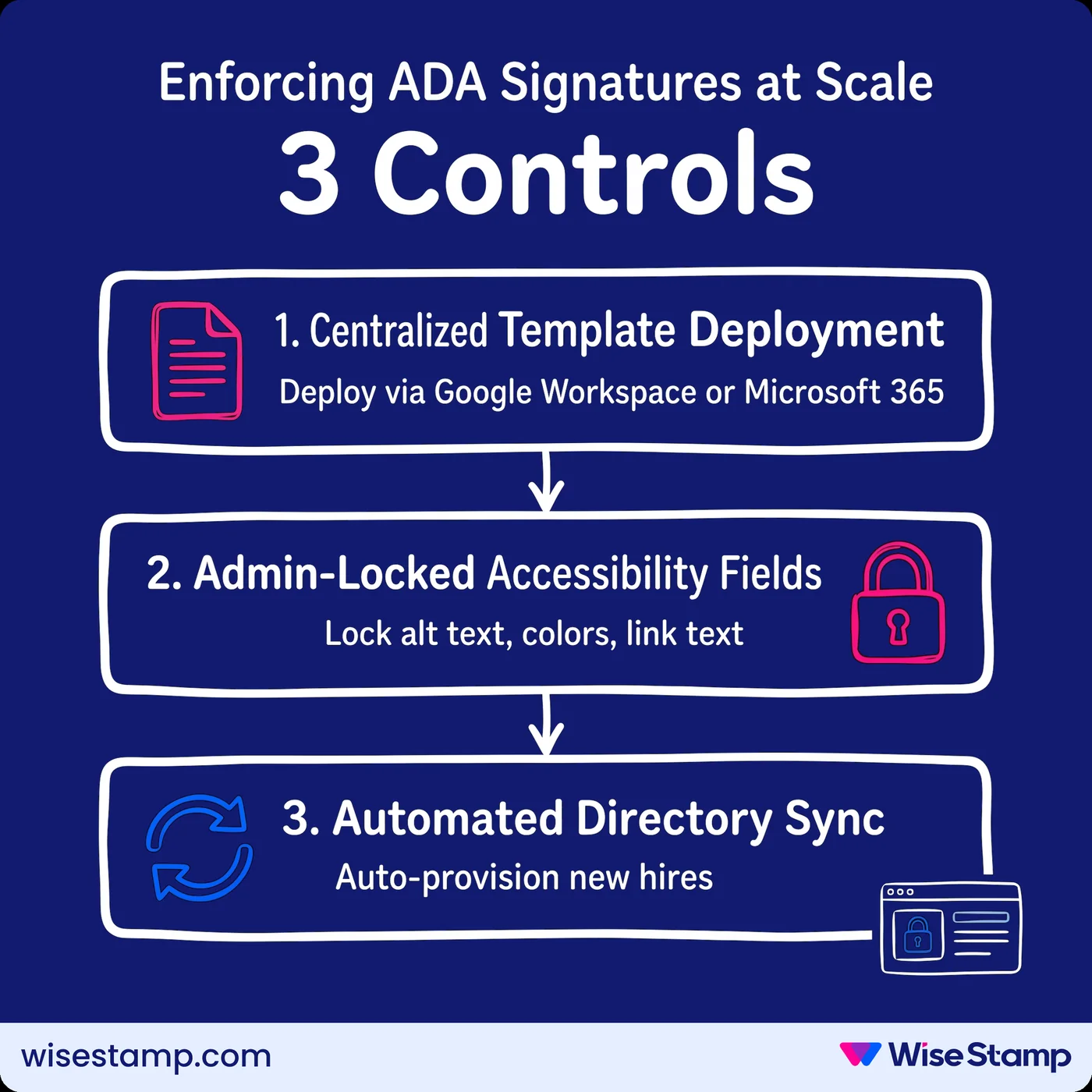
Enforcing ADA compliant signatures at scale requires 3 technical controls:
- Centralized template deployment: push the template through Google Workspace or Microsoft 365 rather than distributing a file for employees to install
- Admin-locked accessibility fields: prevent employees from modifying alt text values, color settings, link anchor text, or any other WCAG-critical element
- Automated directory sync: keep employee data current so no placeholder text ever appears where a real name, title, or photo should be
WiseStamp handles all 3. Admins build templates in the Studio editor and apply role-based access control (RBAC) to lock compliance-critical elements.
Deployment happens server-side through Google Workspace or Microsoft 365 integration.
Employees access their signature through the Employee Hub. They can update permitted personal details — phone number, headshot — but the accessibility architecture is locked.
The outcome: the WCAG-compliant template is what every email recipient receives, from every employee, from every device.
Takeaway
What does ADA compliance in email signatures require?
ADA compliant email signatures meet WCAG 2.1 Level AA across 5 criteria.
Descriptive alt text on all non-decorative images. A minimum 4.5:1 contrast ratio for normal text. Minimum 14px font rendering with support for user resize.
Descriptive link anchor text that makes sense out of context. And animation controls that prevent flashing above 3 cycles per second.
Designing a single compliant signature is achievable in an afternoon.
Enforcing that compliance across hundreds of employees is a different challenge. Every device, every email client, every new hire — without centralized template deployment and admin-locked accessibility elements, compliance depends entirely on individual behavior.
Get expert advice on enforcing compliant signature templates at scale