Email Signature Compliance for Education Institutions (Checklist)
Get a vetting checklist for email signature vendors for your school or university with compliance requirements, including FERPA, ADA Title II, and WCAG 2.1

Short answer
What are the email signature compliance requirements for education institutions?
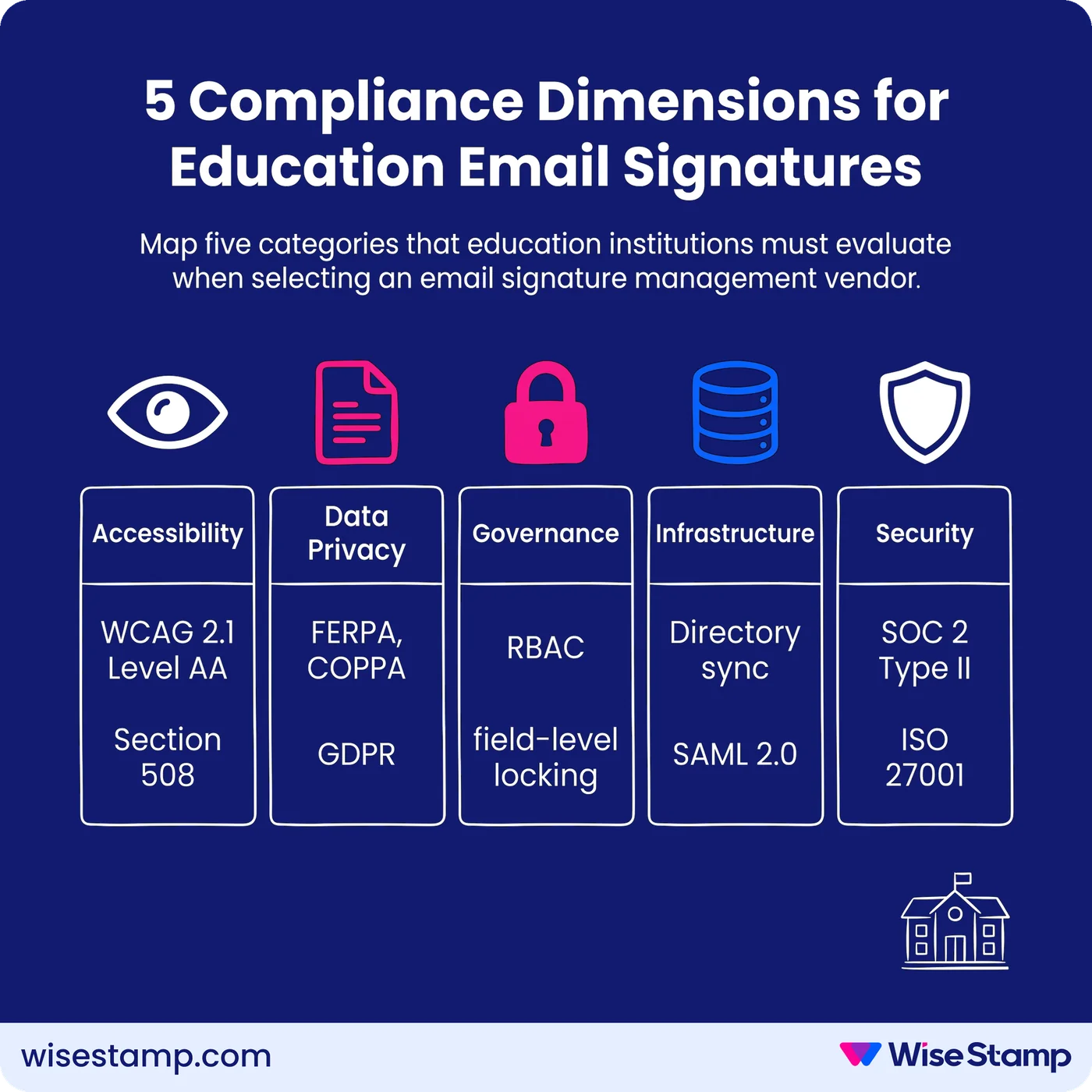
Education institutions require vendors to satisfy:
- WCAG 2.1 Level AA (ADA Title II)
- FERPA and COPPA data privacy rules
- SOC 2 Type II or ISO 27001 certification
- SAML 2.0 SSO
- Role-based access controls (RBAC) for department-level governance
- Real-time directory sync with Microsoft Entra ID or Google Workspace.
Compliance Risk
Why treating email signatures as a low-stakes IT configuration poses significant risk
Education institutions that leave email signatures unmanaged carry regulatory exposure across 3 distinct compliance frameworks simultaneously.
A single non-compliant signature can trigger FERPA violations, including loss of federal funding, ADA Title II enforcement, or COPPA liability.
That risk applies to any staff member who collects payments, handles student records, or communicates with families.
The DOJ’s 2024 final rule sets a hard deadline: WCAG 2.1 Level AA compliance by April 26, 2027.
Accessibility Compliance
What accessibility standards apply to email signatures in education institutions?
WCAG 2.1 Level AA is the mandatory accessibility standard for educational institutions under the U.S. Department of Justice’s 2024 final rule implementing ADA Title II.
All institutional digital communications, including email signatures, must meet this standard.
The deadline is April 26, 2027 for institutions serving populations over 50,000.
Smaller districts and colleges have until April 26, 2028 (U.S. Department of Justice, 2024).
Email signatures trigger specific requirements under Section 508 of the Rehabilitation Act, administered by the U.S. General Services Administration (GSA).
Vendor-generated signatures must include alt text for all images and logos and maintain a minimum contrast ratio of 4.5:1.
Fonts must render at 12pt or larger, and bare URLs or generic “click here” anchors must be replaced with descriptive link text.
Ask any vendor for a completed VPAT (Voluntary Product Accessibility Template) conforming to WCAG 2.1 Level AA.
The Consortium for School Networking (CoSN), the professional association for K–12 ed-tech procurement, requires VPAT documentation as part of its vendor vetting framework.
A vendor unable to produce a current VPAT should not progress past initial screening.
Data Privacy
Which data privacy laws govern email signature vendors in education?
FERPA (Family Educational Rights and Privacy Act) applies to any vendor that processes, stores, or transmits data connected to institutional records.
Email signature platforms that sync with directory systems become data sub-processors under FERPA, pulling faculty titles, department names, or employee IDs.
Vendors must offer a signed Data Processing Agreement (DPA) and must not use institutional data for model training, analytics, or any secondary purpose.
COPPA (Children’s Online Privacy Protection Act) applies to K–12 vendors collecting or processing data from students under 13.
Even indirect data collection through tracking pixels embedded in email signatures can trigger COPPA liability.
Require vendors to confirm in writing that no tracking pixels, analytics scripts, or external beacon calls are embedded in signatures delivered in K–12 environments.
GDPR applies if the institution enrolls EU-based international students.
Vendors must offer EU data residency options, standard contractual clauses (SCCs), and confirm appointment of a Data Protection Officer (DPO).
Higher education institutions with significant international enrollment face dual FERPA-GDPR obligations simultaneously, which means a single DPA that addresses only one framework is insufficient.
Governance
How should role-based access control work in email signature management for education?
Governance is the most consistently underweighted requirement in education vendor evaluations.
A university system may span 12 colleges, dozens of departments, and several distinct legal entities – all with different compliance obligations, branding rules, and acceptable-use policies.
Without a structured permission model, enforcement of any accessibility or data-handling requirement becomes procedurally impossible.
RBAC (role-based access control) at the department level is the enforcement mechanism for every other compliance requirement on this list.
Without it, an IT admin cannot lock accessibility-critical fields – contrast ratios, font sizes, alt text.
Department coordinators could then edit those elements when updating office hours or headshots.
Vendors must support at minimum 4 distinct roles: system administrator, department manager, individual user, and read-only auditor.
WiseStamp’s RBAC framework includes 7 distinct roles – Owner, Admin, Org Manager, Marketer, HR, Designer, and IT.
Field-level locking prevents non-admin users from editing compliance-controlled elements such as disclaimer text, logo alt attributes, or legal footers.
This makes it possible to distribute signature management across a large institution without delegating control over regulated content.
It Infrastructure
What directory integration and deployment architecture must education vendors support?
Directory integration determines whether signatures stay accurate as faculty roles, titles, and departments change throughout the academic year.
Education institutions running Microsoft Entra ID (formerly Azure AD) or Google Workspace for Education require vendors with certified, real-time sync.
CSV imports or scheduled batch jobs introduce lag between directory changes and live signatures – they do not meet this standard.
“Active Directory sync was critical. We didn’t want to manage user data in another system.”
— IT professional, procurement forum
Server-side or hybrid deployment is a non-negotiable for education environments.
Client-side plugins fail on shared workstations, Chromebooks, and mobile devices – all common in K–12 and higher education settings.
Server-side deployment ensures consistent signature application across every device and mail client without requiring individual staff installation or ongoing device management.
SSO via SAML 2.0 is required for institutions using Okta, Google Workspace, OneLogin, or Microsoft Entra ID as their identity providers.
Vendors that do not support SAML 2.0 force institutions to maintain a separate credential system.
This introduces security risk and IT overhead that ed-tech procurement frameworks actively penalize.
Security Certifications
What security certifications must email signature vendors hold to serve education institutions?
Security certification requirements for education email signature vendors mirror those in regulated commercial sectors.
Require SOC 2 Type II – an audit of actual security controls over a sustained observation period, not a point-in-time snapshot.
ISO 27001, the internationally recognized information security management standard, is an equally valid alternative.
ISO 27018 adds specific protections for cloud-hosted personally identifiable information (PII), which is directly relevant given FERPA’s scope over staff and faculty data.
Vendors serving health sciences programs or medical schools within universities may need HIPAA compliance alongside these standards.
Request the most recent audit report in full, not just a certification logo.
Confirm that the audit scope explicitly covers the infrastructure serving education clients – some vendors hold certifications only for specific product tiers or geographic deployments.
WiseStamp holds SOC 2 Type II, ISO 27001, ISO 27018, and HIPAA certifications, with a documented 99.999% uptime SLA and GDPR compliance across all deployments.
Vendor Evaluation
What does a complete education compliance vendor checklist look like?
Education institutions should evaluate email signature management vendors against all 5 compliance dimensions before issuing a shortlist.
Use this rubric to structure the initial RFP screening:
| Requirement | What to verify | Minimum standard |
|---|---|---|
| Accessibility documentation | VPAT conforming to WCAG 2.1 Level AA | Current VPAT, available on request |
| ADA Title II / Section 508 | Contrast ratio enforcement, alt text on all images, descriptive link text | 4.5:1 contrast minimum; alt text required |
| FERPA | Data Processing Agreement covering sub-processor status | Signed DPA, no secondary data use |
| COPPA | No tracking pixels in K–12 environments | Written confirmation; configurable option |
| GDPR | EU data residency, SCCs, DPO appointment | All 3 present for any EU student enrollment |
| Role-based access control | Department-level RBAC with field locking | Minimum 4 roles; field-level lock on compliance elements |
| Directory integration | Certified sync with Microsoft Entra ID or Google Workspace | Real-time sync; no CSV-only option |
| Deployment | Server-side or hybrid | No client-side-only architecture |
| Security | SOC 2 Type II or ISO 27001 | Current full audit report, not a logo |
Next Steps
Your compliance checklist for vetting email signature vendors in education
Education institutions face a compressed procurement timeline.
The DOJ’s ADA Title II deadline of April 26, 2027 creates a fixed window for vendor evaluation, procurement, testing, and deployment.
That window is shorter than most IT cycles in higher education. Start the evaluation process now.
Require VPAT documentation, a signed DPA, and a current SOC 2 Type II or ISO 27001 audit report from every vendor that reaches the shortlist stage.
Governance architecture, specifically RBAC with field-level locking, must be demonstrated in a live environment, not described in a sales deck, before any purchasing decision.
Speak with an expert about email signature compliance implementation