Email Signature Compliance for Government Agencies (IT Guide)
Federal email signatures must comply with Section 508, CISA BOD 18-01, and agency content policies. A guide for IT admins, communications officers, and compliance teams.
Short answer
What compliance requirements apply to government email signatures?
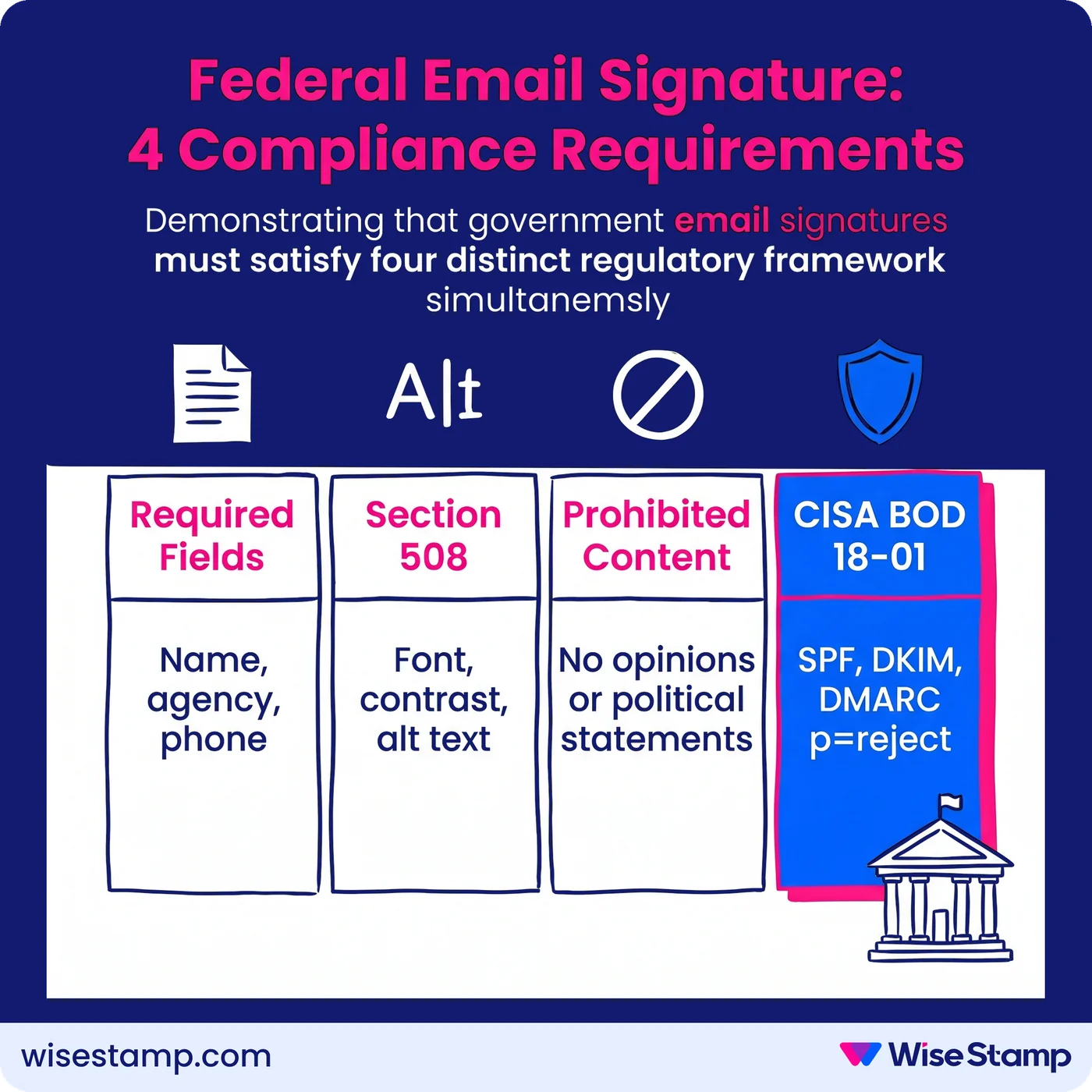
Government email signature compliance spans four regulatory areas.
The first two: required content fields (name, agency, phone) and Section 508 accessibility standards (font, contrast, alt text).
The other two: prohibited content rules (no personal opinions, unofficial taglines, or non-government links) and CISA BOD 18-01 authentication (SPF, DKIM, DMARC at p=reject).
Compliance Audit Risk
Non-compliant government email signatures create serious audit, legal, and security exposure
Unmanaged email signatures in government agencies create three overlapping risks at once.
Section 508 violations expose the agency to federal accessibility complaints and audits.
Content policy breaches create conduct and ethics exposure with no review mechanism in place.
Employees who add personal opinions, political statements, or unofficial taglines to their signatures generate that exposure silently.
Failed email authentication leaves agency domains vulnerable to phishing and spoofing.
A 500-person agency sends roughly 250,000 emails per month. Every one of those emails is a potential compliance failure when signature governance is absent.
Required Signature Fields
What must a federal government email signature include at minimum?
Required signature fields vary by agency but follow a consistent baseline across federal policy.
The USDA Signature Block Instructions define the federal floor: “minimum information must consist of the sender’s name, Department/agency identification, and phone number.”
Most agencies build on that with:
- Full legal name and job title
- Agency or department name
- Direct phone number
- Government email address
- Physical mailing address for official correspondence
Agency-specific additions go beyond the minimum.
The State Department’s Foreign Affairs Manual 5 FAM 750 requires an approved disclaimer on all external email.
The Department of Veterans Affairs OIT email policy specifies that digital signatures must meet PIV-compliant cryptographic standards for sensitive communications.
That baseline is the floor, not the ceiling.
IT admins should verify requirements against their specific agency policy, not just federal minimum standards.
A signature that satisfies the USDA minimum may still be non-compliant under State Department or VA OIT policy.
Section 508 Accessibility
What does Section 508 require in a government email signature?
Section 508 of the Rehabilitation Act applies to all electronic content produced or distributed by federal agencies, including email signatures.
The GSA’s Section508.gov guidance specifies the minimum accessibility requirements for email messages and their components.
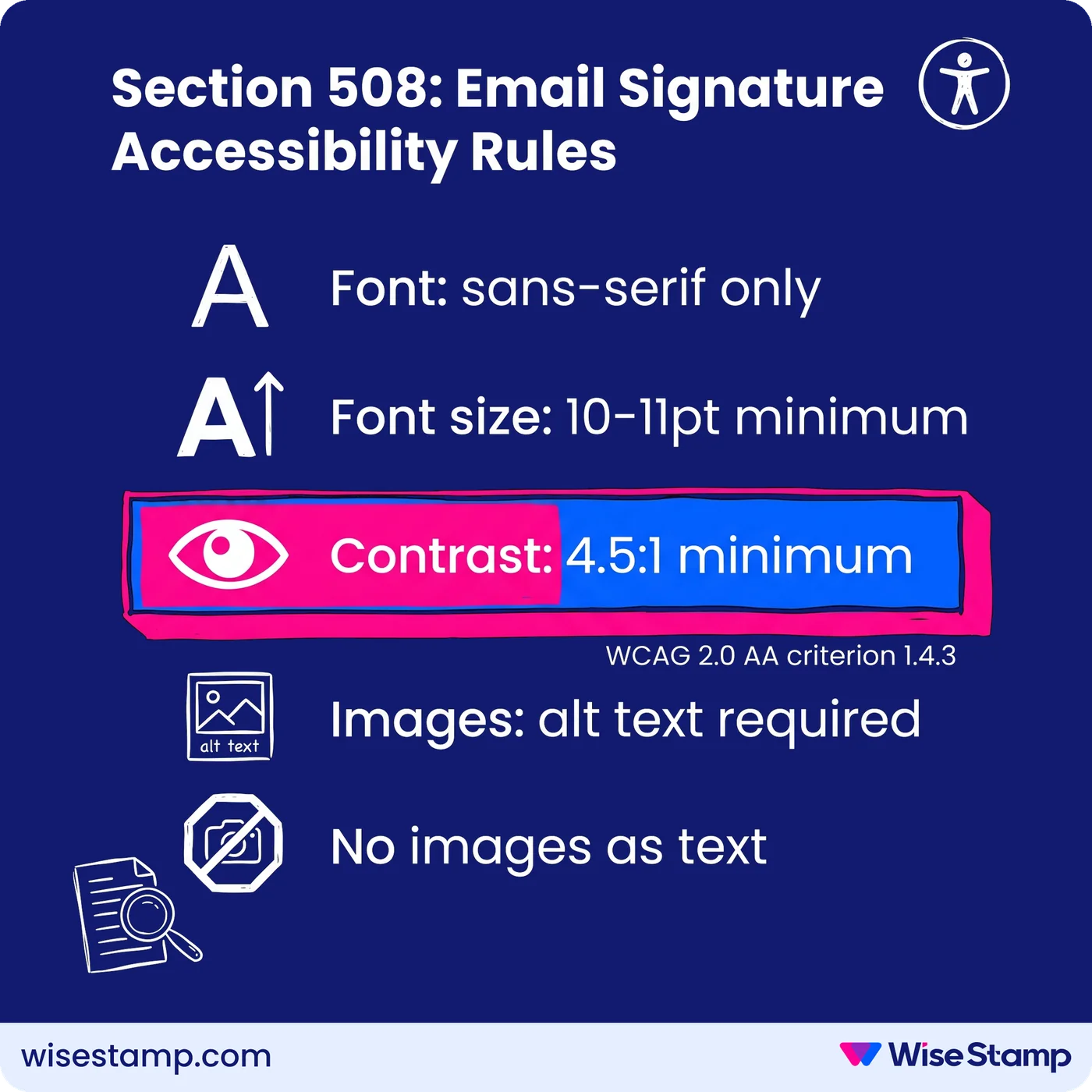
For email signatures, Section 508 compliance means:
- Font: sans-serif typefaces only (Arial, Calibri, Helvetica). No decorative, cursive, or stylized fonts.
- Font size: 10–11pt minimum for all signature text
- Color contrast: 4.5:1 minimum ratio between text and background, meeting WCAG 2.0 AA criterion 1.4.3
- Images: all logos and images must include descriptive alt text
- No images as text: name, title, and contact information must be rendered as live text, not embedded inside a banner image
The practical failure point is individual employee choice.
Left to configure their own signatures, employees routinely select stylized fonts, low-contrast color combinations, and promotional banners with no alt text.
Each of these is a Section 508 violation on every email sent.
WiseStamp’s Studio Editor lets admins build the agency signature template with compliant fonts, sizes, and contrast settings locked at the template level.
Employees cannot override them.
Logos and images are configured with alt text by the admin at setup, so every deployed signature is 508-compliant from the first email it sends.
Prohibited Content
What content is explicitly prohibited in government email signatures?
Government email signature policies consistently prohibit content that implies personal endorsement, political affiliation, or unofficial use of the agency brand.
Standard prohibitions across federal agency policies include:
- Personal quotes, mottos, or inspirational messages
- Political or religious statements
- Personal social media profiles
- Non-government website links
- Unofficial agency taglines or slogans
The USDA Style Guide explicitly prohibits unofficial taglines in any official communication, email included.
The State Department’s 5 FAM 750 restricts any email content that implies personal endorsement of a political candidate, organization, or commercial enterprise.
These prohibitions exist because agency email carries the implicit authority of the federal government.
An employee’s signature appears as official correspondence regardless of intent.
Personal content added without a review mechanism reflects on the agency with no opportunity to intervene.
Email Authentication
How does CISA BOD 18-01 apply to government email compliance?
CISA Binding Operational Directive 18-01, issued in 2018, mandates specific email authentication standards for all federal civilian executive branch agencies.
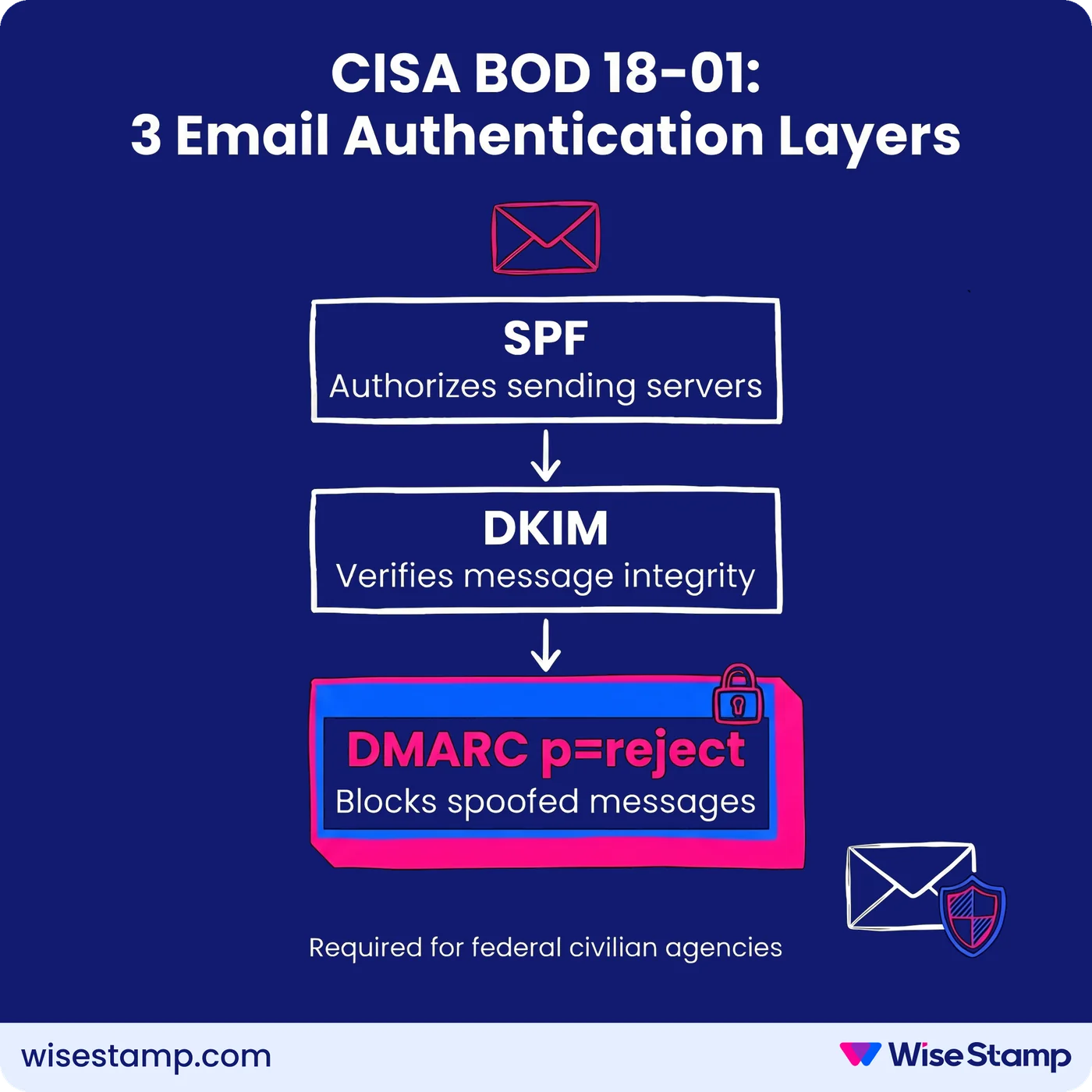
BOD 18-01 requires agencies to implement:
- SPF (Sender Policy Framework): DNS records that authorize which mail servers can send email on behalf of the agency domain
- DKIM (DomainKeys Identified Mail): cryptographic signing that verifies message integrity in transit
- DMARC at p=reject: the enforcement-level policy that instructs receiving servers to reject messages failing SPF or DKIM checks
DMARC at p=reject is the critical requirement.
It closes the spoofing vector that allows attackers to send email appearing to originate from official agency domains.
That is a direct phishing and national security risk that lower DMARC policy levels leave open.
NIST SP 800-177 (Trustworthy Email) provides the technical implementation framework agencies use to operationalize BOD 18-01.
NIST SP 800-53 covers the broader FISMA security control requirements that email infrastructure must satisfy.
These authentication standards operate at the domain infrastructure level.
Compliance officers should confirm that their agency’s mail platform — whether Microsoft 365, Google Workspace, or on-premises Exchange — is configured to enforce DMARC at p=reject.
That confirmation should come before focusing on signature content policies.
Agency Policy Variations
How do email signature requirements differ across federal departments?
Federal departments share the same baseline compliance framework but enforce distinct content requirements at the agency level.
| Requirement | USDA Forest Service | U.S. State Department | U.S. Department of Veterans Affairs |
|---|---|---|---|
| Minimum required fields | Name, agency, phone | Name, title, office, contact info | Name, title, office, phone, email |
| External disclaimer | Not required by default | Approved opinion disclaimer required | Not specified at email level |
| Contractor identification | Not specified | Required by 5 FAM 750 | Subject to PIV/digital signature policy |
| Taglines and slogans | Prohibited (USDA Style Guide) | Restricted | Not specified |
| Authentication standard | DMARC (BOD 18-01) | DMARC (BOD 18-01) | DMARC (BOD 18-01) |
CISA BOD 18-01 and Section 508 apply uniformly across all federal civilian executive branch agencies. Content policy is where departments diverge.
For organizations managing signatures across multiple departments or sub-agencies with different content requirements, WiseStamp supports department-level signature groups.
Each group gets its own template, locked fields, and deployment scope — all managed from a single admin console.
Contractor Requirements
What email signature requirements apply to government contractors?
Government contractors communicating through official agency email channels are subject to the same content and authentication standards as permanent employees.
Additional identification requirements are layered on top.
The State Department’s 5 FAM 750 is explicit: contractors must identify themselves as contractors in their email signature.
Failure to do so creates misrepresentation exposure.
A contractor appearing to communicate as a direct federal employee carries concrete legal and ethics implications for both the individual and the agency.
Contractor signatures should include:
- Full name and employer (the contracting company, not just the individual’s name)
- The agency program or office they support
- Contractor identification as required by the specific agency’s policy
Contractors assigned government email addresses on agency domains fall under the same Section 508 accessibility requirements as permanent staff.
BOD 18-01 DMARC enforcement applies at the domain level, so contractor emails sent from agency domains are covered by the agency’s existing authentication infrastructure.
Enforcement At Scale
How do government agencies enforce email signature compliance across large workforces?
Email signature enforcement is where policy fails most predictably in government agencies.
I’ve seen this described by IT professionals with real precision.
One IT admin who managed a large organization put it plainly: “With hundreds of users, you simply cannot rely on people to keep their own signatures updated and consistent.”
The manual approach, distributing a template via SharePoint or email and asking employees to install it on every device, produces low adoption and no verification.
There is no mechanism to confirm that 2,000 employees installed the correct signature, used accessible fonts, included the required disclaimer, and omitted prohibited content.
The process is invisible to administrators once the template goes out.
Compliance requires technical enforcement, not policy documents.
IT admins managing large agencies face four simultaneous requirements: accessible signature design, required content fields, prohibited content prevention, and audit-ready documentation.
Manual processes cannot satisfy all four reliably at scale.
I hear similar language from compliance officers across regulated environments:
“From a compliance standpoint too — titles, roles, that kind of stuff. We do have people internally who collect payments, and we need to make sure that compliance-wise, we’re checking all the boxes signature-wise.”
That is exactly the problem centralized signature management solves.
WiseStamp’s admin console lets IT admins build the agency-approved signature template once.
Every compliance-critical element — font, contrast, disclaimer text, logo, and prohibited field types — is locked at the template level.
It deploys to all assigned users through Microsoft 365 or Google Workspace.
Employees access the Employee Hub, update only the fields the admin has explicitly unlocked (phone number, profile photo), and install in one click.
All compliance elements are immutable — employees cannot alter them regardless of device or email client.
Directory sync with Microsoft Entra ID or Google Workspace handles onboarding and offboarding automatically.
New hires receive a compliant signature from their first email. Departures are removed without manual intervention.
Template updates, whether a revised disclaimer or a rebranded logo, publish instantly to all assigned users.
WiseStamp holds SOC 2, ISO 27001, HIPAA, and GDPR compliance certifications, with audit log capabilities to support governance documentation.
Takeaway
Government email signature compliance: the four requirements IT admins must enforce
Government email signature compliance is not a single standard.
It is the intersection of four distinct regulatory frameworks applied simultaneously to every email the agency sends.
The four requirements:
- Required content fields: name, agency identification, and phone number as the federal baseline; agency-specific additions vary
- Section 508 accessibility: sans-serif fonts, 10–11pt minimum, 4.5:1 contrast ratio, alt text on all images, no images substituting for live text
- Prohibited content: no personal opinions, political or religious statements, unofficial taglines, or non-government links
- CISA BOD 18-01 authentication: SPF, DKIM, and DMARC at p=reject on the agency domain
Manual enforcement at any organizational scale does not produce verifiable results.
Policy documents do not produce compliant signatures.
A centralized system that locks compliance-critical elements and deploys automatically is the only mechanism that provides audit-ready outcomes at scale.
Speak with an expert about implementing email signature compliance →