How to Evaluate Email Signature Management Software Security
IT guide to evaluating email signature software security: deployment architecture, SOC 2 compliance, SSO/SCIM, data handling, and audit controls
Short answer
What are the security risks of email signature management software?
Email signature software carries risk in 4 areas:
- Server-side email content access
- Over-permissioned directory integrations
- Data residency gaps
- HTML injection via employee-editable fields.
Evaluate vendors against their deployment architecture, certifications (SOC 2 Type II, ISO 27001, GDPR), SSO/SCIM support, and audit capabilities.
Request an email signature security package →
Unmanaged risk
Signature software touches your mail flow, and most IT teams don’t know it
Signature software sits in a part of your infrastructure that most security reviews miss entirely.
A 500-person organization sends roughly 250,000 emails a month (WiseStamp, 2025).
Depending on how the signature tool deploys, every one of those could pass through third-party infrastructure before reaching the recipient.
That’s not inherently dangerous. But you need to know exactly what’s happening before you sign off on the deployment.
Deployment architecture
What deployment architecture risks does email signature software introduce?
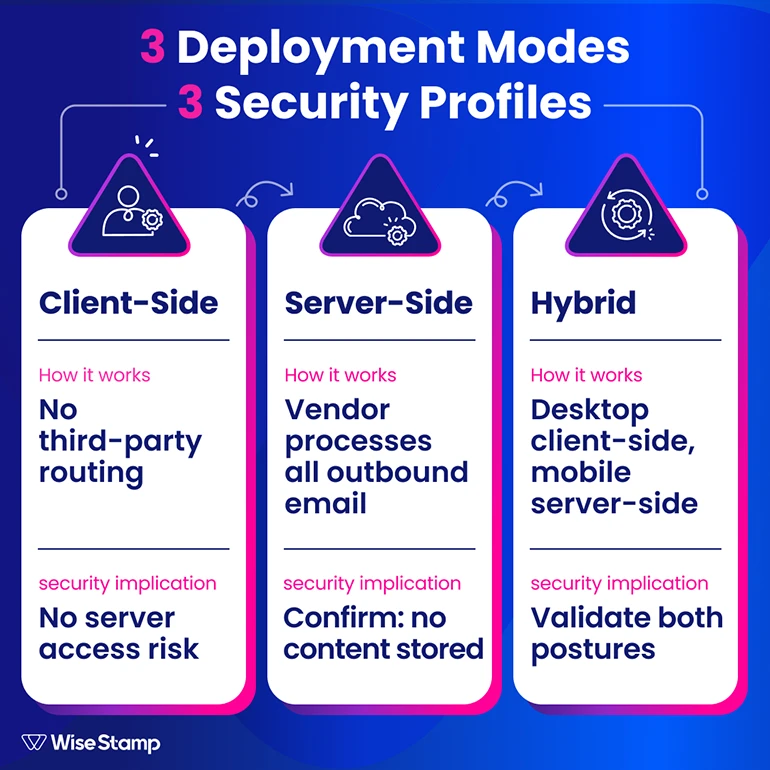
Email signature tools deploy in 3 modes, each with a different security profile:
| Deployment mode | How it works | Key security question |
|---|---|---|
| Client-side | Signature injected via Chrome Extension or Outlook Add-In during composition | Emails don’t pass through third-party servers. No mobile or CRM coverage by default. |
| Server-side | Emails route through the vendor’s hosted service; signature appended before delivery | Vendor processes all outgoing employee email. Does it read or store content? |
| Hybrid | Client-side for desktop; server-side fallback for mobile and CRM emails | Most complete coverage. Requires validating the security posture of both methods. |
The question every vendor must answer before you proceed: does your server-side service read or store email content?
The answer must be no.
I came across an IT professional in a forum who put it plainly: “Routing emails through a third party raised security and privacy concerns internally.”
That concern is legitimate, and it’s the right opening question for any vendor conversation.
WiseStamp’s server-side service appends signatures post-send without reading or storing email content. Each account runs in an isolated tenant. Nothing from your mail flow is retained.
Directory integration
What directory permissions does email signature software actually need?
Email signature platforms sync employee data to populate signature fields: name, title, department, phone, and photo.
The question is how much access they need to do that, and nothing more.
For Microsoft 365, the platform needs read-only access to the employee directory via Microsoft Graph API. The Outlook Add-In needs read-write access only to the currently open email message.
For Google Workspace, the platform needs read-only access via the Google Directory API, plus write access to Gmail signature settings for auto-injection. That’s the complete required scope.
Any vendor requesting write access to user accounts, mailboxes, or mail flow rules beyond those boundaries should produce detailed architecture documentation before you proceed.
WiseStamp uses read-only directory permissions for both Microsoft Entra ID and Google Workspace syncs.
OAuth tokens and API keys are managed via Google Secrets Manager and are never stored in the application codebase.
Compliance certifications
What compliance certifications should an email signature vendor hold?
Certifications tell you how seriously a vendor has invested in security governance, not just how they describe it on a product page.
They’re the difference between “we take security seriously” and proof that external auditors agree.
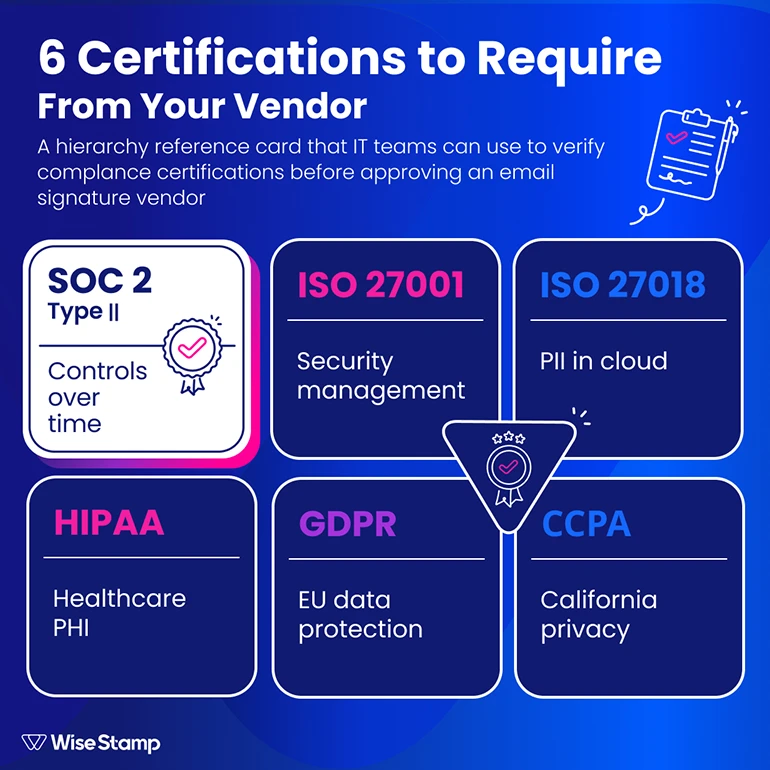
| Certification | What it covers | When it matters |
|---|---|---|
| SOC 2 Type II | Operating effectiveness of security controls over a time period | Always: Type II proves controls work in practice, not just in design |
| ISO 27001 | Information security management system (ISMS) | Enterprise vendor approvals; often a procurement requirement |
| ISO 27018 | PII protection in cloud environments | Any org storing employee personal data in a SaaS platform |
| HIPAA | Protected health information (PHI) safeguards | Healthcare organizations or those handling patient data |
| GDPR | EU data protection regulation | Any org with EU-based employees or customers |
| CCPA | California Consumer Privacy Act | US enterprise organizations with California-based employees or customers |
Ask for Type II specifically. Type I only certifies that controls were designed correctly on a single date.
Type II covers a period of actual operation, typically 6 to 12 months, and proves that controls held up in practice.
WiseStamp holds SOC 2 (2025 attestation), ISO 27001, and ISO 27018 certifications and completed HIPAA compliance requirements in late 2024.
A Data Processing Agreement (DPA) documenting GDPR compliance is available on request.
Access management
What access controls should a secure email signature platform support?
Access control gaps in SaaS tools are among the most consistent enterprise security vulnerabilities.
Email signature platforms connect to your identity provider and handle employee PII. They need to match your access standards, not approximate them.
The minimum access control checklist:
- SAML 2.0 / SSO: Admins authenticate through your IdP (Okta, Microsoft Entra ID, Google Workspace, or OneLogin), not a separate vendor password.
- SCIM provisioning: automated provisioning and deprovisioning so that offboarding an employee in your IdP revokes their signature platform access automatically.
- MFA enforcement: required for all admin logins, not optional.
Beyond those 3 baseline requirements, 2 signature-specific controls matter most:
RBAC (role-based access control) should scope IT, Marketing, and HR to the sections of the platform relevant to their function.
No role should see billing data or employee PII that isn’t needed for their job.
Field-level employee permissions should let admins lock governed fields (legal disclaimers, job titles, logos) while allowing employees to update personal details (mobile number, headshot).
Platforms that allow employees to insert raw HTML into their own signature fields create injection vectors. That capability must stay under admin control.
WiseStamp supports SAML 2.0 with Okta, Google Workspace, OneLogin, and Microsoft Entra ID. SCIM is available on enterprise plans.
The platform uses a 7-role RBAC model: Owner, Admin, Organization Manager, Marketer, HR, Designer, and IT.
Data handling
How should you evaluate a vendor’s data storage and privacy practices?
Email signature platforms store employee PII at minimum: name, title, email address, phone number, and headshot.
For server-side deployments, they also process email metadata. Ask each vendor these 5 questions before the deployment is approved:
- What data do you store? Contact details and signature HTML are expected. Email content should never be retained.
- Where is it stored? Confirm the specific cloud region. GDPR compliance may require EU data residency, which not all platforms support by default.
- How is it encrypted? TLS 1.3 in transit and AES-256 at rest are current standards. Request documentation on key management (Google Key Management Service and AWS KMS are common implementations).
- Is data isolated between accounts? Multi-tenant platforms must use row-level access controls or equivalent logical separation. Cross-account access is a structural risk, not just a policy gap.
- Who owns the data? Signature content and employee records belong to you. Flag any terms allowing the vendor to use your data for model training, benchmarking, or product improvement.
WiseStamp stores PII in Google Cloud US Central with AES-256 at rest and TLS 1.3 in transit. Accounts are logically isolated with row-level access controls.
Customer signature content is never reused across accounts and can be deleted on request under GDPR and CCPA right-to-erasure provisions.
Audit and governance
What audit and governance capabilities matter for email signature security?
Audit and governance capabilities are the part of the evaluation most IT teams skip until a compliance review forces the question.
Once the platform is live, the security question shifts from vendor approval to operational accountability.
Audit logs should capture every admin action: who changed a signature template, when, and from which account. These records are the evidence trail when a compliance auditor asks who modified the legal disclaimer.
Change history at the template level lets you identify and roll back an unauthorized or mistaken update without manually reconstructing the previous state.
Incident response posture reveals the most about a vendor’s security maturity. Ask: do you have a dedicated CISO? What’s the client notification process when a vulnerability directly affects customer data? Is there a defined on-call rotation?
At WiseStamp, the CISO reports directly to the COO and CEO. Annual risk assessments are reviewed at the executive level. All employees complete security awareness training on onboarding and annually thereafter.
Penetration testing runs at least annually by both internal and external security teams. Threat intelligence is monitored via Recorded Future for zero-day exploits and global threat trends.
Clients are notified when a vulnerability has direct potential impact on sensitive customer data.
Evaluation framework
Email signature software security evaluation framework
Email signature tools are not a low-risk SaaS category. They connect to your directory, process employee outgoing mail at scale, and store PII.
Approving one without a structured security review is a gap that surfaces later.
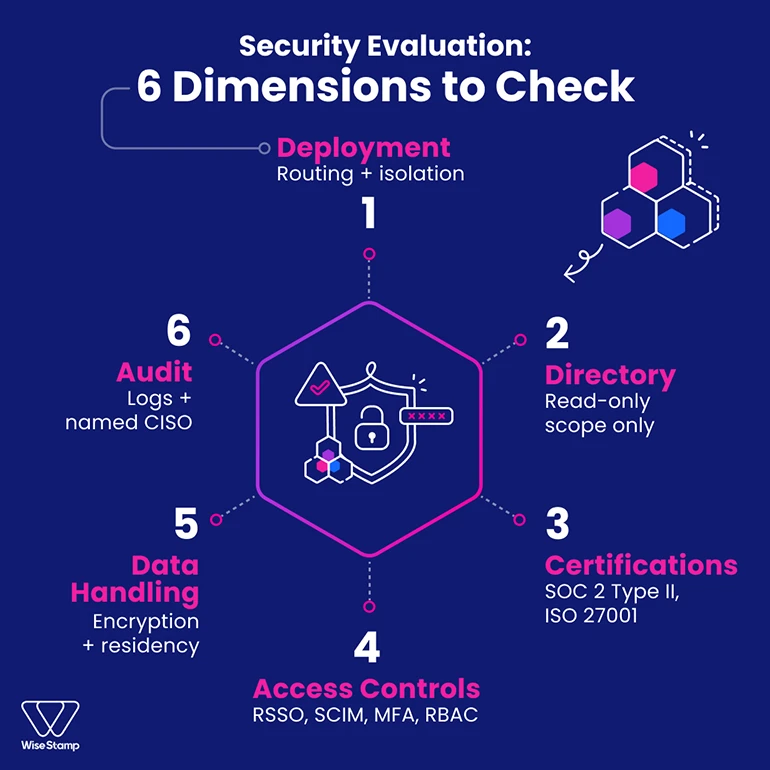
The 6 dimensions to evaluate before approving any vendor:
- Deployment architecture: Does server-side routing read or store email content? What is the tenant isolation model?
- Directory permissions: Is directory access read-only? Is write scope limited to the minimum required operation?
- Compliance certifications: SOC 2 Type II, ISO 27001, ISO 27018, and GDPR or HIPAA as relevant to your industry.
- Access controls: SAML 2.0/SSO, SCIM provisioning, MFA enforcement, and RBAC with field-level employee permission controls.
- Data handling: Encryption standards (TLS 1.3, AES-256), data residency, tenant isolation, and data ownership terms.
- Audit and governance: Admin action logs, template change history, incident response posture, and a named CISO with executive-level accountability.
Request the WiseStamp security package, which includes the SOC 2 attestation, ISO 27001 and ISO 27018 certificates, architecture diagram, and DPA.