How Companies Standardize Email Signatures at Scale (2026)
Learn how IT standardizes email signatures for large companies across all employees with automatic deployment and governance, and zero IT tickets
Short answer
How to standardize email signatures for a large company?
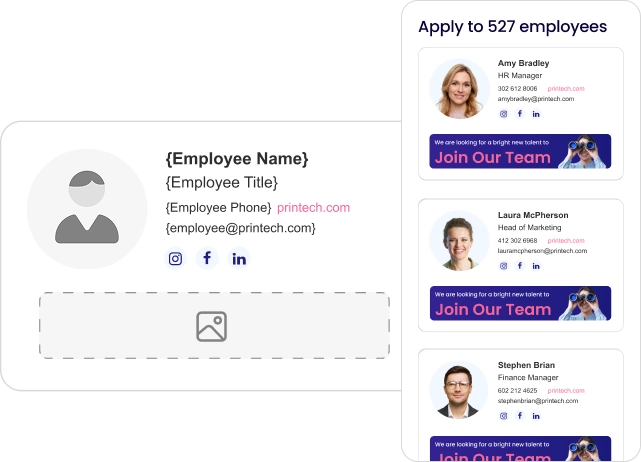
Standardizing email signatures at scale requires API-based deployment connected to your identity directory, role-based access controls across teams and regions, and a governance model that removes IT from day-to-day changes.
The design work takes hours. The infrastructure is what makes it hold.
Root cause
Why does email signature consistency break down at scale?
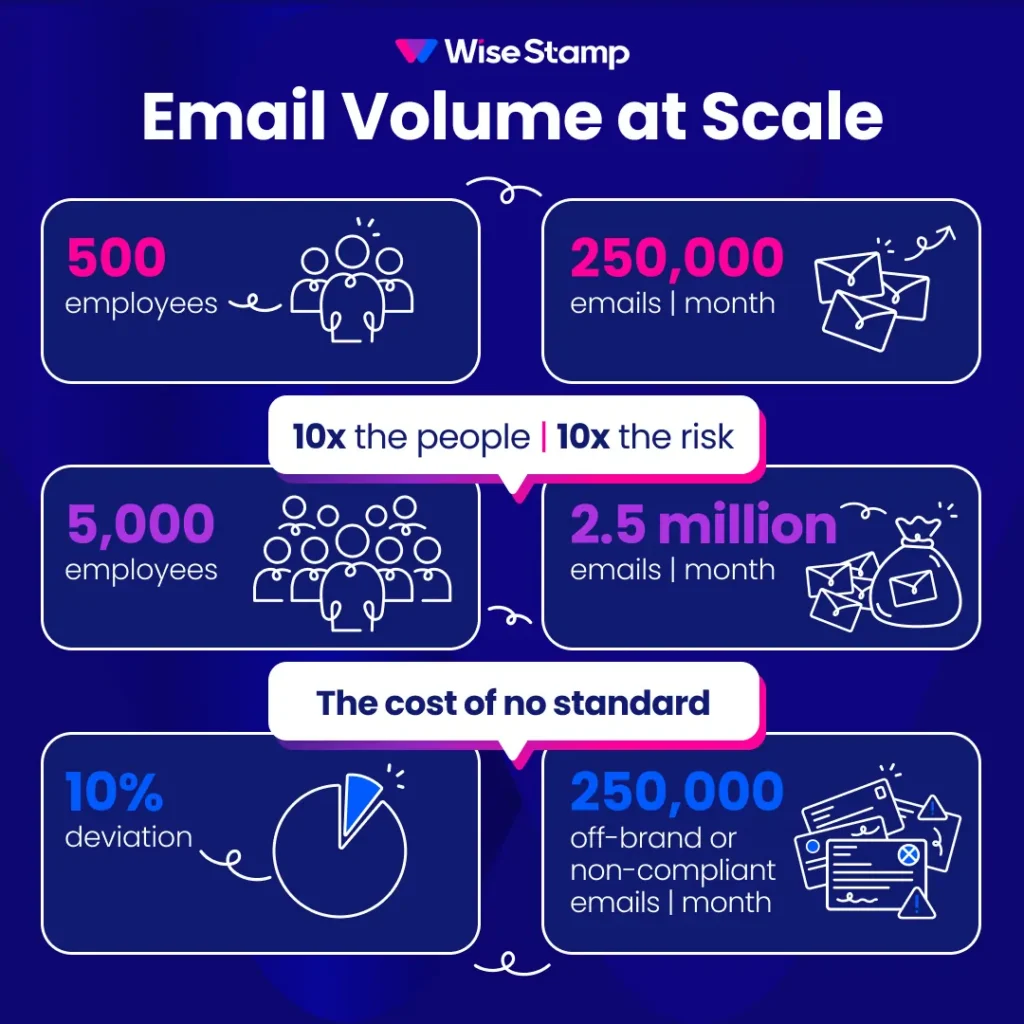
Email signature consistency breaks down at scale because every approach that works for 50 employees fails for 5,000. Asking employees to update their own signatures doesn’t scale.
A 500-person company sends roughly 250,000 emails a month. A 5,000-person organization sends 2.5 million. At that volume, even a 10% deviation means 250,000 off-brand, potentially non-compliant emails going out every month.
The underlying problem is structural, not motivational. Without a centralized system, you’re relying on individuals to make the right choice on every device, in every email client, every day.
One client plainly told us told us: “With thousands of employees you can’t just ask them.”
Large companies face compounding problems that smaller organizations don’t encounter. Multiple legal entities require different disclaimers.
Regional teams have separate legal requirements. M&A scenarios need transition timelines. And IT ends up owning a problem that should belong to Marketing.
“Marketing wanted control over branding, IT had to implement it, and nobody wanted to own the manual work.”
– IT Professional in community forum
Deployment model
What is the best email signature deployment method for large companies?
API-based deployment is the standard for enterprise email signature management.
It connects at the identity layer, requires no MX record changes, and deploys signatures without any action from employees or their devices.
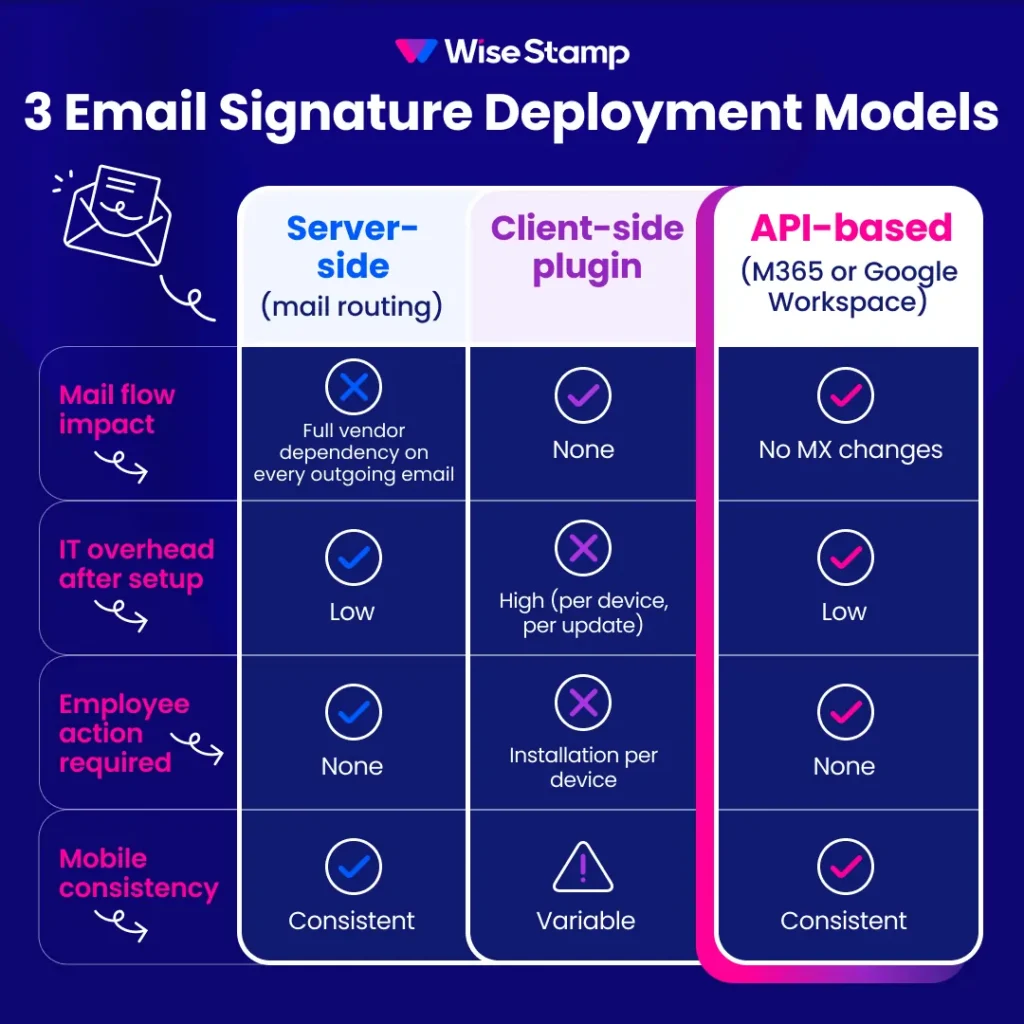
Three deployment methods exist, each with different implications at scale:
| Method | Mail flow impact | IT overhead after setup | Employee action required | Mobile consistency |
|---|---|---|---|---|
| Server-side (mail routing) | Full dependency on vendor routing | Low | None | Consistent |
| Client-side plugin | None | High (per device, per update) | Installation per device | Variable |
| API-based (direct M365 or Google Workspace) | No MX changes | Low | None | Consistent |
Server-side routing introduces a vendor dependency on every outgoing email and raises data residency concerns for regulated industries.
Client-side plugins create a different problem at enterprise scale. They require endpoint maintenance that doesn’t scale past a few hundred users.
API-based deployment resolves both. It connects to your mail platform directly, with no routing changes, no per-device maintenance, and no email content passing through a third party.
WiseStamp’s deployment model uses API-based insertion with Microsoft 365 and Google Workspace. No MX changes. No connectors to configure. No email content is read, stored, or accessed at any point in the process.
Azure AD integration
How does identity directory integration work for email signature management?
Identity directory integration means signature assignments update automatically when employee records change. No manual re-assignment, no lag, no human error. Manual signature data management is unsustainable above a few hundred employees.
Active Directory sync (or its equivalent in Google Workspace, Okta, or another SCIM-compatible provider) is what makes this work at enterprise scale. When connected:
- New hires receive the correct, on-brand signature from their first outgoing email, with no IT ticket
- Department or title changes in the directory update the signature assignment automatically
- Offboarding removes signature access the moment an account is deactivated
“Active Directory sync was critical. We didn’t want to manage user data in another system.”
– WiseStamp client – IT Professional
WiseStamp supports SSO and SCIM provisioning with Microsoft Entra (formerly Azure AD), Google Workspace, and all major SCIM-compatible identity providers.
Dynamic variables pull each employeeâs data directly from the directory.
Employee name, title, phone number, photo, and department all feed into a single shared template. If a field has no value, it suppresses automatically. No blank placeholders appear in any outgoing email.
Brand governance
What governance model prevents brand drift after rollout?
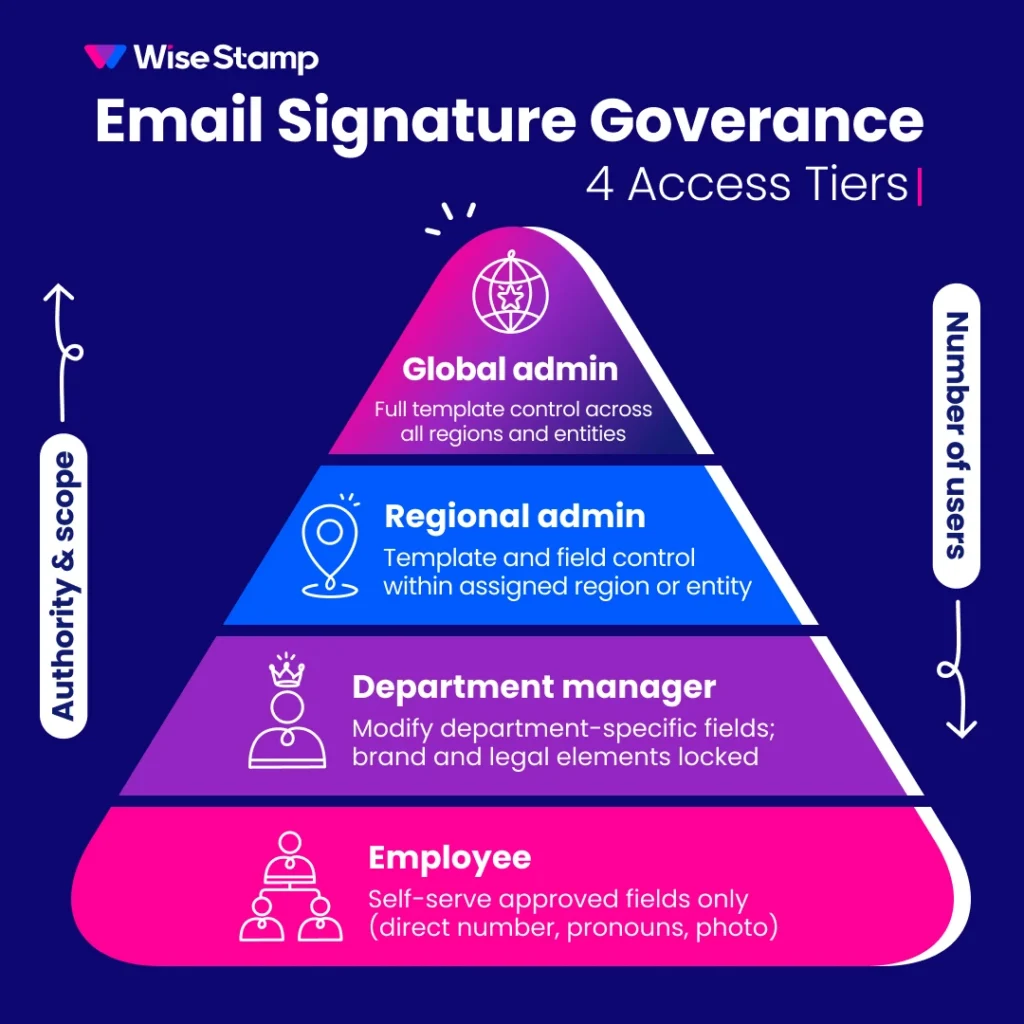
Role-based access controls (RBAC) are the governance mechanism that keeps signatures consistent long after launch. Most large organizations need at least four access tiers to cover global, regional, and employee-level needs.
| Role | Access level |
|---|---|
| Global admin | Full template control across all regions and entities |
| Regional admin | Template and field control within assigned region or entity |
| Department manager | Modify department-specific fields; brand and legal elements locked |
| Employee | Self-serve approved fields (direct number, pronouns, photo) |
Locked fields enforce the standard regardless of what employees do in their email client. Legal text, brand logos, company phone numbers, and required disclaimers are protected at the field level.
Employees update only what they’re permitted to update.
WiseStamp’s Employee Hub handles the employee-facing layer. Employees see their assigned signature, update approved fields through a guided interface, and install it in under two minutes.
IT has the audit log and policy controls. Marketing keeps the brand locked down. Nobody needs to file a ticket for a phone number change.
Multi-region compliance
How do large companies handle multi-region compliance requirements?
Multi-region compliance requires template assignment by directory group, not manual assignment per employee. Regional disclaimer accuracy is the compliance risk most large companies underestimate: the design is correct, but the wrong template gets used.
3 signature compliance challenges specific to large organizations:
Regional variation. GDPR confidentiality notices for EU employees are different from HIPAA disclosures for US healthcare staff or financial services disclaimers by market. Templates must be assigned correctly, not just designed correctly.
Audit readiness. When Legal asks whether all EU employees were using the correct disclaimer in Q3, the answer must come from an audit log, not from manual verification of individual inboxes.
An audit log captures template assignments, admin-level changes, and deployment history in retrievable form.
Employee override prevention. At scale, some employees will always find a workaround. Locked fields prevent modification of legally required text regardless of the employeeâs device, client, or email settings.
WiseStamp holds SOC 2 Type II and ISO 27001 certifications, and supports HIPAA and GDPR compliance requirements. The audit log and locked field enforcement address all three challenges above without additional configuration.
Rollout strategy
What’s the right rollout approach for thousands of employees?
Zero-touch deployment is the only enterprise-grade rollout. Signatures should appear correctly in every employee’s outbox from day one, without requiring any action from them.
API-based deployment with SCIM provisioning achieves exactly this. No installation guide to distribute. No help desk escalation. No company-wide email asking 5,000 people to update something most of them will ignore.
For organizations where employees manage personal fields (direct phone, pronouns, a headshot), WiseStamp’s Employee Hub provides a two-minute self-service flow covering Gmail, Outlook, Apple Mail, and mobile clients.
Self-service within guardrails. Zero flexibility outside them.
“It makes us more efficient as a company. They don’t even have to think about it. As soon as their email gets installed, they already have a signature.”
– WiseStamp enterprise client – IT professional
Marketing ROI
What does signature standardization unlock beyond compliance?
Email signature standardization unlocks a marketing channel most large organizations donât realize they already have.
A 5,000-person company sends roughly 2.5 million emails a month to real contacts: customers, prospects, partners, vendors.
WiseStamp’s Marketing Suite turns that reach into a measurable channel. Marketing can run campaigns inside signatures across the entire organization without an IT request.
Campaign banners carry start and end dates, department-level targeting, and a dashboard showing clicks, impressions, and engagement. The channel grows automatically as the org grows.
The shift from compliance program to performance channel requires one configuration after the governance infrastructure is in place.
“Marketing campaigns inside signatures turned email into a real marketing channel.”
– WiseStamp client – IT professional
Takeaway
Large company email signature standardization
Large company email signature standardization requires four things working in combination: API-based deployment connected to your identity directory, RBAC with locked fields for compliance, multi-template management by region and entity.
The fourth is zero-touch rollout that requires nothing from employees.
The design work takes a day. The governance is what makes it hold at 5,000 employees the same way it holds at 50.
To see how this maps to your org structure and email environment, schedule a technical walkthrough.