Legal Review Checklist for Email Signature Management Software
What legal teams should check when reviewing email signature management software: certifications, data residency, DPA, and deployment architecture
Short answer
How do you conduct a legal review of email signature management software?
A legal review of email signature management software covers 4 areas:
- Data handling (how the vendor processes employee PII and email content)
- Security certifications (SOC 2 Type II, ISO 27001, HIPAA)
- Data residency and GDPR compliance
- Contractual protections (Data Processing Agreement, SLA)
Request the vendor’s Trust Center documentation pack before involving legal. Most enterprise reviews conclude in 2 to 4 weeks.
If you need to run a privacy review or run a compliance review as well, those guides use the same documentation request process.
Compliance Risk
Why unreviewed email signature software is an IT liability
Email signature management tools process employee personal data (names, titles, phone numbers, photos) and in server-side deployment mode, route outgoing email through the vendor’s infrastructure.
Either factor alone is enough to trigger a formal legal review in most organizations.
When reviews happen late or not at all, deployment stalls after IT has already built the rollout plan.
Compliance gaps discovered during an audit are harder to fix than gaps caught before go-live.
Data Architecture
What should legal teams scrutinize in signature management data architecture?
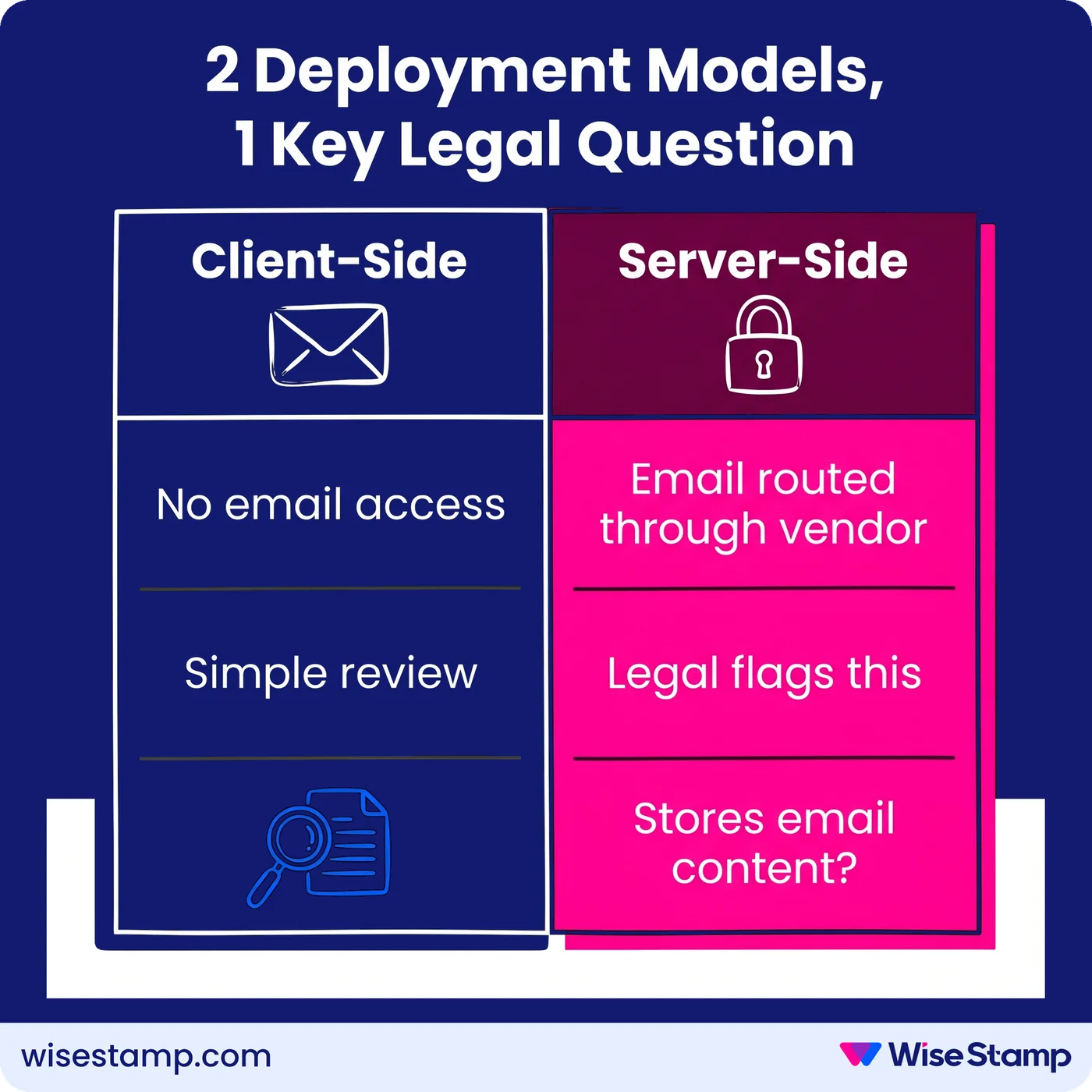
Client-side deployment means the signature is inserted into the email compose window by a browser extension or add-in (the Outlook Add-In or WiseStamp Chrome Extension, for example).
The vendor never touches email content. Legal review for this model is usually straightforward.
Server-side deployment routes outgoing emails through the vendor’s infrastructure after sending, with the vendor appending the signature before delivery. Legal teams almost always flag this configuration.
“Routing emails through a third party raised security and privacy concerns internally.”
It’s the first question legal should ask.
The critical question for server-side deployment is whether the vendor stores or reads email content.
WiseStamp’s server-side architecture processes emails in transit but stores zero email content and performs zero email content reading.
Data is logically separated by account with row-level access controls and TLS encryption on all communications.
That architecture is documented in WiseStamp’s Trust Center, and it’s exactly what legal reviewers need to evaluate.
Documentation Pack
The 4 documents to request from any email signature vendor before legal review
Documents are what legal teams actually review, not the software itself. Gathering the right vendor artifacts before the first legal meeting compresses the review timeline significantly.
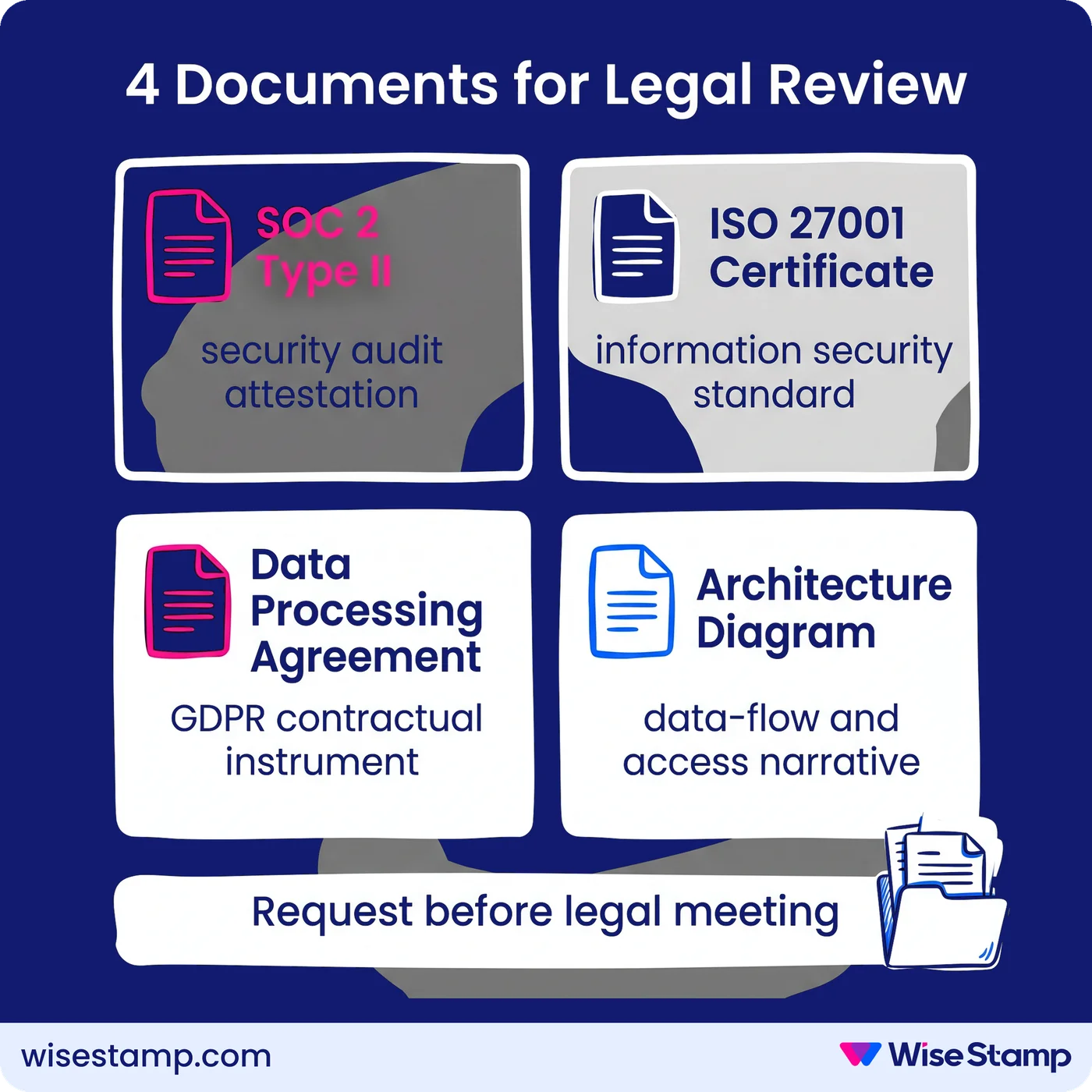
The 4 documents to request:
- SOC 2 Type II attestation report: independent third-party audit of security controls over a defined period. SOC 2 Type II (not just Type I) signals a mature, continuously audited program.
- ISO 27001 certificate: the international standard for information security management systems. Verify the certificate covers ISO 27001:2022 (the current version) and check the issuance date.
- Data Processing Agreement (DPA): the contractual instrument governing how the vendor handles your data under GDPR and CCPA. Without a signed DPA, GDPR compliance cannot be demonstrated.
- Architecture diagram and data-flow narrative: shows exactly where data travels and what access the vendor has at each stage of email processing.
WiseStamp holds SOC 2 Type II certification (most recent audit period: JuneâAugust 2024), ISO 27001:2022, and ISO 27018:2019. Its DPA is available on request. The Trust Center provides the architecture documentation enterprise security reviewers typically ask for.
Security Questionnaire
What to include in the security questionnaire you send to an email signature vendor
Security questionnaires are a standard part of enterprise legal reviews. Most organizations use a CAIQ (Consensus Assessments Initiative Questionnaire), based on the CSA Cloud Controls Matrix, as a foundation.
Beyond the CAIQ, include these questions specific to email signature software:
- How is employee PII stored? In which cloud region and on which certified infrastructure?
- Does the vendor access email body, subject lines, or recipient metadata during server-side processing?
- What is the data retention period, and what happens to data after contract termination?
- What is the uptime SLA?
- Does the platform support SSO via SAML 2.0? Which identity providers are supported (Okta, Microsoft Entra ID, Google Workspace, OneLogin)?
- Is SCIM-based automated user provisioning available?
- Are audit logs available, and can they be exported?
Written responses (not verbal assurances) are what legal teams require for sign-off documentation.
Legal Requirements
What should legal and compliance teams check when reviewing email signature software?
Legal teams reviewing email signature management software work through a checklist of 8 areas:
- Data residency: where is employee data hosted and on what infrastructure? WiseStamp stores data in Google Cloud’s US Central region.
- PII handling: which employee fields are collected? WiseStamp processes name, job title, email address, and phone number. No financial or health data is processed.
- Email content access: does the vendor access email body or recipient information? The architecture diagram answers this.
- Security certifications: SOC 2 Type II, ISO 27001, and HIPAA for healthcare organizations.
- GDPR alignment: DPA in place, CCPA provisions covered.
- Uptime SLA: WiseStamp operates at 99.999% availability.
- Vendor offboarding: what is the data deletion process when the contract ends? Is the Right to Erasure supported?
- Cybersecurity insurance: does the vendor maintain coverage for cybersecurity-related liability? WiseStamp does.
Gdpr & Data Residency
How do GDPR and data residency requirements shape email signature software compliance?
GDPR requires a Data Processing Agreement between any data controller and the processors handling their employees’ personal data.
For email signature tools, that means a signed DPA covering employee PII (name, title, photo, phone number) and, for server-side deployment, email metadata.
3 additional GDPR checks apply:
- Data residency: is your data hosted where you need it? WiseStamp currently hosts data in Google Cloud US Central. EU organizations with hard data residency requirements should confirm the DPA includes Standard Contractual Clauses (SCCs) for cross-border data transfers.
- Right to Erasure: does the platform support deletion requests when employees leave? WiseStamp supports âRight to be Forgottenâ requests via its support team.
- Data segregation: is each customer’s data logically isolated? WiseStamp uses a multi-tenant cloud environment with row-level access controls per account, ensuring no cross-contamination between customer data.
HIPAA became relevant to WiseStamp when it completed HIPAA compliance certification in late 2024.
Healthcare organizations and those handling protected health information (PHI) can now request a Business Associate Agreement (BAA) directly from WiseStamp.
Compliance Enforcement
How should email signature software enforce legal requirements after going live?
Email signature tools should be doing compliance enforcement work autonomously after go-live, not just passing a one-time review. Ongoing enforcement is where the operational risk actually lives.
Locked fields are the core enforcement mechanism. WiseStamp lets admins lock any signature element at the variable level. Legal disclaimers, certification badges, and job titles stay consistent across every mailbox. Employees cannot edit them.
Department-specific disclaimers address the most common regulated-industry requirement. Finance, legal, and payment-processing teams often carry disclosure language that other departments don’t.
WiseStamp handles this through group-based template assignment: each group carries a distinct template with the required locked disclaimer content.
Audit logs and change history give compliance reviewers the documentation trail they need. The question âwhat did the signature say on a given date, and who changed it?â has a clear answer. That’s what audit-ready looks like in practice.
Role-based access control (RBAC) scopes who can modify what. WiseStamp supports 7 distinct roles (Owner, Admin, Organization Manager, Marketer, HR, Designer, and IT), so compliance personnel can access activity logs without holding editing permissions.
Review Process
How to run the internal legal review process step by step
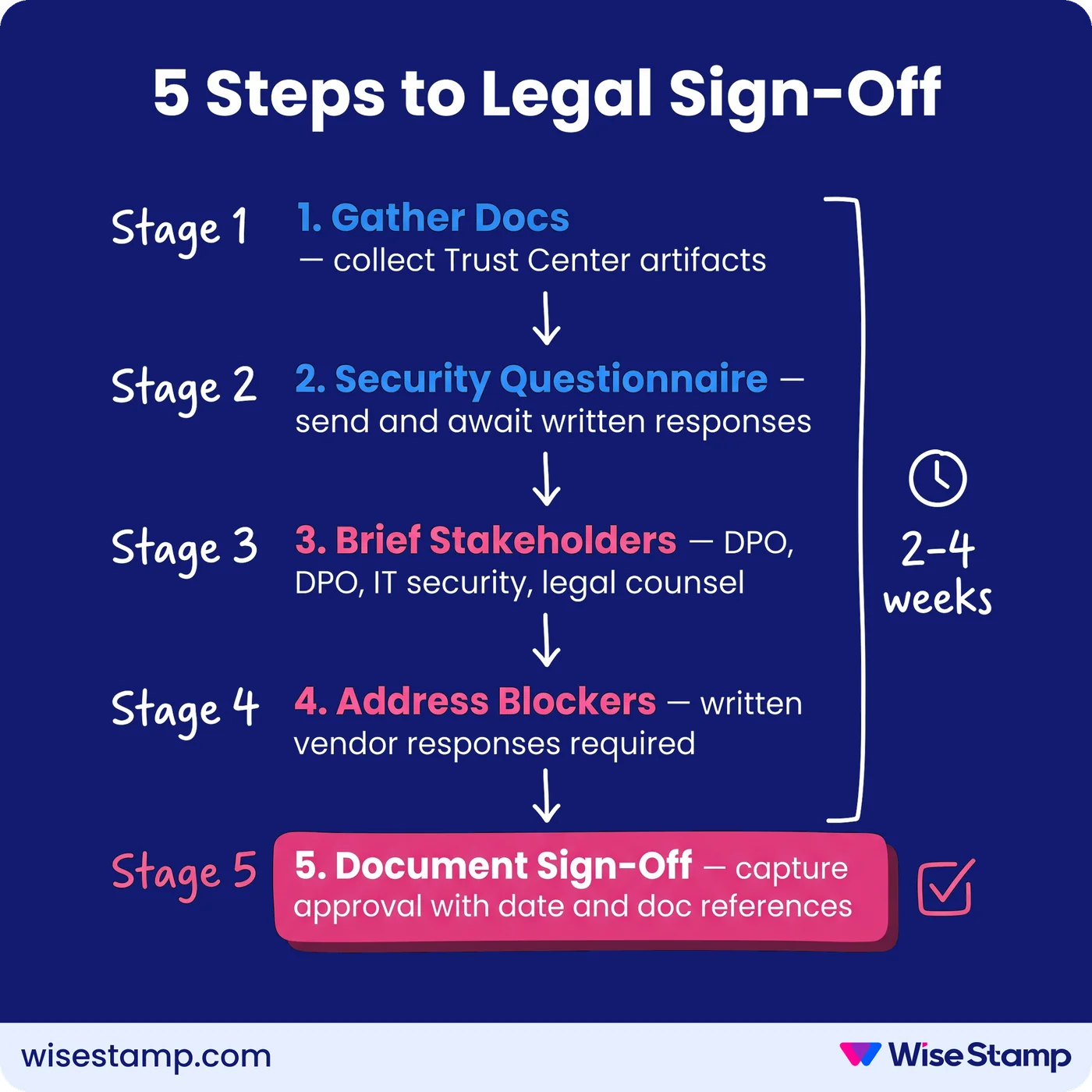
A repeatable legal review for email signature management software runs in 5 steps:
- Gather vendor documentation: Trust Center artifacts: SOC 2 attestation, ISO 27001 certificate, DPA, architecture diagram, Privacy Policy, and Terms of Service.
- Send a security questionnaire: use CAIQ or a proprietary format. Allow 5 to 10 business days for written responses from the vendor’s security team.
- Brief internal stakeholders: loop in your data privacy officer (DPO), IT security lead, and legal counsel. Provide the complete documentation pack before the first meeting.
- Address blockers in writing: the 3 most common blockers are server-side email routing concerns, data residency for EU organizations, and HIPAA for healthcare. Get written vendor responses before the review panel meets.
- Document sign-off: capture the legal team’s approval with a reference to the documentation reviewed and the date of sign-off. File it alongside the vendor contract.
Most mid-market organizations complete this process in 2 to 4 weeks when the documentation pack is complete before the first legal meeting.
Takeaway
Email signature software legal review checklist
A legal review of email signature management software focuses on 4 areas:
- Data handling architecture (especially server-side email routing)
- Security certifications (SOC 2 Type II, ISO 27001, HIPAA)
- GDPR and data residency alignment
- Contractual protections (DPA, SLA, offboarding policy)
Gather the vendor’s Trust Center documentation before involving legal.
The review goes faster, and ongoing compliance stays manageable, when the platform provides audit logs, locked fields for legal disclaimers, and role-based access controls built in from the start.