Email Signature Management Security Review: IT Checklist
Before deploying email signature management software, run this IT security review covering data architecture, certifications, RBAC, and SSO
Short answer
What does a security review of an email signature management tool cover?
An email signature management security review covers 6 areas: data architecture (does the tool read or store email content?), compliance certifications (SOC 2 Type II, ISO 27001, GDPR), deployment method risk, role-based access controls, identity management (SSO, SAML 2.0), and vendor audit documentation.
Risk of Inaction
Skip the security review, inherit the risk
An email signature management tool processes employee PII and, in server-side deployments, routes every outgoing email through vendor infrastructure. Without a structured security review, IT inherits compliance exposure under GDPR, HIPAA, or SOC 2 with no audit trail to justify the vendor selection.
Enterprise IT environments with strict vendor approval processes know this acutely.
One of our enterprise IT contacts described working through a security-restricted procurement process this way: “The security part is even worse than Google. To receive any additional approval related to IT or email stuff is just a pain.”
A security finding after deployment is significantly harder to remediate than one surfaced during evaluation.
Running the review upfront is the difference between a fast deployment and a stalled one.
Security Risks
What security risks does email signature management software introduce?
Email signature management software introduces 3 categories of security risk that IT teams often don’t fully account for during evaluation:
- Employee PII exposure: the tool stores full name, job title, phone number, profile photo, pronouns, and email address for every active employee, qualifying as a PII database under GDPR, CCPA, and most national data protection frameworks
- Email routing exposure: server-side deployment routes outbound emails through the vendor’s infrastructure before delivery, a configuration many security teams flag during procurement
- Unauthorized internal access: without role-based controls, a single compromised admin account gives unrestricted access to every employee record and every signature template in the organization
None of these risks disqualifies a tool. All 3 have standard mitigations, if the vendor has actually implemented them.
For the specific controls to require from a vendor, see data protection controls for signature management.
Employee Data
What employee data does email signature management software handle?
Employee data in email signature platforms typically includes full name, job title, email address, department, phone number, mobile number, profile photo, pronouns, and social media links for every active employee.
This data qualifies as PII under GDPR, CCPA, and most national data protection laws. Before deployment, confirm 3 things:
- Where employee data is hosted (data residency options, especially for EU organizations)
- How it is encrypted (AES-256 at rest and TLS in transit are the standard)
- What the vendor’s data deletion procedure is in case of contract termination
A signed Data Processing Agreement (DPA) is required before any EU employee data is transferred to the vendor’s systems.
Data Architecture
What data architecture should an email signature management tool have?
Data architecture is the highest-stakes variable in an email signature platform security review. The core question is whether the tool reads or stores email content during server-side deployment.
Server-side tools must not read or store the email body. The signature is appended post-send; the message content should pass through without being indexed or retained by the vendor.
Per-account tenant isolation is equally important: customer data must never commingle across the shared infrastructure.
Ask the vendor for an architecture diagram that explicitly states: zero email content storage, zero email content reading, and per-account data isolation.
If those 3 guarantees aren’t in writing, the server-side architecture is unacceptable for most enterprise environments.
WiseStamp’s server-side deployment meets all 3 requirements. Their infrastructure runs on SOC 2 Type II and ISO 27001 certified cloud providers, with a 99.999% uptime SLA backing availability.
Compliance Certifications
What compliance certifications should an email signature management tool hold?
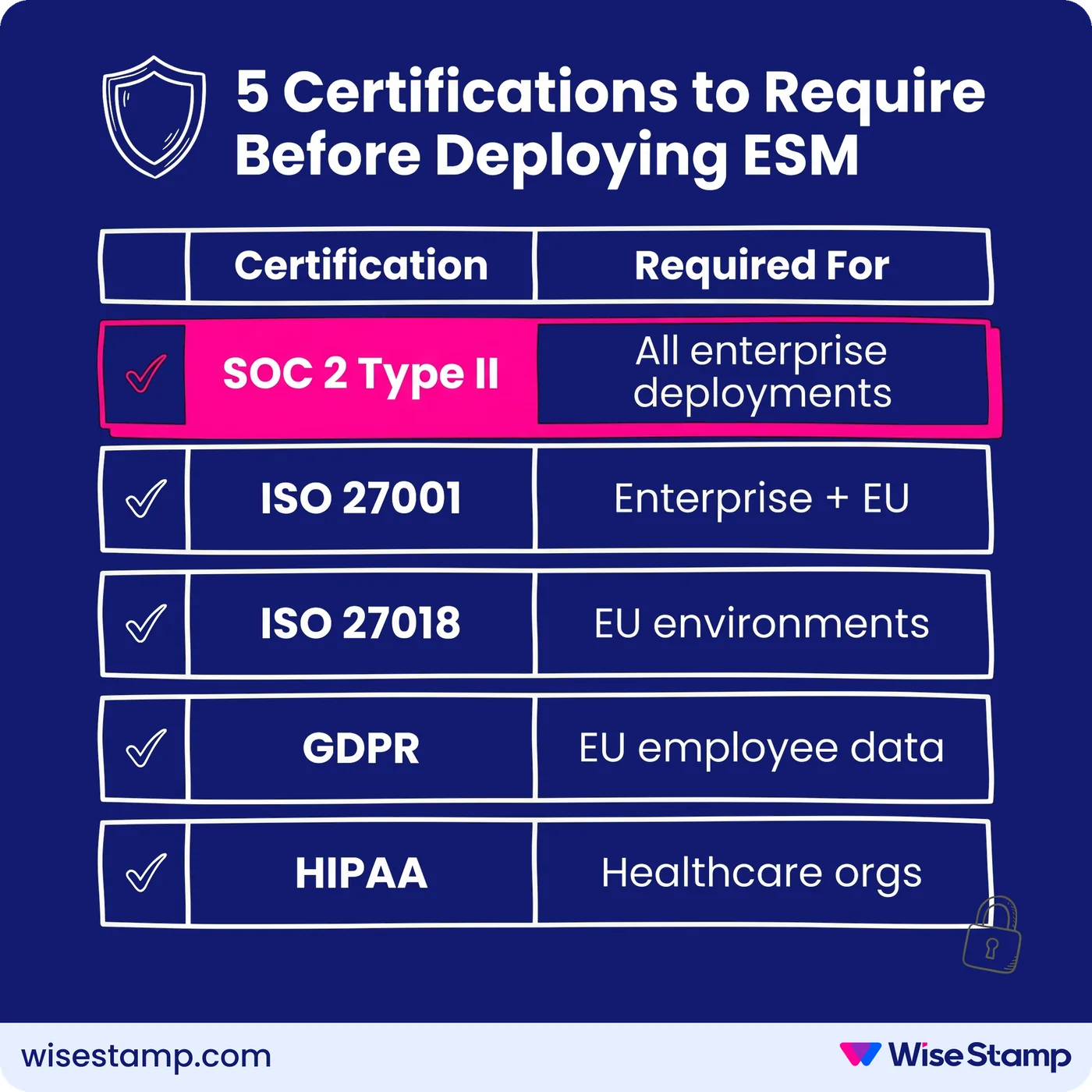
Compliance certifications are the fastest way to assess a vendor’s security maturity. The minimum bar for enterprise deployment is SOC 2 Type II, which independently audits a vendor’s security controls over a sustained period, not just a point-in-time snapshot.
The full certification matrix to evaluate:
| Certification | Issuing body | What it covers | When it’s required |
|---|---|---|---|
| SOC 2 Type II | AICPA | Security, availability, and confidentiality controls | All enterprise deployments |
| ISO 27001 | ISO/IEC | Information security management system | Enterprise and EU deployments |
| ISO 27018 | ISO/IEC | Protection of PII in cloud services | EU and privacy-regulated environments |
| GDPR | EU regulation | EU data protection compliance, including DPA | Any EU employee data |
| HIPAA | HHS | Protected health information handling | Healthcare organizations |
WiseStamp holds SOC 2 Type II, ISO 27001, ISO 27018, HIPAA, and GDPR certifications. Full attestation documents are available from their Trust Center for IT security review packages.
Deployment Security
How does email signature deployment method affect security risk?
Email signature deployment method determines which systems the vendor’s infrastructure touches and what security profile the tool carries. The 2 main methods are client-side and server-side, and they create different risk surfaces.
Client-side deployment (Outlook Add-In, Chrome Extension, Google Workspace auto-inject) keeps signature logic in the email client. Email content never transits the vendor’s servers.
Server-side deployment routes outgoing email through the vendor’s infrastructure for signature insertion before delivery. This guarantees full coverage across mobile devices and CRM-originated emails, but outbound email passes through vendor infrastructure.
The server-side concern comes up in virtually every enterprise security review I’ve seen. One IT professional put the standard objection clearly: “Routing emails through a third party raised security and privacy concerns internally.”
That concern is legitimate.
The right answer isn’t to reject server-side. It’s to verify architecture: zero email content storage, zero email content reading, and per-account tenant isolation.
Those 3 guarantees make server-side deployment defensible in any security review.
Hybrid deployment combines client-side for desktop with server-side fallback for mobile. It gives complete device coverage without duplicate signatures.
Access Controls
What access controls should email signature management software provide?
Access controls determine who can modify signature templates, export employee data, or change integration settings. Without proper role separation, a single compromised or misconfigured admin account creates exposure across the entire organization.
Minimum access control requirements for enterprise deployment:
- Role-based access control (RBAC) with distinct roles for IT, marketing, HR, and designers, each scoped to only the sections they need
- Locked template fields that prevent employees from modifying governed content (legal disclaimers, logos, company URLs) regardless of their email client
- Change audit log covering all admin configuration changes, exportable for compliance reviews
WiseStamp provides 7 admin roles (Owner, Admin, Organization Manager, Marketer, HR, Designer, IT) scoped to specific platform sections. Locked fields are enforced at the variable level. Employees cannot modify governed content from any email client, device, or platform.
Identity Management
What identity management standards should email signature management software support?
Identity management integration determines whether the tool fits into your existing access governance framework or becomes a standalone credential to track and rotate outside your identity provider.
Enterprise deployments require SSO via SAML 2.0. The tool must support your identity provider.
Standard IdP compatibility includes Okta, Microsoft Entra ID (formerly Azure AD), OneLogin, and Google Workspace. Without SSO, admin credentials exist outside your identity provider, creating an audit gap that many security teams flag.
SCIM provisioning is the second critical requirement. SCIM automates user provisioning and deprovisioning from the identity provider, ensuring that when employees are added or removed in your IdP, WiseStamp reflects that change automatically.
WiseStamp supports SAML 2.0 SSO with Okta, Microsoft Entra ID, OneLogin, and Google Workspace. Directory sync with Google Workspace and Microsoft Entra ID handles automated provisioning, including Microsoft Security Group scoping on Enterprise tiers.
Audit Documentation
What audit documentation should an email signature management vendor provide?
Audit documentation turns a vendor conversation into a defensible procurement decision. Every enterprise security review requires specific artifacts before sign-off can be completed.
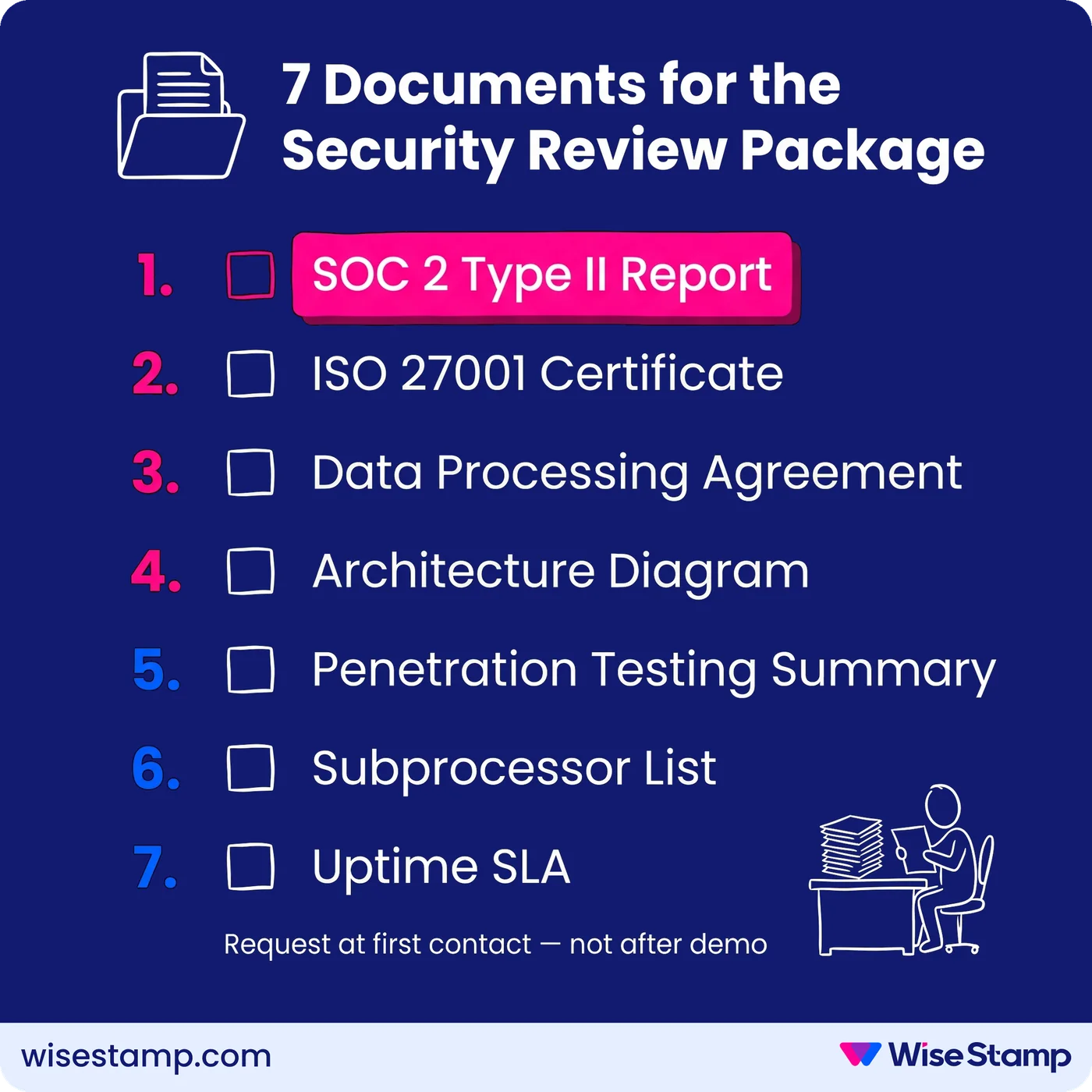
Documentation to request from any email signature management vendor:
- SOC 2 Type II attestation report: the full report from the auditing firm, not a marketing summary slide
- ISO 27001 certificate: current, with issuing body name and certificate validity dates
- Data Processing Agreement (DPA): required for GDPR-regulated environments before any data transfer
- HIPAA Business Associate Agreement (BAA): required if PHI is in scope
- Penetration testing summary: recency and scope of the most recent test (annual is the standard cadence)
- Uptime SLA: contractual commitment with defined service credits (WiseStamp holds a 99.999% five-nines SLA)
- Subprocessor list: which third-party services process your data and where
A vendor without a public trust center or without the ability to produce documentation on request is a procurement red flag.
The security review for WiseStamp is designed to be fast: their full security package, including DPA, certifications, and architecture documentation, is available for IT review teams.
Review Process
How do you structure an email signature management security review?
Security review structure keeps vendor evaluation from stretching into months. Running the review against a fixed sequence prevents gaps and gives procurement a clear sign-off path.
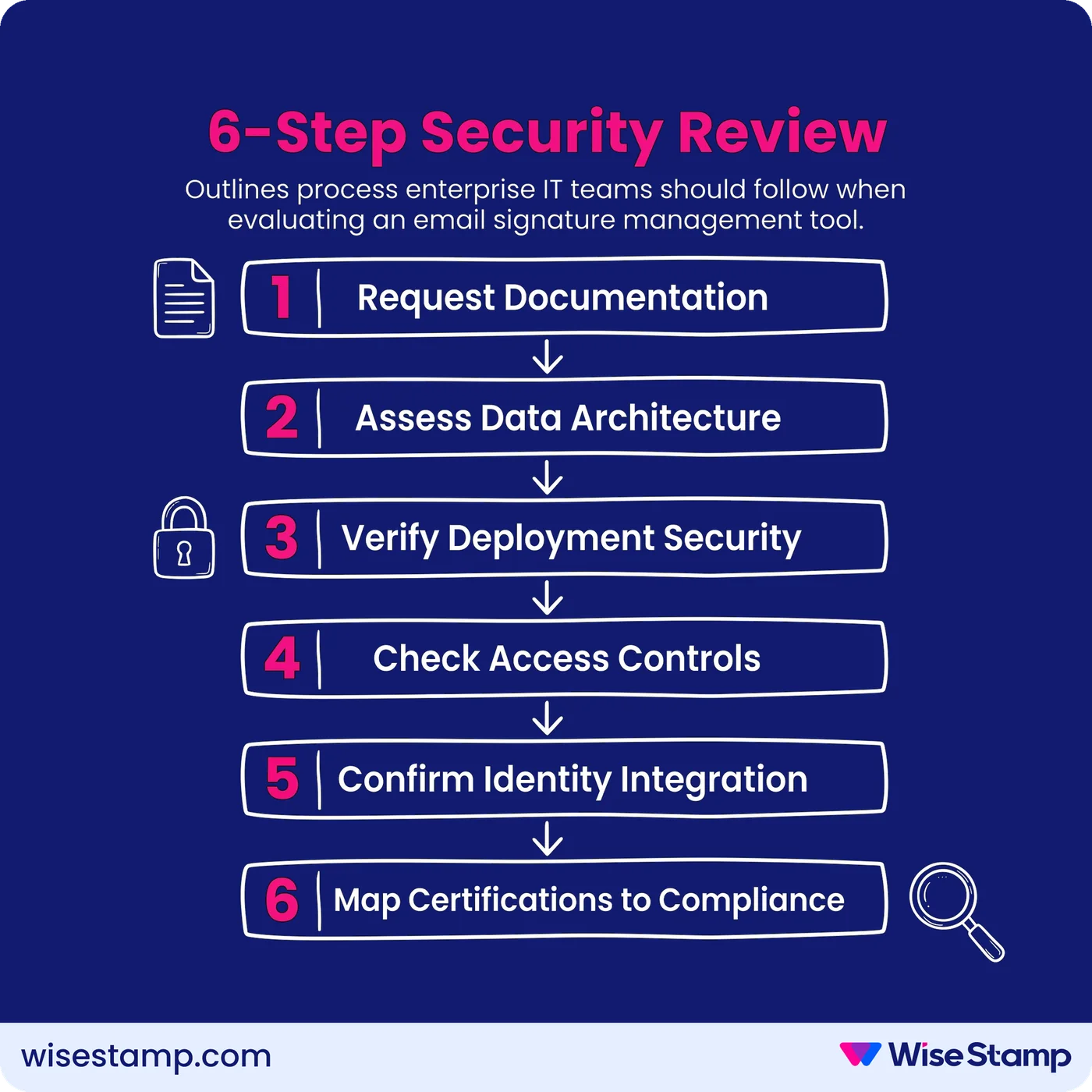
The 6-step process:
- Request the documentation package: SOC 2 Type II report, ISO 27001 certificate, DPA, and architecture diagram with explicit server-side data handling guarantees
- Assess data architecture: confirm the tool does not read or store email content on server-side, and that per-account tenant isolation is in place
- Verify deployment security: clarify client-side vs. server-side scope; confirm hybrid mode availability for full device coverage without duplicate signatures
- Check access controls: validate RBAC roles, locked field enforcement, and change audit log availability
- Confirm identity integration: SAML 2.0 SSO with your specific identity provider (Okta, Microsoft Entra ID, OneLogin, or Google Workspace); SCIM provisioning scope
- Map certifications to your regulatory environment: GDPR DPA, HIPAA BAA, FCA/FINRA disclaimer requirements, or industry-specific compliance obligations
Most vendors need 5-10 business days to provide complete documentation. Build that lead time into your evaluation timeline and request the package at first contact, not after a demo.
Takeaway
What an email signature management security review requires
Email signature management security review is a structured vendor evaluation covering data architecture, compliance certifications, deployment method risk, RBAC, identity integration, and audit documentation.
The goal is to confirm the tool meets enterprise requirements before granting access to employee PII or outbound email routing.
The 3 non-negotiable requirements for any enterprise deployment:
- Zero email content access: server-side vendors must not read or store email body content. Require the architecture guarantee in writing.
- SOC 2 Type II and ISO 27001: with current attestation documentation available on request, not just certification logos on a marketing page
- SAML 2.0 SSO: the tool must authenticate through your existing identity provider (Okta, Microsoft Entra ID, OneLogin, or Google Workspace), not a standalone credential
Run the review before deployment. Most enterprise security teams can complete this review in 2-3 weeks with a well-prepared vendor. WiseStamp’s security documentation is structured for this process.
Get expert advice on reviewing email signature software security →