How to Do Email Signature Software Compliance Review
Compliance checklist for IT and security teams reviewing email signature management tools. Covers security, compliance, and data residency
Short answer
What does an email signature management compliance review cover?
An email signature management compliance review covers 5 areas: security certifications (SOC 2 Type II, ISO 27001, HIPAA, GDPR), role-based access control (RBAC), employee data handling, SSO and authentication, and data residency. These 5 areas determine whether a tool is safe to approve at enterprise scale.
Compliance Review Risk
Approving the wrong email signature tool after your security audit closes is expensive
Most IT teams discover compliance gaps in a vendor after procurement. A failed audit, an unvetted data flow, or a missing certification only surfaces when a security reviewer asks the hard questions.
Getting that wrong costs time, money, and organizational trust. The review is faster and cheaper done before you sign.
Compliance Review Overview
What compliance categories does an email signature management tool need to satisfy?
Email signature management software handles employee personally identifiable information (PII), may route outgoing email through a third-party host, and connects to corporate directories.
If personal data is in scope, also see how to run a privacy review for the process specific to that.
That gives it real compliance surface area.
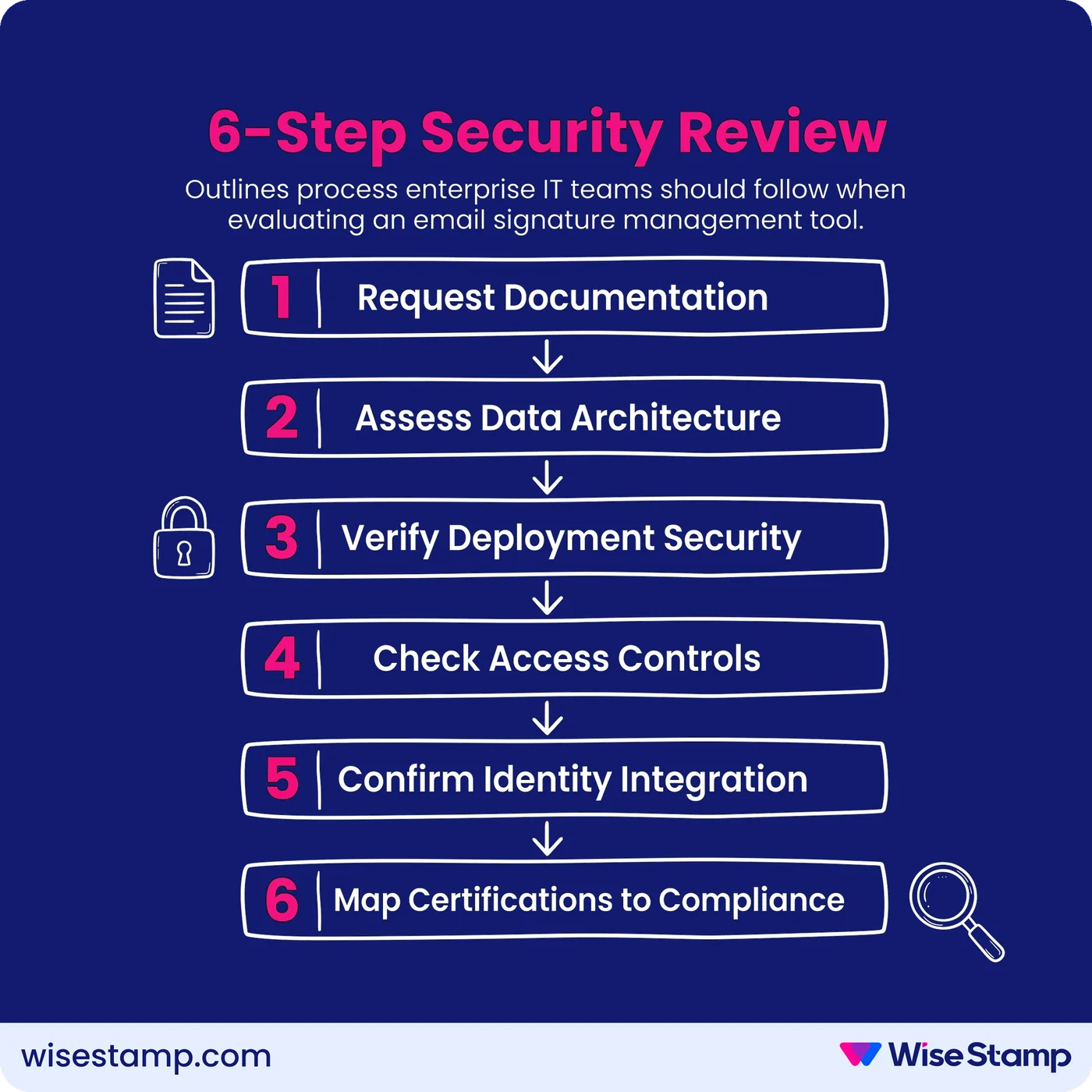
Any review should cover 5 categories:
- Security certifications: SOC 2 Type II, ISO 27001, ISO 27018, HIPAA, GDPR, CCPA
- Access control and governance: RBAC, field-level locking, admin audit logs
- Employee data handling: storage location, encryption standards, retention policy, directory sync permissions
- Authentication: SSO via SAML 2.0, MFA support, supported identity providers (Okta, Microsoft Entra ID, OneLogin)
- Data residency and privacy: where data is stored, whether a Data Processing Agreement (DPA) is available
Missing any one of these will surface problems in an enterprise security questionnaire.
“From a compliance standpoint, we have people internally who collect payments, and we need to make sure that compliance-wise, we’re checking all the boxes signature-wise.”
Enterprise client managing regulated environments
That’s the right instinct. Start with the checklist, not the demo.
Security Certifications
What security certifications should an email signature management tool hold?
Security certifications are the baseline for any enterprise SaaS approval. They represent independent verification of security controls, not the vendor’s own assertion.
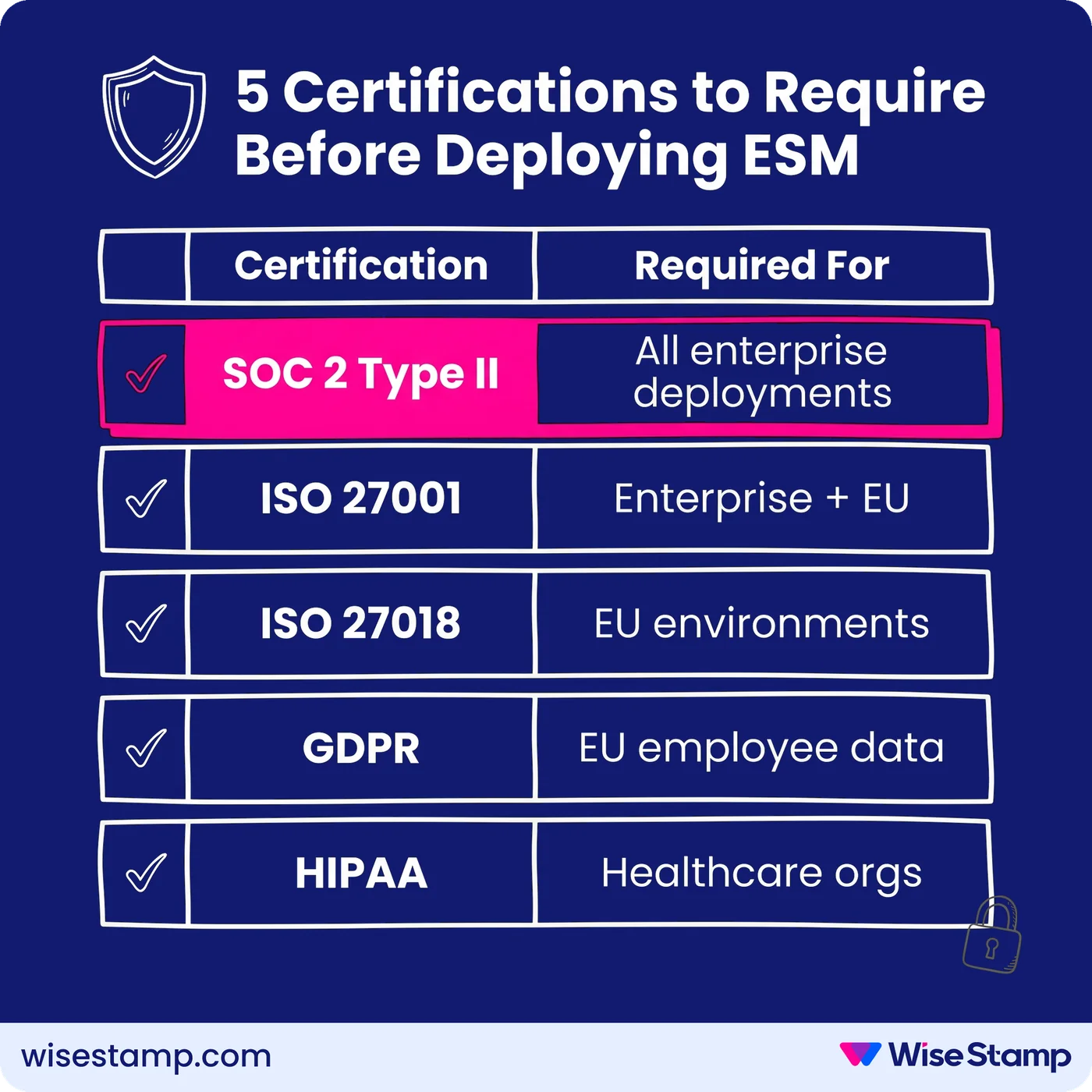
Require all of the following:
- SOC 2 Type II: verifies that security controls were in operation over a defined period, not just at a point in time. Ask for the current certificate and audit period dates.
- ISO 27001: the international information security management system (ISMS) standard. Look for ISO 27001:2022 certification.
- ISO 27018: covers protection of PII in public cloud environments. Directly relevant for any tool handling employee data.
- GDPR compliance: required for EU-touching deployments. Ask for a signed Data Processing Agreement before proceeding.
- HIPAA compliance: required for healthcare organizations. WiseStamp completed HIPAA requirements in late 2024 and now supports Business Associate Agreements for regulated industries.
Certifications must be current and independently audited. “GDPR compliant” without a signed DPA means very little in a formal security review.
Access Control And Governance
What RBAC and governance controls should email signature management software provide?
RBAC and governance controls are where most compliance reviews find real gaps.
A tool that lets any employee freely edit any part of their signature is a compliance liability, even if the platform holds a SOC 2 certificate.
What to require:
- Role-based access control (RBAC): distinct roles for IT, marketing, HR, designers, and system admins, each scoped to what they need. WiseStamp provides 7 roles: Owner, Admin, Organization Manager, IT, HR, Marketer, and Designer.
- Field-level locking: template elements like legal disclaimers, company logos, and regulatory footers must be lockable so employees cannot alter them. Personal fields (phone number, profile photo) remain editable within those guardrails.
- Admin audit logs: a timestamped record of who changed what, across all signature templates and employee assignments. This is the artifact a compliance officer will ask for.
- Change history: the ability to review prior template states, in case a disclaimer was removed or a required element was altered.
Without field-level locking, required regulatory disclosures are only as reliable as each employee’s individual compliance.
Employee Data Handling
How should an email signature management tool handle employee data and directory sync?
Email signature tools pull employee data (name, title, phone, photo, email address) from your corporate directory. How they handle that data is a direct security concern for any IT or compliance review.
Get written answers to these questions:
- Where is PII stored? (WiseStamp: Google Cloud US Central data centers)
- Is data encrypted at rest? (WiseStamp: AES-256)
- Is data encrypted in transit? (WiseStamp: TLS 1.3)
- Are customer accounts logically isolated? (WiseStamp: multi-tenant environment with row-level access controls)
- Who owns the data? (customer data must remain the customer’s sole property, never reused across accounts)
For directory sync with Microsoft Entra ID or Google Workspace, the tool should request only read-only permissions. Write access to your corporate directory is unnecessary and creates avoidable risk.
WiseStamp’s Microsoft integration uses the Microsoft Graph API with read-only directory import permissions.
Client-side features require write access only to the currently open email message, not to the full mailbox.
Server-Side Routing Compliance
Does server-side email signature injection create a compliance risk?
Server-side signature deployment routes outgoing email through the vendor’s infrastructure after it leaves your mail server.
That routing raises legitimate compliance questions, particularly for organizations handling regulated communications.
The assurances to get in writing:
- No email content storage: the vendor must not retain the body of any routed email
- No email content reading: vendor systems must not parse, index, or read email body content
- Tenant isolation: each customer’s mail flow must be logically isolated from other customers
- No additional content injection: beyond the customer-defined HTML signature, nothing else should be added without explicit consent
I’ve seen this concern raised in IT communities more than once. One security professional put it this way: “Routing emails through a third party raised security and privacy concerns internally.”
Get written confirmation on all 4 of these before routing any production mail through a third-party host.
WiseStamp’s server-side deployment stores zero email content during processing.
The only optional addition is an analytics tracking pixel, which can be disabled via configuration if your security policy requires it.
SSO and Authentication
What SSO and authentication requirements should you verify for an email signature management tool?
SSO support is a hard requirement in most enterprise IT environments.
Any SaaS tool that does not support SAML 2.0 single sign-on will be blocked by most corporate security policies before the compliance review concludes.
What to verify:
- SAML 2.0 support: confirm which identity providers are supported. WiseStamp supports Okta, Google Workspace, OneLogin, and Microsoft Entra ID.
- MFA enforcement: when SSO is configured through Okta or Entra ID, MFA is enforced at the identity provider level. Confirm the vendor’s architecture does not create a bypass path.
- Session timeout policy: inactive sessions must terminate after a defined interval.
- Non-SSO credential policy: for accounts not using SSO, confirm password complexity requirements and rotation frequency.
If your organization uses Okta or Microsoft Entra ID, verify the vendor supports your exact IdP configuration before procurement, not after.
Data Residency And GDPR
What data residency and GDPR questions should you ask an email signature management vendor?
Data residency is a hard blocker for many European enterprise IT teams.
If a vendor cannot confirm where data is stored and cannot provide a Data Processing Agreement, the tool will not clear a GDPR compliance review.
Get written answers to each:
- Where is data physically stored? (WiseStamp: primarily Google Cloud US Central)
- Is EU data residency available? (ask directly; options vary significantly by vendor)
- Does the vendor sign Data Processing Agreements? (WiseStamp provides a DPA)
- Is CCPA covered? (WiseStamp processes data in compliance with both GDPR and CCPA)
- Is there a documented right to be forgotten process? (WiseStamp supports deletion requests via the Support team)
Getting these answers before routing through internal approval saves significant time.
Vendor Claims Verification
How do you verify an email signature vendor’s compliance claims during your IT security review?
Vendor self-assessment is not sufficient for enterprise approval. Independent documentation is what IT security teams and procurement reviews require.
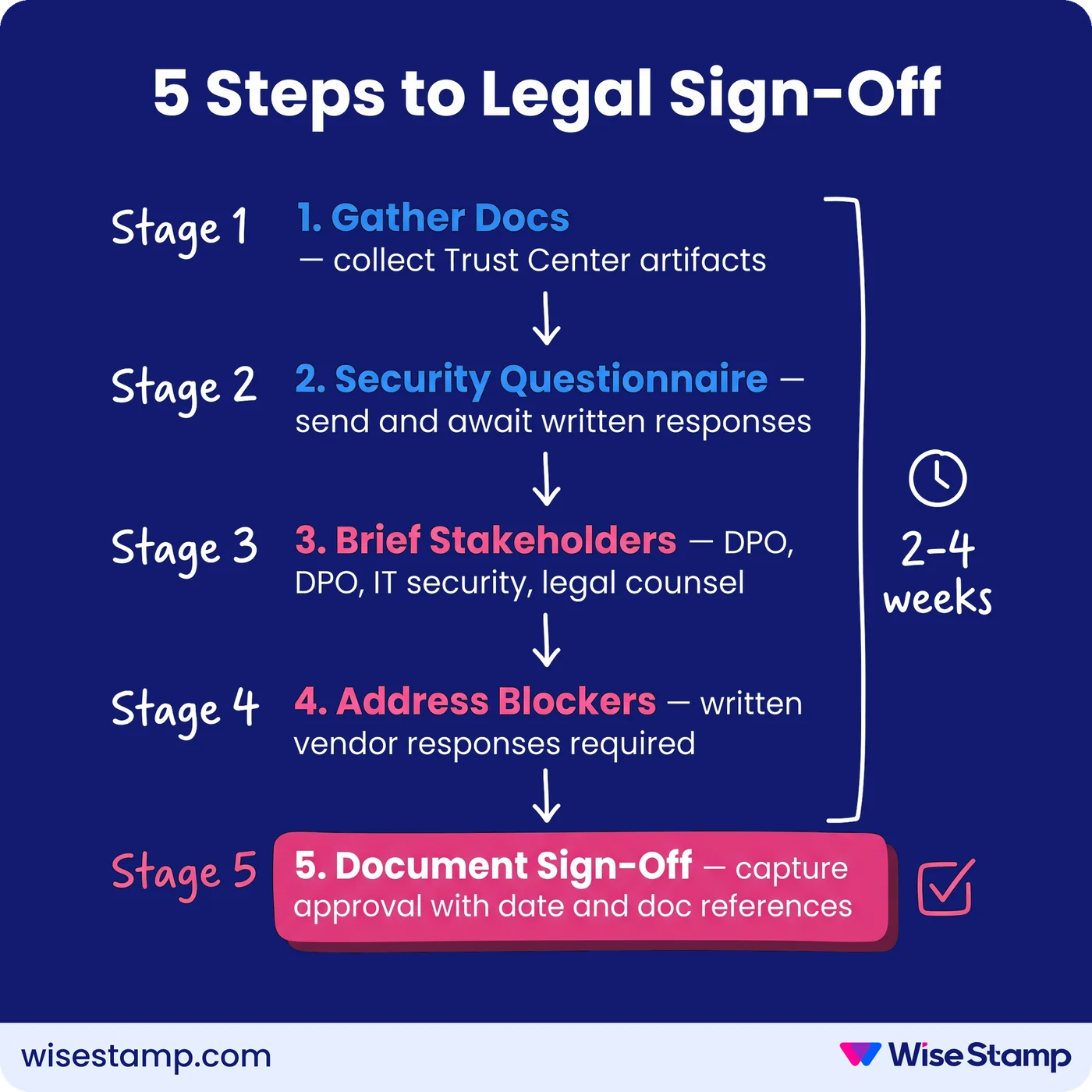
The artifact package to request from any email signature management vendor:
- SOC 2 Type II attestation (current audit period)
- ISO 27001 and ISO 27018 certificates
- HIPAA documentation and Business Associate Agreement, if applicable
- Data Processing Agreement (DPA)
- Security architecture or data flow diagram
- Penetration testing summary or responsible disclosure policy
- Responses to your organization’s standard vendor security questionnaire
WiseStamp’s SOC 2 Type II covers the period June 1 to August 31, 2024, with annual re-assessment. ISO 27001 and ISO 27018 are certified by the Standards Institution of Israel.
The platform maintains a dedicated CISO who reports directly to executive leadership, with periodic penetration testing on products and infrastructure.
Having the full artifact package ready from day one removes most of that friction.
Compliance Review Summary
What does a complete email signature management compliance review require?
A complete compliance review for email signature management software covers 5 areas: security certifications, access control and governance, employee data handling, server-side routing assurances, and SSO and data residency.
The 6-point checklist:
- Security certifications: SOC 2 Type II, ISO 27001, ISO 27018, GDPR DPA, HIPAA if regulated
- RBAC and field-level governance: role-scoped permissions, locked compliance fields, admin audit logs
- Employee data practices: read-only directory permissions, AES-256 at rest, TLS 1.3 in transit, tenant isolation
- Server-side routing assurances: no content storage, no content reading, zero additional injection beyond approved HTML
- SSO and authentication: SAML 2.0, MFA enforced at identity provider level, documented supported IdPs
- Data residency and privacy: written DPA, GDPR and CCPA compliance, right to be forgotten process
Manual signature management cannot satisfy these governance requirements.
When every employee configures their own signature, there is no way to guarantee required compliance fields are present and unchanged across the organization.
Pair this with our legal review checklist for signature software so legal and compliance are working from the same requirements.